ULTRALOQ U-Bolt Pro WiFi Smart Lock is a strong fit if you want a feature-dense smart deadbolt with built-in Wi-Fi, fingerprint access, and door-status awareness.
It is best for buyers who care about convenience without giving up a serious security spec.
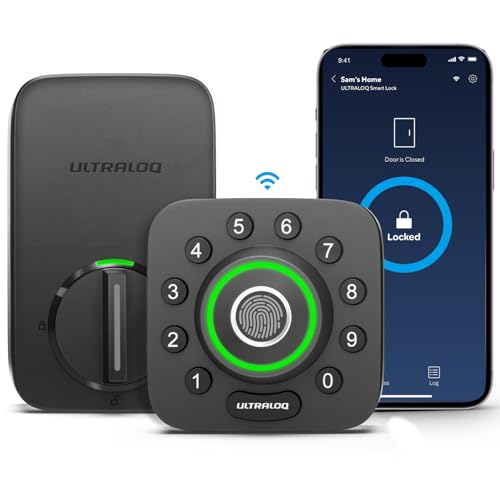
U-Bolt Pro WiFi Review Summary
ULTRALOQ U-Bolt Pro WiFi Smart Lock makes sense for a homeowner, rental host, or office manager who wants multiple ways to get in and manage access remotely.
The listing points to a lock that combines fingerprint entry, passcodes, app control, voice assistant support, auto-unlock, auto-lock, and a door sensor, which gives it a broader practical feature set than a basic smart deadbolt.
Verdict: this is a convenience-first smart lock with a security-minded hardware spec. If you want remote access and flexible entry methods in one device, the U-Bolt Pro WiFi Smart Lock is easy to justify.
If you only want a simple keypad deadbolt, some of its capabilities will be more than you need.
Review Scorecard
| Category | Score | Why it earns that score |
|---|---|---|
| Entry flexibility | 10/10 | Fingerprint, passcode, app unlock, web portal, eKey sharing, voice control, and two physical keys cover almost every use case. |
| Remote control | 9/10 | Built-in Wi-Fi means remote locking, unlocking, sharing access, and viewing entry logs without an extra hub. |
| Security hardware | 9/10 | ANSI Grade 1 and the lock’s weatherproof, IP65-rated exterior point to a serious durability and security posture. |
| Family and guest sharing | 9/10 | Up to 100 fingerprints and up to 50 passcodes give plenty of room for households and short-term access needs. |
| Smart-home fit | 8/10 | Alexa, Google Home, SmartThings, IFTTT, and the Xthings Home app make it flexible for common smart-home setups. |
| Installation practicality | 8/10 | The listing says it fits most standard US left- or right-handed doors and can be installed with a screwdriver in about 10 minutes. |
| Overall buyer value | 9/10 | The feature mix is unusually broad for a single lock, especially for buyers who want remote control plus local fallback methods. |
Key Features and Specifications of U-Bolt Pro WiFi Smart Lock
This ULTRALOQ model is built around a built-in Wi-Fi deadbolt design, so remote access does not depend on an extra hub.
The listing also emphasizes that it connects on 2.4GHz Wi-Fi only, which is important if your home network setup is mixed or dual-band.
The lock supports a long list of entry methods: fingerprint ID, passcode entry, app remote unlocking, auto unlock, web portal access, eKey sharing, voice control, and two physical keys.
That breadth matters because it reduces the chances that one user preference, app issue, or temporary network problem leaves you stuck.
Key listed details include:
- Up to 100 fingerprints, with 2 per user
- Up to 50 passcodes
- Built-in Wi-Fi, no extra hub required
- 2.4GHz Wi-Fi only
- Auto-lock when the door closes
- Door sensor for checking door status
- Voice control with Alexa or Google Assistant
- Works with SmartThings, IFTTT, and the Xthings Home app
- ANSI Grade 1 security claim
- IP65-rated dust and weather resistance
- Fits most US standard left-handed or right-handed doors
- Not recommended for metal doors
- Installation with just a screwdriver in about 10 minutes, per the listing
- Lifetime mechanical guarantee and 18-month electronic guarantee
The inclusion of a door sensor is worth calling out separately.
Many smart locks advertise remote access, but fewer emphasize door-status awareness as part of the day-to-day experience.
That can be useful if you are managing a busy home, an Airbnb-style setup, or an office door that needs more than just a lock/unlock command.
Pros and Cons of U-Bolt Pro WiFi Smart Lock
Pros
- Excellent access flexibility. Fingerprint, passcode, remote app control, auto unlock, eKeys, voice commands, and physical keys give you many ways to enter.
- Built-in Wi-Fi is practical. You do not have to budget for or manage an extra hub.
- Strong guest and family sharing limits. Up to 100 fingerprints and 50 codes are generous for multi-user setups.
- Security and durability are emphasized. ANSI Grade 1 and IP65 are meaningful signals for buyers who care about hardware quality.
- Smart-home compatibility is broad. Alexa, Google Home, SmartThings, IFTTT, and the Xthings Home app cover a lot of common setups.
Cons
- 2.4GHz only. That is normal for many smart devices, but it can be annoying if your network setup is not friendly to 2.4GHz pairing.
- Not ideal for metal doors. The listing specifically says it is not recommended for metal doors.
- Feature-rich by design. Buyers who want the simplest possible deadbolt may not use most of what this lock offers.
- Depends on app and connectivity for the full experience. The physical keys and codes remain useful, but the premium features are clearly connected to the smart layer.
Who Should Buy U-Bolt Pro WiFi Smart Lock?
This lock is a good fit for buyers who want one deadbolt to handle many different access styles.
Families with several users, hosts who need to share codes or eKeys, and homeowners who want to check and control the door remotely will get the most from it.
It is also a sensible option if you want a smart lock that does more than basic phone control.
The door sensor, auto-lock, auto-unlock, and entry log features make it better suited to real-world routines than a bare-bones keypad model.
You should probably skip it if:
- You only need a low-cost keypad deadbolt without app features
- Your door is metal, since the listing does not recommend it
- You do not want to deal with Wi-Fi setup or smart-home integration
- You prefer a minimal lock with just one or two entry methods
Smart Lock Features and Real-World Fit
Fingerprint and Code Access
Fingerprint entry is one of the most useful features here because it gives the lock a fast local fallback that does not depend on phones or network access.
The listing says it stores up to 100 fingerprints, which makes it practical for larger households or shared access.
Passcodes add another layer of flexibility.
Up to 50 codes is enough for family, guests, cleaners, contractors, or short-term tenants without forcing you to reuse a single shared code.
Remote Control and Activity Awareness
The built-in Wi-Fi design is the main reason this model stands out.
You can lock, unlock, share access, and see logs remotely, and the lock does not require an extra hub for that part of the experience.
The door sensor is a meaningful addition because it gives you more context than a simple locked or unlocked state.
If you care about whether the door is actually closed, that matters just as much as whether the bolt has moved.
Security and Durability Positioning
ULTRALOQ leans hard on security and durability in the listing.
ANSI Grade 1 is the headline claim, and the IP65 weatherproof rating suggests the exterior hardware is designed to handle exposure better than a basic indoor-oriented product.
That does not automatically make it the right lock for every door, but it does suggest the product is pitched to buyers who want convenience without treating the deadbolt like a gadget first and a lock second.
Installation and Household Use
The installation claim is also part of the appeal.
Replacing an existing deadbolt with a screwdriver in about 10 minutes, as the listing says, lowers the barrier for buyers who do not want a major install project.
The lock is also positioned for families, apartments, offices, hotels, and Airbnb-style use.
That makes sense because its mix of fingerprints, temporary codes, and remote sharing is most valuable when more than one person needs controlled access.
Alternatives to U-Bolt Pro WiFi Smart Lock
If you want to compare the U-Bolt Pro WiFi Smart Lock against other smart deadbolts, these are the most credible starting points on Amazon:
- Schlage Encode Smart WiFi Deadbolt
- Yale Assure Lock 2
- August Wi-Fi Smart Lock
- Kwikset Halo Wi-Fi Smart Lock
Schlage Encode is the clearest alternative if you want another Wi-Fi deadbolt with a mainstream brand name.
Yale Assure Lock 2 is worth comparing if you care more about ecosystem flexibility and modular entry options.
August Wi-Fi Smart Lock is the better-known retrofit style option, while Kwikset Halo is another strong comparison point for buyers who want built-in Wi-Fi and app-based access.
Is U-Bolt Pro WiFi Smart Lock Worth It?
Yes, if you want a smart deadbolt that combines remote control, fingerprint access, passcodes, and built-in Wi-Fi in one package.
The ULTRALOQ U-Bolt Pro WiFi Smart Lock looks especially compelling for households, hosts, and small offices that need flexible access management more than they need a stripped-down lock.
It is less compelling if you only want the most basic keypad experience or if your door is a poor fit for the installation guidance.
For the right buyer, though, this is a practical, feature-rich smart lock with enough hardware credibility to justify serious consideration.