College dorm rooms, libraries, and shared study areas make laptops easy targets when you step away—even for a few minutes. The right security lock adds a practical layer of protection by tethering your computer to a fixed object or dedicated mounting station.
This roundup compares 10 laptop security locks for college dorms, with options for standard, Nano, and wedge-shaped slots, plus adhesive anchors and adjustable desk mounts for devices without a built-in slot.
Best 10 Laptop Security Locks for College Dorms Picks for 2026
Best Standard-Slot Pick
Kensington T-Bar Combination Lock

- Resettable 4-digit combination
- 6-foot carbon-steel cable
- Designed for standard Kensington slots
Best For: Students with standard Kensington-compatible laptop slots
Best Adhesive-Mount Kit

- Two adhesive anchor sets included
- 6-foot galvanized steel cable
- Works with laptops, tablets, and phones
Best For: Students securing devices without built-in security slots
Best Simple Combination Cable

- Keyless 4-wheel combination
- 10,000 possible combinations
- Push-button one-hand installation
Best For: Students who prefer a keyless lock for compatible devices
Best Multi-Slot Option
AboveTEK 3-in-1 Universal Lock

- Supports K-Slot, Nano, and Wedge slots
- Resettable 4-digit combination
- 360-degree rotating head
Best For: Students with laptops using varied security-slot formats
Flexible Keyed Protection
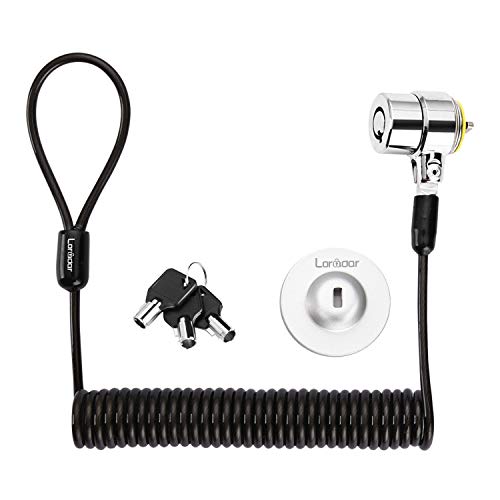
- 6.2-foot retractable steel cable
- Three keys with traceable lock number
- Supports direct slots or adhesive anchor plate
Best For: Students securing compatible laptops and electronics in shared spaces
Simple Combination Security

- Resettable four-digit combination
- Slim head for Nano security slots
- 5-foot carbon-steel cable
Best For: Thin laptops with Nano-sized security slots
Adjustable Desk-Mount Security
AboveTEK Laptop Locking Station

- Fits 12- to 16-inch laptops
- 78.7-inch keyed cable included
- Adjustable viewing angle and desk-mount options
Best For: Dorm desks and recurring study setups needing a stable laptop cradle
Dell Dorm Defender
Dell & Alienware Combination Lock

- Fits Dell and Alienware wedge slots
- Resettable four-wheel combination
- Six-foot carbon steel cable
Best For: Compatible Dell and Alienware laptops
Flexible Dorm Anchor
Keyed Cable Lock with Adhesive Plate

- Supports standard laptop slots
- Includes an adhesive anchor plate
- Six-and-a-half-foot steel cable
Best For: Mixed laptops, tablets, phones, and other devices
Future-Proof Dorm Lock
Universal 3-in-1 Combination Cable

- Fits standard, nano, and wedge slots
- Resettable four-number dial
- Six-foot carbon steel cable
Best For: Students needing cross-brand slot compatibility
Best Standard-Slot Pick – Kensington T-Bar Combination Lock
For laptop security locks for college dorms, this Kensington model offers a familiar combination design and a 6-foot carbon-steel cable for securing compatible devices to a desk, table, or other fixed structure. Its push-button attachment is designed for one-handed use, but check your laptop’s security-slot type before buying.
Best For: Students with laptops that use a standard Kensington security slot and who prefer a resettable combination lock.
Pros:
- Resettable four-wheel combination with 10,000 possible codes
- Six-foot cut-resistant carbon-steel cable
- Push-button design supports one-handed engagement
- Works with compatible laptops, monitors, TVs, docking stations, and other devices
Cons:
- Not compatible with Dell and Alienware models using Noble slots
- May not fit some 2016-and-newer Dell laptops and tablets
This is a practical choice for a dorm desk when your computer has the standard Kensington slot. Dell owners should verify compatibility carefully and consider the specified Noble-slot alternatives if needed.
Best Adhesive-Mount Kit – AboveTEK Keyed Laptop Lock
This AboveTEK kit is a flexible option among laptop security locks for college dorms because it uses adhesive anchor plates rather than requiring a built-in security slot. The package includes two adhesive sets, a keyed steel cable lock, and a 6-foot cable for laptops, tablets, phones, and other devices with suitable flat surfaces.
Best For: Students securing multiple mobile devices or devices without a standard laptop security slot.
Pros:
- Includes two adhesive sticker-and-anchor sets
- Industrial-grade 3M adhesive is designed for most flat surfaces
- Six-foot cut-resistant galvanized steel cable
- Includes two keys for straightforward operation
Cons:
- Adhesive anchors require a suitable flat surface and proper installation
- Keyed design means keeping track of the included keys
Its adhesive mounting approach can broaden compatibility beyond laptops with built-in slots, while the second anchor set supports another device. Confirm that the intended surface is appropriate before relying on the anchor.
Best Simple Combination Cable – Kensington Ultra Cable Lock
Kensington Combination Ultra Cable Lock for Laptops and Other Devices (K64675US),Silver
Check Price On AmazonFor students who want laptop security locks for college dorms without carrying a key, the Kensington Ultra uses a resettable four-wheel combination and a push-button design. It anchors to a desk, table, or other fixed surface and is intended for laptops and other portable devices.
Best For: Dorm residents who want a keyless, one-hand combination lock for compatible portable devices.
Pros:
- Resettable combination with 10,000 possible codes
- Push-button design supports one-hand installation
- Superior-strength lockhead is designed to resist tampering
- Anchors to desks, tables, or other fixed surfaces
Cons:
- The supplied notes do not specify the cable length
- Compatibility depends on the device’s security-slot design
This model keeps the setup simple for a shared dorm workspace: choose a combination, attach it to a fixed point, and avoid managing a separate key. Verify the lock-slot fit before purchasing.
Best Multi-Slot Option – AboveTEK 3-in-1 Universal Lock
This AboveTEK model stands out among laptop security locks for college dorms by supporting K-Slot, Nano, and Wedge security slots. Its resettable four-digit combination, galvanized steel cable, and 360-degree rotating head are designed to make daily use easier across compatible laptop models.
Best For: Students who need one combination lock for laptops using different common security-slot formats.
Pros:
- Compatible with K-Slot, Nano, and Wedge slots
- Resettable four-digit combination with 10,000 possible codes
- 360-degree rotating head supports flexible positioning
- Includes six secure spacers for fitting assistance
Cons:
- Slot type must be checked before purchase
- Combination lock does not use a key backup
The multi-slot design makes this a versatile pick for students whose devices do not share the same security-slot format. Its value depends on confirming that the included system and spacers fit your specific laptop.
Flexible Keyed Protection – Portable Cable Lock Kit
For shoppers comparing laptop security locks for college dorms, this retractable keyed cable lock offers a portable option for compatible laptops, monitors, tablets, and other devices. Its 6.2-foot cut-resistant steel cable can attach directly to standard 3×7mm security slots, while the included adhesive anchor plate supports devices without those slots.
Best For: Students securing compatible laptops and electronics at desks, tables, libraries, or shared spaces.
Pros:
- Includes three keys and a traceable key-and-lock number.
- Self-rolling cable extends to approximately 6 feet for flexible anchoring.
- Includes an adhesive anchor plate for devices without a compatible security slot.
- Compact, portable design weighs about 4.69 ounces.
Cons:
- Compatibility depends on the device having a 3×7mm slot or using the anchor plate.
- The adhesive plate requires careful surface preparation and up to 48 hours to reach maximum pressure.
- Newer MacBooks and several listed laptop models require the anchor plate or may not be compatible.
This kit is versatile and easy to carry, but students should verify their laptop’s lock-slot dimensions before buying. The anchor-plate setup adds flexibility, though it is less immediate than direct slot attachment.
Simple Combination Security – Kensington Nano Slot Lock
This Kensington combination lock is a straightforward choice among laptop security locks for college dorms, especially for thin laptops with Nano-sized security slots. The resettable four-digit code eliminates the need to carry a key, while the 5-foot carbon-steel cable provides room to secure a device to a desk or table.
Best For: Students with thin laptops that use Nano-sized security slots and prefer keyless access.
Pros:
- Resettable four-wheel combination provides 10,000 possible codes.
- Slim lock head is designed for thin laptops with Nano security slots.
- Pivoting lock head and rotating cable help preserve access to nearby ports.
- Anti-shearing plastic sleeve helps protect desk and table surfaces.
Cons:
- Only 5 feet long, giving less reach than some longer cable locks.
- Designed for laptops with Nano-sized slots, so compatibility must be checked.
- Does not list compatibility with phones or other non-laptop devices.
For a dorm room, library, or shared study area, this lock keeps the routine simple: set a personal code and attach the cable to a fixed point. Its main limitation is slot compatibility, particularly for laptops that use a different security-slot format.
Adjustable Desk-Mount Security – AboveTEK Laptop Locking Station
For students seeking laptop security locks for college dorms, the AboveTEK locking station combines a physical laptop cradle with a keyed cable lock. Its adjustable arms fit many 12- to 16-inch laptops, while the folding design, viewing-angle adjustment, and desk-mount options make it suited to a dedicated study setup.
Best For: Dorm desks and shared spaces where a more stable, adjustable laptop mount is useful.
Pros:
- Fits laptops from 12 to 16 inches, with adjustable widths from 11.1 to 15.7 inches.
- Includes a keyed lock and a lengthy 78.7-inch cable.
- Pivot hinge supports viewing angles from 45° to 125°.
- Non-slip construction and heat-dissipating materials support extended desk use.
Cons:
- At about 0.94 pounds, it is heavier and less pocket-friendly than a basic cable lock.
- The station may be more setup than needed for students who only want a simple tether.
- Fit still depends on the laptop’s size and the station’s adjustable range.
This is the most workstation-oriented option in the group. It offers a more secure, stable fit than a cable alone, but its larger form makes the most sense for a dorm desk or recurring study location rather than frequent transport.
Dell Dorm Defender – Dell & Alienware Combination Lock
Kensington N17 Dell Laptop Computer Lock, Combination Security Locking Cable (K68008WW) Black
Check Price On AmazonFor students with compatible Dell or Alienware laptops, this combination lock is a focused choice among laptop security locks for college dorms. Its wedge-slot fit, push-button engagement, and six-foot cable make it practical for securing a laptop to a desk or other fixed structure.
Best For: Dell and Alienware laptops with wedge-shaped security slots.
Pros:
- Designed to fit Dell and Alienware wedge-type lock slots.
- Resettable four-wheel combination provides 10,000 possible codes.
- Push-button design supports one-handed attachment.
- Six-foot carbon steel cable is cut-resistant and suitable for anchoring to fixed objects.
Cons:
- Not a universal fit; compatibility depends on having a wedge-shaped slot.
- Combination locks require remembering the chosen code.
This is a sensible dorm-room option when your Dell laptop has the matching wedge slot. Verify the laptop’s lock-slot style before buying.
Flexible Dorm Anchor – Keyed Cable Lock with Adhesive Plate
This cable lock offers broad device compatibility for students comparing laptop security locks for college dorms. It can connect to laptops with standard slots, while the included adhesive anchor plate is intended for devices such as tablets or laptops without a built-in security slot.
Best For: Students securing mixed devices, including laptops, tablets, phones, and Surface-style hardware.
Pros:
- Works with most laptops that have standard lock slots.
- Adhesive anchor plate expands compatibility to devices without standard slots.
- Six-and-a-half-foot PVC-coated, cut-resistant twisted steel cable.
- Rotating stainless steel lock head can turn 360 degrees.
Cons:
- Some devices require using the adhesive security plate.
- Adhesive installation may not suit users who prefer built-in lock slots.
- Compatibility should be checked before relying on the anchor plate.
Its main advantage is flexibility: one lock can cover several types of dorm electronics. However, check your device and comfort with an adhesive plate before choosing it.
Future-Proof Dorm Lock – Universal 3-in-1 Combination Cable
Students with different laptop brands or uncertain slot types may prefer this universal option among laptop security locks for college dorms. Its interchangeable tips fit standard, nano, and wedge-shaped security slots, while the six-foot carbon steel cable anchors to a fixed object.
Best For: Multi-brand laptop households or students who want flexibility across slot generations.
Pros:
- Includes adapters for standard, nano, and wedge-shaped slots.
- Resettable four-number dial offers 10,000 possible combinations.
- Six-foot carbon steel cable provides cut and theft resistance.
- Unused lock tips remain attached by a tether, and combination retrieval is available through Kensington’s registration program.
Cons:
- Interchangeable tips add a setup step compared with a single-slot lock.
- Users must select and install the adapter matching their laptop’s slot.
This is the most adaptable choice in the group, especially when laptop models may change. It is a practical way to avoid buying a new lock solely because a device uses a different slot shape.
How We Picked These Laptop Security Locks for College Dorms
We focused on products suited to student routines: studying in shared rooms, leaving a laptop briefly in a library, and transporting a lock between classrooms and residence halls. Our selection considers cable length, locking method, device compatibility, portability, and whether the product requires a built-in security slot or an added anchor.
We also included established Kensington designs alongside universal and adhesive-anchor kits. A lock is only useful when it fits the computer securely and can be attached to something genuinely difficult to move, so compatibility and installation requirements matter as much as the lock mechanism.
Quick Comparison
| Lock type | Best for | What to check |
|---|---|---|
| Combination cable | Students who do not want to carry keys | Slot style, cable length, and reset procedure |
| Keyed cable | Simple, familiar everyday use | Keep a spare key in a secure location |
| Universal 3-in-1 | Mixed laptops, tablets, and shared devices | Compatibility with K-Slot, Nano, or wedge slots |
| Adhesive-anchor kit | Devices without a security slot | Surface preparation, adhesive strength, and cure time |
| Locking station or desk mount | Fixed dorm desks and high-value laptops | Desk fit, adjustability, and installation space |
Key Buying Factors
Confirm the Security Slot
Standard K-Slot, Nano, and wedge-shaped slots are not interchangeable. Check the laptop manufacturer’s specifications or inspect the port before ordering. Universal locks can improve flexibility, but they still need a compatible locking head and adequate clearance around the device.
Choose the Right Locking Method
Combination locks eliminate the need for keys and work well in dorms, where losing small accessories is common. Keyed models may be faster and straightforward, particularly if several people use the same device. Resettable combinations are useful when you want to replace a code after sharing it.
Consider Cable Length and Construction
A cable should reach a sturdy bed frame, desk leg, or other fixed anchor without excessive slack. Longer cables offer more placement flexibility, while steel construction and a thick protective coating can improve resistance to casual tampering. No portable cable lock is a substitute for supervision or insurance.
Plan for Slotless Devices
MacBooks, tablets, and some thin laptops may lack a built-in slot. Adhesive anchors and locking stations can address that limitation, but they require careful installation on a clean, suitable surface. Avoid attaching an anchor where it could interfere with ports, ventilation, hinges, or a removable case.
Who Should Buy Which Laptop Security Locks for College Dorms?
- Most students: Choose a resettable combination lock that matches the laptop’s slot and is easy to carry between locations.
- Students with multiple devices: A universal 3-in-1 model offers broader compatibility across standard, Nano, and wedge-style slots.
- MacBook or slotless-laptop owners: Look for an adhesive-anchor system or a compatible locking station, and follow installation instructions closely.
- Fixed-desk users: An adjustable locking station can provide more stability than a basic cable, especially for a frequently used dorm workstation.
- Shared-device users: A keyed or combination model with a durable cable is practical, but store keys or codes securely and lock the computer whenever you leave.
Before buying, match the lock to your laptop’s exact slot, identify a reliable anchor point, and decide whether convenience or maximum flexibility matters more. Those checks will narrow the list quickly and help ensure your chosen lock is usable every day.