Leaving a laptop unattended in a library, café, coworking space, or shared office can create an avoidable security risk. A suitable cable lock adds a visible physical barrier and helps keep your computer anchored while you step away.
This roundup compares 10 laptop security locks for public workspaces, including combination and keyed models, adhesive anchor options, and locks designed for common security slots.
Best 10 Laptop Security Locks for Public Workspaces Picks for 2026
Best Standard-Slot Pick
Kensington T-Bar Combination Cable Lock

- Six-foot carbon-steel cable
- Resettable 10,000-code combination
- For standard Kensington slots
Best For: Standard-slot laptops in shared offices, libraries, and cafes
Best Adhesive-Anchor Kit
AboveTEK Laptop and Tablet Security Cable

- Two adhesive anchor sets included
- Six-foot galvanized-steel cable
- Works with laptops, tablets, and phones
Best For: Mixed-device public workspaces and retail displays
Best for Thin Laptops
Kensington Nano-Slot Combination Lock

- Slim head for Nano-sized slots
- Resettable four-wheel combination
- Five-foot carbon-steel cable
Best For: Thin laptops with compatible Nano security slots
Most Flexible Fit
Universal Laptop Combination Cable Lock

- Supports slotted and slotless devices
- 6.23-foot braided cable
- Includes adhesive lock-slot plate
Best For: Mixed laptops and tablets in shared public workspaces
Best Adjustable Station
Portable AboveTEK Laptop Locking Station

- Adjustable fit for 12- to 16-inch laptops
- 78.7-inch cable with keyed lock
- 45°-125° viewing-angle range
Best For: Shared workspaces where positioning flexibility matters
Best Flexible Cable Kit
Laptop and Tablet Security Cable Lock

- Includes two keys and two adhesive anchors
- Supports slot-equipped and slot-free devices
- 6.6-foot, 5 mm steel cable
Best For: Shared spaces securing varied electronics
Best Dell-Specific Option
Kensington N17 Combination Laptop Lock

- Fits compatible Dell and Alienware wedge slots
- Resettable four-wheel combination
- Six-foot carbon-steel cable
Best For: Dell users who want keyless workstation security
Portable Keyed Pick
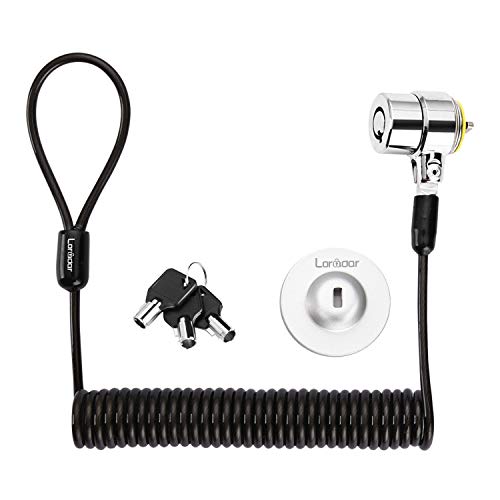
- 6.2-foot retractable steel cable
- Three keys included
- Supports compatible slots or adhesive anchor plate
Best For: Portable keyed security across laptops, tablets, and monitors
Universal Combination Pick

- Fits standard, nano, and wedge slots
- Resettable four-number combination
- Six-foot carbon-steel cable
Best For: Shared workspaces with varied laptop slot types
Simple Keyed Option
Laptop Cable Lock with Anchor Plate

- Fits most standard laptop slots
- Supports slot-free devices with anchor plate
- Six-and-a-half-foot steel cable
Best For: Basic keyed security for laptops, tablets, and phones
Best Standard-Slot Pick – Kensington T-Bar Combination Cable Lock
For laptops with a standard Kensington security slot, this resettable combination lock is a practical choice for public workspaces. Its six-foot carbon-steel cable anchors to a desk, table, or other fixed structure, while the push-button design supports one-handed attachment.
Best For: HP, Lenovo, Acer, Asus, and other devices with a standard Kensington slot in offices, libraries, cafes, and shared work areas.
Pros:
- Resettable four-wheel combination with 10,000 possible codes
- Six-foot cut-resistant carbon-steel cable
- Works with laptops, monitors, docking stations, projectors, and other compatible devices
- Independently tested for several security and durability standards
Cons:
- Not compatible with Dell and Alienware devices using a Noble lock slot
- May not fit some 2016-and-newer Dell laptops and tablets
This is a versatile option when your device has the standard Kensington slot, but checking the slot type before buying is essential—especially for newer Dell models.
Best Adhesive-Anchor Kit – AboveTEK Laptop and Tablet Security Cable
For laptops, tablets, or phones without a built-in security slot, this key-operated kit adds an adhesive anchor for use in public workspaces. It includes two adhesive sticker-and-plate sets, making it useful when securing multiple mobile devices or moving between setups.
Best For: Tablets, smartphones, notebooks, and laptops used in libraries, cafes, restaurants, retail counters, showrooms, and other shared spaces.
Pros:
- Includes two adhesive anchor sets for multiple devices
- Industrial-grade 3M adhesive is designed for most flat surfaces
- Six-foot cut-resistant galvanized-steel cable
- Key operation avoids managing a combination code
Cons:
- Adhesive anchors require a suitable flat surface and proper installation
- Key-operated design means the key must be available when unlocking
This kit broadens compatibility beyond devices with built-in lock slots. It is especially practical for mixed-device environments, though the adhesive anchor should be applied carefully to a compatible surface.
Best for Thin Laptops – Kensington Nano-Slot Combination Lock
Thin laptops often use a Nano-sized security slot rather than a standard Kensington opening. This five-foot Kensington combination lock has a slim lock head designed for that format, plus a rotating head and anchor to help preserve port access while the device is secured in a public workspace.
Best For: Thin laptops with compatible Nano-sized lock slots used in shared offices, cafes, and while traveling.
Pros:
- Slim lock head supports compatible Nano-sized security slots
- Resettable four-wheel combination offers 10,000 possible codes
- Five-foot carbon-steel cable resists cutting attempts
- Pivoting head and rotating anchor can improve port access and positioning
Cons:
- Compatible only with devices using a Nano-sized slot
- Five-foot cable is shorter than some six-foot alternatives
This is a focused choice for newer, thinner laptops whose slot dimensions require a slimmer lock head. Confirming the device’s slot type and size is the key buying step.
Most Flexible Fit – Universal Laptop Combination Cable Lock
This combination lock supports both laptops with built-in security slots and devices without one by using the included adhesive lock-slot plate. Its 6.23-foot cable provides room to work while tethered, making it a flexible option for laptop security in public workspaces.
Best For: Users securing a mix of devices, including laptops and tablets with or without built-in security lock holes.
Pros:
- Works with built-in lock slots or the included adhesive plate
- Four-digit combination provides over 10,000 possible codes
- Six-foot-plus braided cable supports movement while secured
- One-hand push-button operation with a 360-degree rotating design
Cons:
- Devices without a lock slot require adhesive-plate installation
- Adhesive compatibility depends on the device’s surface
- Combination locks require remembering the selected code
Its dual attachment approach makes this a useful all-purpose pick when device compatibility varies. For slotless devices, take extra care with surface preparation and adhesive placement.
Best Adjustable Station – Portable AboveTEK Laptop Locking Station
For laptop security locks for public workspaces, the AboveTEK Locking Station adds a physical cradle, adjustable arms, and a long tether. It fits laptops from 12 to 16 inches and supports several common devices, including MacBook, Surface, and Chromebook models.
Best For: Users who want an adjustable, portable laptop station with viewing-angle flexibility for cafes, libraries, and other shared spaces.
Pros:
- Fits a broad range of 12- to 16-inch laptops with adjustable arms.
- Includes a 78.7-inch cable and keyed lock for tethering to fixed structures.
- Pivot hinge supports viewing angles from 45° to 125°, while dual clips accommodate different laptop thicknesses.
Cons:
- The station is more substantial than a basic cable lock, weighing about 0.94 pounds.
- Its keyed lock requires carrying and managing a physical key.
The AboveTEK is a practical choice when you need more than a simple tether. Its adjustable cradle and hinge improve positioning, while the included mounting options and cable provide flexible security for public workspaces.
Best Flexible Cable Kit – Laptop and Tablet Security Cable Lock
This cable kit is a flexible option for laptop security locks for public workspaces, especially when you need to protect devices without standard security slots. It combines a 6.6-foot steel cable with two adhesive anchor plates for laptops, tablets, phones, POS equipment, and other shared electronics.
Best For: Offices, cafes, libraries, classrooms, retail counters, and other areas securing a mix of slot-equipped and slot-free devices.
Pros:
- Includes a 5 mm steel cable, two keys, and two adhesive anchor plates.
- Works with standard 3 x 7 mm security slots and compatible smooth, flat surfaces.
- The 6.6-foot reach makes it easier to loop around desks, table legs, counters, and display stands.
Cons:
- Adhesive anchors require clean, dry surfaces and waiting time before use; full bonding can take up to 72 hours.
- The adhesive plates are intended for smooth, flat surfaces such as metal, glass, and hard plastic.
The B-LC01 stands out for mixed-device environments. Its anchor plates extend protection to equipment lacking a built-in slot, but careful installation and curing time are important for dependable everyday use.
Best Dell-Specific Option – Kensington N17 Combination Laptop Lock
Kensington N17 Dell Laptop Computer Lock, Combination Security Locking Cable (K68008WW) Black
Check Price On AmazonFor owners of compatible Dell and Alienware laptops, this Kensington N17 is a focused choice among laptop security locks for public workspaces. It uses a wedge-style lock slot, a resettable four-wheel combination, and a six-foot carbon-steel cable for attaching to a fixed structure.
Best For: Dell and Alienware laptop users who prefer a resettable combination lock and one-handed push-button engagement.
Pros:
- Designed for Dell and Alienware laptops with wedge-type lock slots.
- Resettable four-wheel combination provides 10,000 possible codes without a key.
- Six-foot carbon-steel cable and push-button operation support convenient workstation use.
Cons:
- Compatibility is specialized for laptops with the supported Dell wedge-style slot.
- It may be less versatile than kits that include adhesive anchors for slot-free devices.
The Kensington N17 is a straightforward fit when your Dell laptop has the required wedge slot. Its combination design avoids key management, while the independently tested construction and five-year warranty add reassurance for regular use.
Portable Keyed Pick – Retractable Cable Lock Kit
For laptop security locks for public workspaces, this compact keyed kit is a flexible option for compatible laptops, monitors, tablets, and other devices. Its retractable 6.2-foot cable and included anchor plate make it adaptable to desks and devices without a built-in security slot.
Best For: Users who want a portable keyed lock for mixed devices in libraries, cafés, hotels, offices, or similar shared spaces.
Pros:
- Works with compatible 3 x 7 mm security slots and can also use the adhesive anchor plate.
- Includes three keys with a traceable lock-and-key number.
- Retractable, cut-resistant steel cable extends to about 6 feet and stores compactly.
- Stainless-steel lock head rotates 360 degrees.
Cons:
- Several listed laptop models require the adhesive anchor plate.
- The notes state that new Apple MacBooks are not compatible; only older MacBook Pro models with DVD drives are supported.
- Adhesive mounting requires a clean surface, several minutes of pressure, and up to 48 hours for maximum hold.
This is a practical choice when portability and broad device coverage matter, but check your laptop’s slot type carefully and plan for anchor-plate installation when needed.
Universal Combination Pick – Kensington 3-in-1 Laptop Lock
For laptop security locks for public workspaces, the Kensington 3-in-1 combination lock is designed to fit standard, nano, and wedge-shaped security slots. Its resettable four-number dial avoids carrying keys while supporting a wide range of laptop generations.
Best For: Shared offices, libraries, and hot desks where users need one adaptable, key-free lock for different laptops.
Pros:
- Includes adapters for standard, nano, and wedge-shaped security slots.
- Resettable four-number combination provides 10,000 possible codes.
- Six-foot carbon-steel cable offers cut and theft resistance.
- Includes combination retrieval through Kensington’s Register & Retrieve program and carries a five-year warranty.
Cons:
- Combination locks require users to remember or securely record the code.
- The cable is not retractable, so storage may be less compact than with a self-rolling design.
- Only one lock is included.
This is the strongest fit for organizations or individuals who need slot flexibility and easy code changes. Verify which adapter matches each device before securing it.
Simple Keyed Option – Laptop Cable Lock with Anchor Plate
This keyed cable lock is a straightforward choice for laptop security locks for public workspaces. It fits most laptops with standard security slots and can protect tablets, phones, MacBooks, and other devices when used with its adhesive anchor plate.
Best For: People securing a standard-slot laptop or adding protection to slot-free tablets and electronics at a desk.
Pros:
- Works with most laptops that have standard security slots.
- Supports tablets, phones, MacBooks, and other slot-free devices with an anchor plate.
- Six-and-a-half-foot cut-resistant steel cable provides useful reach around a fixed object.
- Rotating stainless-steel lock head helps accommodate different positioning.
Cons:
- Devices without a standard slot require a separate adhesive anchor-plate setup.
- The notes do not specify the number of included keys or a warranty.
- Users should confirm compatibility before relying on the anchor-plate method.
This option makes sense for basic keyed protection and longer cable reach, especially if your primary device has a standard slot. For tablets and slot-free devices, factor in the anchor plate before buying.
How We Picked the Best Laptop Security Locks for Public Workspaces
We selected models across the main categories shoppers encounter: standard T-Bar locks, Nano-slot and Dell-compatible options, universal designs, adhesive anchor plates, and freestanding locking stations. We considered compatibility, locking method, cable construction, portability, installation requirements, and ease of use in shared environments.
Because laptop security slots vary by manufacturer, compatibility was treated as a priority rather than an optional feature. A strong lock is only useful when its head fits the device or its anchor can be installed securely.
Quick Comparison
| Lock type | Best for | Main consideration |
|---|---|---|
| Standard T-Bar combination | Many business laptops | Requires a compatible slot |
| Nano-slot lock | Thin modern laptops | Check slot dimensions carefully |
| Keyed cable lock | Simple shared-device management | Protect and track the keys |
| Universal adhesive anchor | Devices without a built-in slot | Requires careful surface preparation |
| Locking station or desk mount | Permanent or semi-permanent setups | Less portable than a cable alone |
Key Buying Factors for Laptop Security Locks for Public Workspaces
Compatibility
Identify the security slot on your laptop before buying. Kensington T-Bar, Nano, and Dell N17 slots are not interchangeable. If the computer has no slot, choose an adhesive anchor system and verify that the mounting surface is suitable.
Combination or Key
Combination locks avoid misplaced keys and work well for individual users. Keyed models can be easier to manage when several staff members share equipment, especially if spare keys are available. A resettable combination is useful when access codes need to change.
Cable and Anchor Design
Look for a steel cable with enough length to reach a sturdy desk frame or fixed fixture without excessive slack. A thicker cable may provide more resistance, while a retractable design is easier to carry. The anchor point matters just as much as the lock: attach it to something that cannot be easily moved.
Portability and Daily Use
For commuters and students, prioritize compact hardware and a cable that coils neatly. For a fixed workstation, a locking station or desk mount may provide a cleaner, more consistent setup. Avoid solutions that block ports, vents, hinges, or normal screen movement.
Who Should Buy Which Laptop Security Locks for Public Workspaces?
Frequent travelers and students: choose a compact combination or keyed cable lock that matches the laptop’s slot and packs easily.
Thin-laptop owners: select a Nano-compatible lock only after confirming the device’s exact security-slot type.
MacBook, Surface, and slotless-device users: consider a reputable adhesive anchor system, following the installation and curing instructions carefully.
Shared offices and schools: keyed locks or resettable combinations can simplify equipment control, while locking stations suit desks that remain in place.
Whichever option you choose, use the lock as one layer of protection alongside screen privacy, strong login credentials, automatic locking, and sensible device-handling practices.