When it comes to securing your rental properties, choosing the right fingerprint door lock can make all the difference. These advanced locks offer convenience and enhanced security, making it easier for you to manage guest access. With options that include smartphone control and multiple entry methods, you’ll find a model that fits your needs. Let’s explore the top 10 fingerprint door locks that can help you safeguard your space effortlessly.
Philips Wi-Fi Smart Door Lock with Keyless Entry

The Philips Wi-Fi Smart Door Lock with Keyless Entry is the ideal solution for rental property owners looking to enhance security and convenience. With flexible access methods, you can choose to use an app, passcode, fingerprint, or even voice commands via Alexa or Google Assistant. You can create up to 100 custom passcodes for friends or renters, and share unlimited one-time codes for guests. Remote control features allow you to lock or access the door from anywhere using your smartphone. Plus, its auto-lock feature and Away Mode guarantee your property remains secure when you’re not around.
Best For: Rental property owners seeking enhanced security and convenient access for tenants and guests.
Pros:
- Flexible unlocking options including app, passcode, fingerprint, and voice control.
- Remote locking/unlocking capability from anywhere using a smartphone with built-in Wi-Fi.
- Supports multiple fingerprints and up to 100 custom passcodes for family and guests.
Cons:
- Requires 4 or 8 AA alkaline batteries, which are not included.
- Limited to compatibility with doors 1-3/8 to 2 inches thick.
- May require stable 2.4GHz network for optimal performance and voice control functionality.
Fingerprint Smart Door Lock with Handle & Keypad

For busy rental property owners and hosts, the Fingerprint Smart Door Lock with Handle & Keypad offers an unbeatable combination of convenience and security. You can enjoy keyless entry with multiple access methods—fingerprint, keypad, app, FOB, or key—ideal for families and guests. The Bluetooth app lets you manage access logs and user settings from anywhere, while the ability to generate guest access codes simplifies Airbnb rentals. Installation is a breeze, fitting most standard doors in minutes. Plus, with smart home compatibility, you can gain entry hands-free, making it a perfect fit for your rental property needs.
Best For: Busy rental property owners and hosts looking for a convenient and secure keyless entry solution.
Pros:
- Multiple unlocking methods including fingerprint, keypad, app, FOB, and traditional key for flexibility.
- Easy DIY installation that fits most standard doors, allowing for quick setup without professional help.
- Smart home integration for hands-free unlocking and remote access management, enhancing convenience.
Cons:
- Requires Bluetooth connectivity for app functionality, which may not be ideal for all users.
- Limited to standard door sizes, potentially excluding some unique door configurations.
- Battery-operated, requiring regular checks and replacements to ensure functionality.
Philips Built-in WiFi Smart Lock with App and Touchscreen

If you’re managing rental properties, the Philips Built-in WiFi Smart Lock stands out with its built-in Wi-Fi, allowing you to control access remotely without needing an additional hub. You can manage user access, PIN codes, and receive real-time notifications right from your smartphone. With five entry options—app, fingerprint, PIN code, voice assistant, or physical key—it’s versatile for various users. The 360° fingerprint recognition grants access in just 0.3 seconds, while the auto-lock feature provides hands-free security. Plus, it’s compatible with Alexa and Google Assistant, making it ideal for modern living. Enjoy peace of mind with 24/7 support and a 24-month warranty.
Best For: Property managers and homeowners seeking a secure, versatile, and easily manageable smart locking solution.
Pros:
- Remote access management via smartphone without the need for an additional hub.
- Multiple unlocking options including biometric, PIN, and voice control for convenience.
- Real-time notifications and user access management enhance security and monitoring.
Cons:
- Dependency on Wi-Fi may pose a challenge in areas with poor connectivity.
- Initial setup may require technical knowledge for optimal configuration.
- Limited physical key usage could be inconvenient for traditional users.
Philips WiFi Keypad Door Lock with Handle

Looking for a secure and convenient entry solution for your rental property? The Philips WiFi Keypad Door Lock with Handle offers keyless entry with impressive features. You can gain access using a fingerprint or passcode, and it even connects directly to your WiFi for easy remote management via the Philips Home Access App. With auto-lock settings and real-time status monitoring, you’ll never worry about whether you left the door ajar. Installation is a breeze, needing just a screwdriver, and Philips’ US-based customer support is always ready to assist you. Make your rental property safer and smarter with this innovative lock!
Best For: The Philips WiFi Keypad Door Lock with Handle is best for rental property owners seeking a secure and convenient keyless entry solution.
Pros:
- Easy remote management via the Philips Home Access App, allowing for locking/unlocking and monitoring access.
- Quick fingerprint access (0.3 seconds) and multiple passcode options for enhanced security.
- Simple installation process that requires only a screwdriver, making it user-friendly.
Cons:
- Limited to 2.4GHz WiFi connectivity, which may not be suitable for all home networks.
- Requires a smartphone for full functionality, potentially limiting use for those without smartphones.
- May have compatibility issues with doors outside the specified thickness range (1-3/8 to 1-3/4 inches).
Fingerprint Smart Door Lock with WiFi Remote Access and App Control
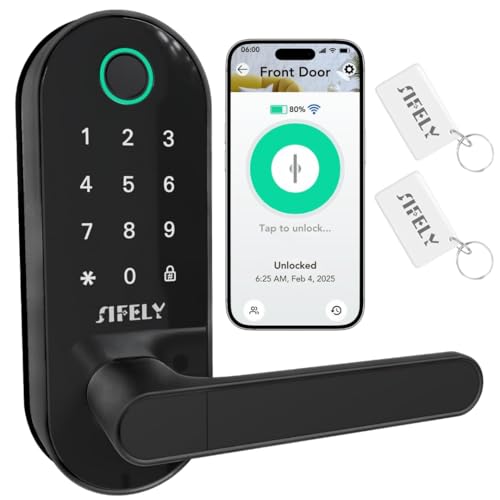
The Fingerprint Smart Door Lock with WiFi Remote Access and App Control is perfect for rental property managers who crave convenience and security. With built-in WiFi, you can control access remotely without needing a separate gateway. Enjoy multiple entry methods—fingerprint recognition, passcode, app, FOB, or mechanical key—ensuring quick access in just 0.3 seconds. The heavy-duty deadbolt provides robust protection, while features like auto-lock and low-battery alerts keep your property secure. Easily manage user access through the app and even integrate with Amazon Alexa or Google Assistant for voice control, making this lock a smart choice for any rental property.
Best For: Rental property managers and homeowners seeking a convenient and secure keyless entry solution.
Pros:
- Offers multiple unlocking methods for flexibility and convenience.
- Built-in WiFi allows for remote access without additional equipment.
- Easy DIY installation makes it accessible for all users.
Cons:
- May require regular battery changes for optimal functionality.
- Potential reliance on WiFi connectivity for remote features.
- Fingerprint recognition may not work effectively for all users in certain conditions.
eufy Security Smart Lock C220, Fingerprint Keyless Entry Door Lock

For property owners seeking a seamless and secure entry solution, the eufy Security Smart Lock C220 stands out with its impressive fingerprint recognition feature, granting access in under 1.5 seconds. This keyless entry lock offers six access methods, including an app remote control, keypad, and even voice commands via Alexa or Google Assistant. With easy installation compatible with most standard deadbolts, you’ll be set up in just 15 minutes. Plus, the 8-month battery life guarantees reliability. The built-in alarm and waterproof rating add extra security, making it an excellent choice for rental properties. Enjoy peace of mind with eufy!
Best For: Property owners looking for a secure and convenient keyless entry solution for their homes.
Pros:
- Quick fingerprint recognition providing access in under 1.5 seconds.
- Multiple unlocking methods including app control, keypad, and voice commands.
- Easy 15-minute installation without the need for drilling.
Cons:
- Requires 8 AA batteries, which may need frequent replacements based on usage.
- Limited to standard US & CA deadbolt compatibility, which may not fit all doors.
- The reliance on Wi-Fi could be problematic in areas with unstable internet connections.
Fingerprint Smart Door Lock with Keypad & Bluetooth Access

Fingerprint Smart Door Locks with Keypad & Bluetooth Access are perfect for property owners managing rentals or Airbnb listings. You’ll love the versatility of multiple entry methods, including fingerprint recognition in just 0.3 seconds. With Bluetooth keyless access and compatibility with Alexa and Google Assistant, you can enjoy seamless access and control. The robust deadbolt knob guarantees your property’s security, while the smartphone app lets you manage user access and view logs. Plus, auto-lock functionality and low-battery alerts keep everything running smoothly. This smart lock combines convenience and safety, making it an excellent choice for your rental properties.
Best For: Property owners managing rentals or Airbnb listings seeking a secure and convenient access solution.
Pros:
- Multiple unlocking methods: Offers fingerprint recognition, passcode, app access, FOB, and mechanical key for versatility.
- Smart technology integration: Compatible with Alexa and Google Assistant for hands-free control and user management through a smartphone app.
- Enhanced security features: Heavy-duty deadbolt knob and auto-lock functionality provide reliable physical protection and convenience.
Cons:
- Dependence on batteries: Requires battery power, which may lead to issues if not regularly maintained.
- Initial setup complexity: DIY installation may be challenging for those less tech-savvy.
- Potential connectivity issues: Bluetooth reliability can vary based on the smartphone or environmental factors.
Tapo Smart Wi-Fi Door Lock with Keyless Entry and Fingerprint Recognition

Imagine effortlessly managing access to your rental property with the Tapo Smart Wi-Fi Door Lock. This sleek deadbolt offers keyless entry, allowing you to open your door using fingerprint recognition or custom passcodes. You can integrate it with smart home assistants like Amazon Alexa and Google Home for added convenience. With a battery life of up to a year, it’s reliable and easy to recharge via USB-C. Enjoy peace of mind with real-time alerts, an activity log, and the ability to create guest profiles. Installation is straightforward, making this lock a top choice for security and ease.
Best For: Individuals seeking a modern, secure, and convenient solution for managing access to their properties, including rental units and smart homes.
Pros:
- Multiple Access Methods: Offers fingerprint recognition, custom passcodes, and smart home integration for flexible entry options.
- Long Battery Life: Lasts up to a year on a single charge, with Bluetooth mode extending battery life to two years.
- Enhanced Security Features: Provides real-time alerts, an activity log, and guest profile management for improved security.
Cons:
- Reliance on Technology: Requires stable Wi-Fi for full functionality, which may be a concern in areas with poor connectivity.
- Initial Cost: May be more expensive upfront compared to traditional locks.
- Limited Backup Options: While backup keys are included, reliance on digital access methods may not suit everyone’s preferences.
Yale Assure Lock 2 Touch Deadbolt with Wi-Fi and Fingerprint Scanner

The Yale Assure Lock 2 Touch Deadbolt with Wi-Fi and fingerprint scanner stands out as an ideal choice for vacation rental hosts looking to streamline guest access. With its smart entry system, you can easily share unique door codes via the Yale Access app, making check-ins hassle-free for your guests. Each code is temporary, ensuring security during their stay while preventing re-entry after checkout. Installation is a breeze, requiring only a screwdriver, and the automatic locking feature adds extra peace of mind. Plus, with the Yale Connect Wi-Fi Bridge, you can manage everything remotely for added convenience.
Best For: Vacation rental hosts seeking a secure and convenient way to manage guest access.
Pros:
- Easy installation with just a screwdriver, requiring no DIY experience.
- Temporary door codes for guests enhance security and eliminate the need for physical key exchanges.
- Remote management capabilities through the Yale Connect Wi-Fi Bridge for added convenience.
Cons:
- Limited to U.S. and Canada markets, restricting international use.
- Dependent on Wi-Fi connectivity for full functionality, which may not be reliable in all locations.
- Battery-operated, requiring periodic battery changes to maintain operation.
Built-in WiFi Fingerprint Smart Door Lock with Handle & Keypad

For rental property owners looking to streamline access for a variety of users, the Built-in WiFi Fingerprint Smart Door Lock with Handle & Keypad stands out with its six keyless entry options. You can gain entry using a fingerprint, keypad code, RFID card, app, physical key, or voice commands via Alexa and Google. This lock easily accommodates kids, seniors, and guests, and you can create one-time codes for convenience. With a durable design and simple DIY installation, it enhances security while fitting most doors. Plus, the low-power alerts and emergency power port keep you covered even during battery issues.
Best For: Rental property owners seeking a versatile and secure access solution for various users.
Pros:
- Multiple unlocking methods provide flexibility for different user needs.
- Easy DIY installation allows for quick setup on most standard doors.
- Durable design with zinc alloy enhances both security and aesthetic appeal.
Cons:
- Dependent on battery life, which may require regular monitoring and replacement.
- Potential connectivity issues if WiFi signal is weak or unstable.
- Initial setup may be complex for users unfamiliar with smart technology.
Factors to Consider When Choosing Fingerprint Door Locks for Rental Property
When choosing fingerprint door locks for your rental property, you need to evaluate several key factors. Think about the variety of releasing methods available, whether remote access is a feature you want, and the significance of robust security features. Installation ease and user management options also play an essential role in making the right choice.
Unlocking Methods Variety
Choosing a fingerprint door lock with a variety of access methods can considerably enhance your rental property’s convenience and security. Look for locks that offer fingerprint recognition, keypad codes, mobile app access, and physical keys. These options allow family members, guests, and service personnel to enter without fumbling for keys. Some smart locks even let you create temporary or scheduled access codes, which is perfect for managing short-term rentals. Plus, voice control compatibility with smart home assistants adds a hands-free entry option. By ensuring diverse entry methods, you guarantee that you can always access your property, even in case of a dead battery or technical glitch. This flexibility ultimately brings peace of mind for you and your tenants.
Remote Access Capability
While managing rental properties, having remote access capability in fingerprint door locks can greatly simplify your tasks. This feature lets you lock and release doors from anywhere using a smartphone app, enhancing your convenience. Many locks with remote access also send real-time alerts about door activity, allowing you to monitor access history for added security. You can create and manage custom PIN codes remotely, granting temporary access to guests, cleaners, or maintenance personnel without needing physical keys. Plus, compatibility with smart home systems and voice assistants enables hands-free control and seamless integration with other devices. Some locks even include auto-lock and away mode features, providing extra security when your property is unoccupied.
Security Features Importance
Remote access capability in fingerprint door locks is just one aspect of what makes them valuable for rental properties. Security features like auto-lock functionality enhance safety by guaranteeing doors lock automatically after a set time, reducing forgetfulness. The ability to create one-time or scheduled access codes lets you control entry for guests or contractors, minimizing unauthorized access. Real-time alerts and activity logs provide immediate notifications of door activity, so you can monitor access and respond to suspicious behavior quickly. Biometric security, such as fingerprint recognition, guarantees quick access while eliminating the risk of lost or stolen keys. Additionally, many locks have away modes that disable all release methods except the master code, boosting security when your property is unoccupied.
Installation Ease
When selecting fingerprint door locks for rental properties, installation ease is essential. Look for models that offer DIY installation, so you can set them up without needing a professional. Most locks require only a screwdriver, making the process simple. Verify the lock is compatible with standard door sizes, typically fitting doors between 1-3/8 to 2-1/4 inches thick. This compatibility covers most residential doors. Choose locks that come with clear installation instructions and all necessary components for a straightforward setup. A reversible handle design is also beneficial, allowing for installation on both left and right-opening doors. Finally, select models with easy access to the battery compartment for quick replacements, confirming your lock remains functional with minimal downtime.
User Management Options
Choosing the right fingerprint door locks for your rental property means taking into account user management options that enhance security and convenience. Look for locks that support multiple user profiles, so you can easily register fingerprints for family, guests, and service personnel. It’s also smart to think about locks that let you create one-time or scheduled access codes for temporary visitors, eliminating the need to share permanent codes. Evaluate options with remote access management through a smartphone app, allowing you to monitor who enters or exits in real-time. Make sure the lock can store a significant number of fingerprints and passcodes, accommodating various users while maintaining security. Finally, check for features that digitally auto-send access codes, simplifying check-in for your guests.