If you’re looking to enhance your home security without replacing your entire lock system, smart lock retrofit kits could be the answer. These kits offer convenient features like keyless entry and remote access, making it easy to manage who enters your home. With various options available, it’s important to know what sets each one apart. Let’s explore the top contenders that can elevate your security effortlessly.
Philips Retrofit Smart Lock 230X for Keyless Entry
If you’re looking to upgrade your home security without the hassle of replacing your existing deadbolt, the Philips Retrofit Smart Lock 230X is an ideal choice. This smart lock transforms your current deadbolt into a keyless entry system while maintaining its original appearance. With built-in Wi-Fi, you can connect directly to your smartphone using the Philips Home Access app, allowing for remote control. Enjoy voice activation through Alexa or Google Assistant, and rely on the auto-lock feature for added security. Plus, receive instant alerts when your door is locked or opened, keeping you informed about who accesses your home.
Best For: Homeowners seeking a smart security upgrade without replacing their existing deadbolt.
Pros:
- Keyless entry provides convenience and eliminates the need for physical keys.
- Voice control compatibility with Alexa and Google Assistant enhances user experience.
- Auto-lock feature increases security by automatically locking the door when closed.
Cons:
- Initial setup may require some technical knowledge for app integration.
- Dependent on Wi-Fi for full functionality, which could be a limitation in areas with poor connectivity.
- Limited compatibility with certain older deadbolt models may restrict some users.
Kwikset Convert Zigbee 3.0 Electronic Smart Lock Conversion Kit

The Kwikset Convert Zigbee 3.0 Electronic Smart Lock Conversion Kit is perfect for homeowners looking to upgrade their existing deadbolt to a smart lock without the hassle of replacing the entire system. This satin nickel device transforms your deadbolt into a smart lock, offering keyless entry with a personalized code and a back-lit keypad. It’s compatible with popular smart home systems like Xfinity and Amazon Echo, allowing for remote monitoring of your door’s status. Installation is straightforward, and it operates on just 4 AA batteries. Plus, it comes with a lifetime mechanical finish warranty and a year for electronics.
Best For: Homeowners looking to upgrade their existing deadbolt to a smart lock without replacing the entire system.
Pros:
- Easy Installation: Simple to install and set up, making it accessible for most homeowners.
- Keyless Entry: Offers personalized codes for entry and a back-lit keypad for visibility in low light.
- Smart Home Compatibility: Works seamlessly with popular smart home systems like Xfinity and Amazon Echo for remote monitoring.
Cons:
- Battery Operated: Requires 4 AA batteries, which will need to be replaced periodically.
- Limited Electronics Warranty: Only comes with a 1-year warranty for electronics compared to a lifetime warranty for the mechanical finish.
- Dependence on Smart Home Systems: Full functionality relies on compatibility with existing smart home systems, which may not be available to all users.
Yale Approach Smart Wi-Fi Deadbolt Retrofit Smart Lock

For homeowners seeking a seamless blend of security and convenience, the Yale Approach Smart Wi-Fi Deadbolt Retrofit Smart Lock stands out with its keyless access feature. You can grant unlimited virtual keys to family and friends, making it perfect for vacation rentals too. With the Yale Access app, you’ll manage access remotely, track activity, and enjoy auto-lock/unlock functionality as you approach. Installation is simple; it fits over your existing deadbolt while keeping traditional keys as a backup. Plus, it integrates smoothly with smart home systems like Alexa and Google Assistant, enhancing your home security effortlessly.
Best For: Homeowners looking for a convenient and secure smart lock solution that accommodates multiple users and integrates with smart home systems.
Pros:
- Keyless Access: Grant unlimited virtual keys to family and friends for easy entry.
- Remote Management: Control and monitor your lock from anywhere using the Yale Access app.
- Easy Installation: Installs over existing deadbolts without the need for extensive modifications.
Cons:
- Battery Operated: Requires 4 AA batteries, which need regular replacement.
- Smart Home Dependency: Full functionality relies on smart home compatibility and stable Wi-Fi connection.
- Limited Customer Reviews: Currently has a moderate rating of 4.0 out of 5 stars based on 73 reviews.
Yale Approach Smart Wi-Fi Deadbolt Retrofit Smart Lock
Looking for a smart lock solution that offers keyless entry without the hassle of replacing your existing deadbolt? The Yale Approach Smart Wi-Fi Deadbolt Retrofit Smart Lock is perfect for you. This sleek lock installs easily on the inside of your door, keeping your traditional keys as a backup. With the Yale Access app, you can lock, release, and share access from anywhere—plus, enjoy features like Auto-Unlock and Auto-Lock with Doorsense® for added security. Compatible with smart home systems like Amazon Alexa and Google Assistant, this lock combines convenience and safety effortlessly. Enjoy a 30-day return policy and solid customer support.
Best For: Those seeking a convenient keyless entry solution that enhances security without replacing their existing deadbolt.
Pros:
- Keyless entry: Unlimited virtual keys for easy access sharing.
- Smart home compatibility: Works seamlessly with Amazon Alexa, Google Assistant, and other smart systems.
- Hands-free access: Features like Auto-Unlock and Auto-Lock with Doorsense® enhance convenience and security.
Cons:
- Requires Wi-Fi: Relies on a stable internet connection for optimal functionality.
- Installation limited to the inside: May not suit those who prefer external installation options.
- Battery-powered: Requires periodic battery changes, adding to maintenance.
Philips WiFi Smart Deadbolt Lock with Fingerprint Keypad
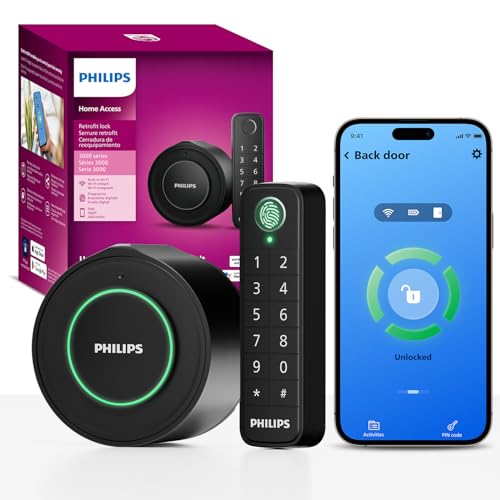
Upgrade your home security effortlessly with the Philips WiFi Smart Deadbolt Lock featuring a fingerprint keypad. You can easily retrofit your existing deadbolt without needing new hardware. With built-in Wi-Fi, you’ll control locking and opening from anywhere using the app. The auto-lock feature adds an extra layer of security, giving you peace of mind. You can assign unique codes or fingerprints to family, visitors, or service providers, ensuring easy access without the app. Real-time notifications keep you updated on door activity, while quick installation makes it compatible with most single-cylinder deadbolts. Enjoy flexible access sharing for your convenience!
Best For: Homeowners looking to upgrade their security with a smart, easy-to-install deadbolt lock that offers keyless entry and remote access.
Pros:
- Convenient access control with unique codes or fingerprints for family and visitors without needing an app.
- Real-time notifications keep you informed about door activity, enhancing security.
- Easy retrofit installation compatible with most existing single-cylinder deadbolts.
Cons:
- Dependent on Wi-Fi connectivity, which may affect performance if the network is unstable.
- Requires a smartphone app for full functionality, potentially limiting access for those without smartphones.
- Battery-operated, necessitating regular battery checks and replacements to ensure continuous operation.
Philips Retrofit Smart Lock 230X for Existing Deadbolt

Transforming your existing deadbolt into a smart lock is effortless with the Philips Retrofit Smart Lock 230X, making it an ideal choice for homeowners seeking convenience and modern security. This smart lock features built-in Wi-Fi, allowing remote access via the Philips Home Access App. You’ll appreciate the keyless entry that still works with traditional keys. Voice control through Alexa and Google Assistant offers hands-free operation, while the auto-lock feature secures your door automatically. Installation is a breeze with included accessories, and Philips provides excellent customer support. Enjoy peace of mind with real-time notifications about your door’s status!
Best For: Homeowners looking to upgrade their existing deadbolts to smart locks for added convenience and security.
Pros:
- Easy installation with included mounting accessories and batteries.
- Voice control compatibility with Alexa and Google Assistant for hands-free operation.
- Real-time notifications keep users informed about the door’s status.
Cons:
- Mixed customer ratings with a score of 2.8 out of 5 stars based on 17 reviews.
- Limited compatibility may not suit all existing deadbolt types.
- Dependence on Wi-Fi for remote features could be problematic in areas with poor connectivity.
Philips WiFi Smart Deadbolt Lock with Fingerprint Keypad
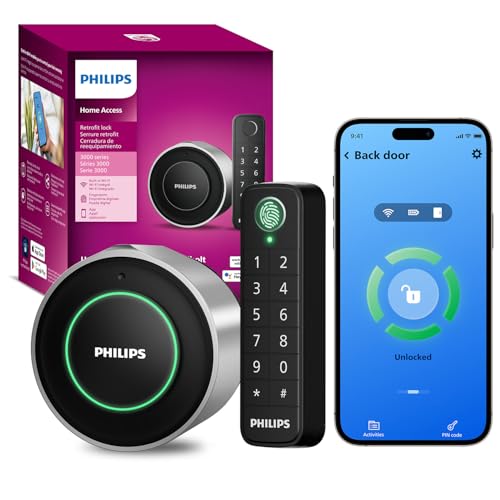
For homeowners seeking an effortless way to enhance security without replacing existing hardware, the Philips WiFi Smart Deadbolt Lock with Fingerprint Keypad is an ideal choice. This smart lock transforms your existing deadbolt into a secure entry system featuring a fingerprint keypad and app remote control. You can grant unique access codes or fingerprints to family and guests, ensuring secure entry without needing the app. With auto-lock functionality and real-time notifications, you’ll always know who’s coming and going. Installation is quick and compatible with most single-cylinder deadbolts, making it a convenient upgrade for your home security.
Best For: Homeowners looking to enhance their home security effortlessly without replacing existing deadbolt hardware.
Pros:
- Easy integration with existing deadbolts, preserving door aesthetics.
- Allows for unique access codes and fingerprints for multiple users.
- Offers remote control and notifications through a mobile app for added convenience.
Cons:
- Compatibility limited to indoor thumb turns that rotate 90°; others are not supported.
- Requires a Wi-Fi connection for remote access features to function.
- Installation may require some technical knowledge for optimal setup.
Schlage Encode Smart Wi-Fi Deadbolt Lock with Touchscreen Keypad

If you’re looking for a seamless way to enhance your home security, the Schlage Encode Smart Wi-Fi Deadbolt Lock with Touchscreen Keypad is an excellent choice. This keyless entry lock offers app control and connects directly to your Wi-Fi network, allowing you to manage up to 100 access codes and monitor lock history from anywhere. You can even use voice commands with Alexa or Google Home for hands-free operation. Installation is a breeze, needing just a screwdriver, and the lock features an auto-lock option and customizable alerts for added security. Plus, it comes with a backup key for peace of mind.
Best For: Homeowners seeking a convenient and secure keyless entry solution that integrates with smart home systems.
Pros:
- Easy installation with just a screwdriver, requiring no hardwiring.
- Remote control and monitoring through the Schlage Home app, allowing management of access codes and lock history from anywhere.
- Voice activation compatibility with Alexa and Google Home for hands-free operation.
Cons:
- Battery-operated, requiring periodic battery changes every six months on average.
- Limited to standard door sizes, which may not fit all door configurations.
- Initial setup may require a strong Wi-Fi connection for optimal performance.
August Home Wi-Fi Connected Smart Keyless Entry Door Lock (AUG-SL05-M01-S01)
The August Home Wi-Fi Connected Smart Keyless Entry Door Lock (AUG-SL05-M01-S01) is the ideal solution for homeowners seeking convenience and security without sacrificing the charm of their existing door. This easy-to-install lock fits over most single cylinder deadbolts in about 10 minutes, preserving your original keys. With built-in Wi-Fi, you can remotely lock or open your door, check its status, and grant virtual guest keys via the August app. Plus, it works seamlessly with voice assistants like Amazon Alexa and Google Assistant. Enjoy hands-free opening and the option for added security with biometric verification for peace of mind.
Best For: Homeowners who want a convenient, secure, and aesthetically pleasing smart lock that integrates with their existing door and smart home systems.
Pros:
- Easy installation that fits over most single cylinder deadbolts in about 10 minutes.
- Remote access allows for locking/unlocking and monitoring the door status from anywhere via the app.
- Compatibility with voice assistants like Amazon Alexa and Google Assistant enhances convenience.
Cons:
- Requires a smartphone and Wi-Fi connection for full functionality, which may not suit all users.
- The Smart Keypad for code-based entry is sold separately, adding to the overall cost.
- Biometric verification features may not be necessary for all users and could complicate the setup process.
August Home Smart Lock + Connect, Silver

Looking for a smart lock that seamlessly integrates with your existing deadbolt? The August Home Smart Lock + Connect, Silver is your answer. You can lock and gain entry to your door using the August App, granting keyless access to trusted individuals effortlessly. Its Auto-Entry feature detects your approach, ensuring you never struggle with keys again. Installation is a breeze, attaching to the inside of your door while keeping your existing keys functional. Plus, you can manage guest access by sending secure keys instantly. With voice control compatibility for Alexa and Google Assistant, this smart lock makes home security simple and convenient.
Best For: Those seeking a convenient and secure smart lock solution that integrates with existing deadbolts and offers keyless access.
Pros:
- Allows remote locking and unlocking via the August App for ultimate convenience.
- The Auto-Unlock feature simplifies entry by recognizing your approach.
- Compatibility with Alexa and Google Assistant enables easy voice control.
Cons:
- Installation may require some technical skills for those unfamiliar with smart home devices.
- Reliance on a smartphone app may not appeal to all users, especially those who prefer traditional keys.
- Battery life may require periodic replacements, which could be a hassle for some users.
Factors to Consider When Choosing a Smart Lock Retrofit Kit
When you’re choosing a smart lock retrofit kit, you’ll want to take into account several key factors. Think about how well it fits with your existing hardware, the connectivity options it offers, and the keyless entry features that suit your lifestyle. Don’t forget to evaluate the installation complexity and the security features to guarantee your home stays safe and convenient.
Compatibility With Existing Hardware
Choosing the right smart lock retrofit kit starts with confirming it’s compatible with your existing deadbolt. Many kits are specifically designed for single-cylinder deadbolts, so take a moment to check the specifications. You don’t want to face unnecessary replacements or alterations.
Also, consider the installation requirements; some might need specific tools or hardware that aren’t included. If you value traditional keys, look for kits that allow you to retain that option alongside smart features, making your change smoother. Finally, verify the connectivity protocols, like Zigbee or Wi-Fi, to guarantee the kit integrates seamlessly with your smart home ecosystem. This careful evaluation will help you make a well-informed choice for your home security upgrade.
Connectivity Options Available
Understanding the various connectivity options available for smart lock retrofit kits is essential for seamless integration into your smart home. These kits typically offer Zigbee, Wi-Fi, and Bluetooth, each with distinct advantages. Wi-Fi connectivity allows you to control your lock directly through smartphone apps, eliminating the need for extra hubs and enhancing convenience. Zigbee, on the other hand, enables your smart lock to communicate with other compatible devices, creating a reliable mesh network. If you prefer localized control, Bluetooth lets you open your door using your smartphone when you’re nearby. Keep in mind compatibility with your existing home automation systems, as certain connectivity protocols might restrict integration with specific devices or platforms. Choose wisely to guarantee a smooth experience!
Keyless Entry Features
While exploring smart lock retrofit kits, you’ll want to contemplate the keyless entry features they offer. These systems let you gain access to doors without physical keys, using codes, mobile apps, or even fingerprints. Look for kits that provide personalized access codes for family, friends, or service providers, giving you control over who can enter your home. Voice control compatibility with smart home assistants like Amazon Alexa and Google Assistant adds convenience, allowing hands-free operation. Consider options with auto-lock features that secure doors automatically after closing, reducing the chance of leaving them open. Finally, instant notifications keep you informed about your door’s status, letting you monitor access activity in real-time and enhancing your overall peace of mind.
Installation Complexity and Time
When considering smart lock retrofit kits, installation complexity and time can considerably impact your decision. Many kits are designed for easy installation, typically fitting over existing deadbolts in under 10 minutes without needing special tools. Some come with detailed guides and all necessary hardware, allowing you to complete the setup yourself with minimal effort. However, installation complexity can vary by model; some might require just a screwdriver, while others could involve a more detailed process. It’s essential to guarantee compatibility with your existing hardware, as most kits work with standard single-cylinder deadbolts. Additionally, consider if the retrofit kit allows for retaining traditional keys, which can help maintain accessibility during the shift.
Security Features Offered
Choosing a smart lock retrofit kit isn’t just about convenience; it’s crucial to contemplate the security features that can protect your home. Look for locks with secure, encrypted connections to safeguard against unauthorized access. Customizable alarms are a great addition, alerting you to door movement or forced entry attempts. Verify the device supports multiple access codes, allowing you to manage who enters and monitor usage effectively. Auto-lock features provide an extra layer of protection by securing the door after it closes. Finally, consider smart locks that offer activity logs or notifications, keeping you informed about who comes and goes. These features collectively enhance your home’s security and give you peace of mind.
App Functionality and Control
How well does the app control your smart lock? A robust app is essential for remote management, letting you lock or open your door and monitor access from anywhere. Look for retrofit kits that provide activity tracking features, giving you a log of who accessed your door and when. Real-time notifications keep you informed, alerting you whenever your door is locked or opened. If you’re into smart home tech, verify the app supports voice control with popular virtual assistants like Alexa and Google Assistant. A user-friendly interface is also key, allowing you to set personalized access codes or temporary keys for guests, making managing home access seamless and flexible. Your smart lock experience hinges on the app’s functionality.