Reliable Ethernet installation starts with the right pulling and termination tools. Whether you are routing cable through walls, conduit, electrical boxes, or tight spaces, the right equipment can reduce friction, prevent cable damage, and make each run more manageable.
We selected 10 practical options for different installation needs, from simple pulling aids and fish tape to all-in-one kits with crimpers, testers, and pass-through connectors.
Best 10 Cable Pulling Tools for Ethernet Installation Picks for 2026
Best Pass-Thru Kit
Klein Tools VDV026-813 Cable Installation Kit

- Pass-Thru crimper and 50 connectors
- Tests CAT3 through CAT6/6A cables
- Includes storage pouch
Best For: Ethernet termination and cable testing
Best Flexible Wire Guide
2-Pack 40-Inch Electrical Wire Pullers

- Two flexible 40-inch guides
- Shape-retaining iron core
- PVC coating helps protect wire
Best For: Short, tight-space cable routing
Best Long-Reach Fish Tape
Klein Tools 50-Foot Steel Fish Tape

- 50-foot steel tape
- Firm yet flexible 1/8-inch design
- One-foot laser-etched markings
Best For: Longer wall and conduit cable pulls
Best Complete Network Toolkit
Cable Matters 7-in-1 Ethernet Tool Kit

- Crimper, stripper, cutter, and tester
- Includes punch-down tool and stand
- Carrying case and RJ45 plugs included
Best For: Portable Ethernet building and termination
Best for One-Person Pulling

- Built-in rollers support smoother wire feeding
- Helps reduce hand fatigue
- Designed for one-person installation
Best For: Feeding wire through electrical boxes with less manual effort
Best Dedicated Ethernet Termination Tool
Klein Tools VDV226-110 Crimper

- Strips, cuts, and crimps in one tool
- Supports RJ11, RJ12, and RJ45 applications
- Full-cycle ratchet aids complete termination
Best For: Data and voice cable installation and maintenance
Best Complete Network Tool Kit

- Includes crimper, strippers, cutter, and tester
- Supports Cat5 through Cat7 cable types
- Includes 50 connectors and strain relief boots
Best For: DIY Ethernet installation, repair, and cable testing
Flexible Cable Grip

- Fits 4–6 mm OD cables
- Mesh sleeve grips cables securely
- Rotating section helps reduce twisting
Best For: Small flexible cable pulls through conduit
Pass-Through Crimper Kit

- Crimps CAT5 through CAT7 cable
- Includes 50 connectors and 50 boots
- Tester supports cables up to 300 m
Best For: Ethernet termination and basic cable testing
Professional Network Kit
14-in-1 Ethernet Installation Set
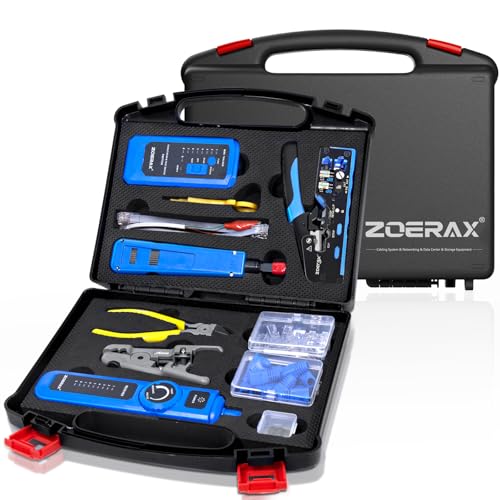
- Combines crimping, testing, and punch-down tools
- Includes wire tracker and cable tester
- Comes in a sturdy portable case
Best For: Complete home, office, and network installation work
Best Pass-Thru Kit – Klein Tools VDV026-813 Cable Installation Kit
For cable pulling tools for ethernet installation, this Klein Tools kit is a practical choice when termination and testing matter as much as routing. It combines a Pass-Thru RJ45 crimper, cable tester, 50 connectors, and a storage pouch for CAT5e/CAT6 data-cable work.
Best For: Installers who want one kit for Pass-Thru RJ45 termination and basic cable testing.
Pros:
- Pass-Thru connectors let you visually check wire order before crimping.
- Includes a crimper, tester, 50 connectors, and a zippered pouch.
- Tests CAT3, CAT5e, and CAT6/6A cables with clear LED status indications.
Cons:
- Focused on termination and testing rather than physically fishing cable through walls or conduit.
- The included connectors are Pass-Thru style, so compatibility with other connector types should be considered.
This is a well-rounded Ethernet installation kit for users who need to make and verify network cables efficiently, especially in PoE+ CAT5e/CAT6 applications.
Best Flexible Wire Guide – 2-Pack 40-Inch Electrical Wire Pullers
Among cable pulling tools for ethernet installation, these flexible wire pullers are suited to short, confined runs. Their shape-retaining iron cores, reinforced end loops, and PVC coating help guide cable behind dashboards, through walls, and around tight pathways.
Best For: DIYers handling short Ethernet, home-theater, automotive, or general wire-routing jobs.
Pros:
- Two 40-inch guides provide a spare or support multiple runs.
- Flexible iron cores bend to the desired angle and retain their shape.
- Smooth PVC coating helps reduce snagging and protect wire insulation.
Cons:
- A 40-inch length may be limiting for long wall cavities or extended conduit runs.
- Designed as a flexible guide rather than a full fish-tape reel.
This compact two-pack makes sense for localized cable routing where maneuverability is more important than maximum reach.
Best Long-Reach Fish Tape – Klein Tools 50-Foot Steel Fish Tape
This Klein Tools fish tape is a straightforward option for cable pulling tools for ethernet installation when you need extended reach. Its 50-foot, 1/8-inch steel tape balances firmness with flexibility for larger wire pulls and includes markings to help estimate how much tape has been deployed.
Best For: Longer cable pulls through walls, conduit, and other pathways where a firm steel tape is useful.
Pros:
- 50-foot steel tape offers substantially more reach than short wire guides.
- 1/8-inch width provides a firm yet flexible pulling path.
- Optimized housing, multi-position handle, and descending one-foot markings support controlled use.
Cons:
- Steel construction can be less forgiving than a flexible coated guide in very tight bends.
- This is a fish tape only, so it does not include Ethernet termination or testing tools.
For installers who already have crimping and testing equipment, this fish tape is a practical dedicated tool for longer, more demanding pulls.
Best Complete Network Toolkit – Cable Matters 7-in-1 Ethernet Tool Kit
For cable pulling tools for ethernet installation, the Cable Matters 7-in-1 kit covers the network-building tasks that follow routing a cable. It includes an RJ45 crimper with cutter and stripper, punch-down tools, a tester, connectors and boots, and a carrying case for field work.
Best For: DIYers and IT professionals who need a portable kit for building, terminating, and testing Ethernet cables.
Pros:
- Combines crimping, stripping, cutting, punch-down, and testing tools.
- Supports RJ45, RJ-12, and RJ11 cable formats with the included crimper.
- Includes Cat6 RJ45 plugs and boots plus a carrying case.
Cons:
- It is primarily a network termination and testing kit, not a fish tape or cable-pulling guide.
- The included eight-pack of plugs may be limited for larger installation projects.
This kit is a strong all-in-one choice for finishing Ethernet runs after the cable has been routed, with useful tools for both modular plugs and punch-down connections.
Best for One-Person Pulling – Southwire Pull-It Roller Tool
For cable pulling tools for ethernet installation, the Southwire Pull-It focuses on feeding wire smoothly through electrical boxes. Its built-in rollers are designed to reduce friction, hand fatigue, and the risk of wire damage during one-person installation.
Best For: Electricians and installers who need a compact roller-style aid for feeding wire through electrical boxes with less manual effort.
Pros:
- Built-in rollers support smooth, efficient wire feeding.
- Helps reduce hand fatigue during cable pulling.
- Designed for one-person installation.
- Compact, lightweight design weighs 8.1 ounces.
Cons:
- It is a pulling aid rather than a complete Ethernet termination or testing kit.
- The notes do not specify compatibility with particular Ethernet cable categories or connectors.
This is a focused choice when the main challenge is guiding wire through boxes efficiently. Choose a different tool if you also need to strip, crimp, or test network cables.
Best Dedicated Ethernet Termination Tool – Klein Tools VDV226-110 Crimper
The Klein Tools VDV226-110 is a practical option among cable pulling tools for ethernet installation when your workflow includes preparing and terminating data cable. It combines stripping, cutting, and crimping for RJ11, RJ12, and compatible RJ45 pass-through connectors.
Best For: Data and voice cable installation or maintenance where a single ergonomic tool can handle cable preparation and connector termination.
Pros:
- Combines a wire stripper, crimper, and cutter.
- Supports 4-, 6-, and 8-position modular connectors.
- Full-cycle ratchet helps ensure complete connector termination.
- On-tool wiring guide can help minimize wiring errors.
Cons:
- It is a hand tool and does not include a cable tester or connectors in the supplied details.
- Its RJ45 pass-through compatibility is specifically identified for Klein Tools connectors.
For installers who already have cable and connectors, this tool offers a focused way to prepare and terminate data cables. Its integrated functions can reduce the need to carry separate preparation tools.
Best Complete Network Tool Kit – RJ45 Pass-Through Crimper Kit
This 8-in-1 kit is a broad choice among cable pulling tools for ethernet installation, covering cable preparation, RJ45 termination, and connection testing. It includes a pass-through crimper, strippers, cutters, a tester, 50 Cat6 pass-through connectors, and 50 strain relief boots.
Best For: DIY installers and repair tasks that need a ready-to-use collection of Ethernet preparation, crimping, testing, and connector accessories.
Pros:
- Works with Cat5, Cat5e, Cat6, Cat6A, and Cat7 cables, plus RJ11/RJ12 standards.
- Includes a network cable tester with 60V PoE support and anti-burn protection.
- Provides 50 Cat6 pass-through connectors and 50 strain relief boots.
- Adjustable stripper is designed for round and flat network cables.
Cons:
- The tester requires a 9V battery, which is not included.
- The kit may be more than needed for installers who already own preparation and testing tools.
- The supplied details identify it as a DIY-oriented set rather than a specialized pulling device.
This kit is the most comprehensive option of the three for building and checking Ethernet patch cables. Its included connectors and tester make it convenient for multiple installation or repair projects.
Flexible Cable Grip – Stainless Steel Pulling Sock
For cable pulling tools for ethernet installation, this compact stainless steel mesh grip is designed to hold smaller flexible cables securely while they are pulled through conduits or pipes. Its rotating section helps reduce slipping, twisting, and potential cable scratching during a pull.
Best For: Pulling 4–6 mm OD Ethernet or other flexible cables through conduit.
Pros:
- Stainless steel construction offers corrosion, rust, wear, and strength resistance.
- Mesh sleeve provides a firm grip around the cable.
- Soft shape and rotating part help limit slipping and twisting.
- Simple insert-and-pull design with a compact, lightweight profile.
Cons:
- Designed only for cables measuring 4–6 mm in outside diameter.
- Includes one cable-puller grip rather than a broader installation kit.
This is a focused pulling accessory rather than a termination or testing tool. Choose it when cable diameter compatibility and a secure conduit pull are your main priorities.
Pass-Through Crimper Kit – RJ45 Ethernet Tool Set
This pass-through crimper kit is a practical choice among cable pulling tools for ethernet installation when your workflow also includes cutting, stripping, terminating, and testing network cables. It supports CAT5 through CAT7 cable, RJ45 pass-through connectors, and RJ11/RJ12 connections.
Best For: Home and light professional Ethernet termination projects that need crimping supplies and basic cable testing.
Pros:
- Strips, cuts, and crimps CAT5, CAT5e, CAT6, CAT6A, and CAT7 cables.
- Supports shielded and unshielded modular plugs, including pass-through connectors.
- Includes 50 pass-through Cat6 connectors, 50 boots, a stripper, and replacement blades.
- Network tester supports RJ45/RJ11/RJ12 cables and testing up to 300 m.
Cons:
- The tester requires a 9V battery, which is not included.
- It is a termination kit and does not include a dedicated cable-pulling grip or fish tool.
With its crimper, consumables, stripper, and tester, this set covers several post-pull installation tasks. It is a stronger fit for users building and validating Ethernet ends than for those seeking a conduit-pulling accessory alone.
Professional Network Kit – 14-in-1 Ethernet Installation Set
For broader cable pulling tools for ethernet installation workflows, this 14-in-1 network kit combines Ethernet termination, punch-down, stripping, tracking, and testing tools in a portable case. It is suited to projects where cable installation continues through connection, troubleshooting, and verification.
Best For: Home, office, server-room, engineering, and network-installation work requiring a complete portable tool set.
Pros:
- Includes a pass-through crimper, wire tracker, cable tester, stripper, cutter, and punch-down tool.
- Crimper supports pass-through and non-pass-through RJ45/RJ11/RJ12 connectors.
- Interchangeable reversible punch-down blades support 110 and 110/88 standards.
- Heavy-duty case keeps the tools organized for transport and storage.
Cons:
- At 1.2 kg, it is less minimal than a single-purpose installation tool.
- Only 10 Cat6 pass-through connectors and RJ45 boots are included.
- The supplied tools focus on network installation and testing rather than a dedicated conduit cable-pulling grip.
This is the most comprehensive option of the three for end-to-end network work. Its wire tracker and tester add troubleshooting capability, while the crimper and punch-down tool support multiple termination styles.
How We Picked the Best Cable Pulling Tools for Ethernet Installation
We evaluated these tools by focusing on the tasks that make Ethernet work faster and more reliable: pulling cable through enclosed paths, guiding wire around obstacles, preparing twisted-pair conductors, terminating RJ45 plugs, and checking finished connections. We also considered tool versatility, compatibility with common Cat5e, Cat6, and Cat7 cable, ease of use, portability, and suitability for occasional home projects versus repeated professional installations.
Some products are dedicated pulling tools, such as fish tape, wire pullers, roller-style devices, and mesh grips. Others are termination kits that become useful once the cable is in place. A complete network installation often benefits from both categories.
Quick Comparison
| Tool Type | Best For | What to Look For |
|---|---|---|
| Fish tape | Long, enclosed runs | Length, stiffness, and smooth feeding |
| Wire puller or grip | Short pulls and cable handling | Secure attachment and cable-safe materials |
| Roller-style puller | One-person routing through boxes | Stable guidance and reduced friction |
| Crimping tool | Installing RJ45 connectors | Pass-through compatibility and clean cuts |
| Complete network kit | End-to-end home installations | Tester, stripper, crimper, plugs, and boots |
Key Buying Factors for Cable Pulling Tools for Ethernet Installation
Run Length and Pathway
Choose a fish tape with enough reach for the longest route, while remembering that extra length can be harder to control in confined spaces. For short pulls, a flexible wire puller or mesh grip may be quicker and easier.
Cable Protection
Ethernet cable should not be sharply kinked, crushed, or pulled by its conductors. Look for smooth edges, secure attachment points, and pulling grips sized for the cable’s outside diameter. Pull steadily rather than forcing cable around corners.
Connector and Cable Compatibility
If you will terminate the cable yourself, verify that the crimper supports the connector style you plan to use. Pass-through tools are convenient for compatible RJ45 plugs, but they do not automatically replace proper conductor alignment, jacket control, or testing.
Testing and Portability
A cable tester can identify opens, shorts, crossed pairs, and wiring-order mistakes before the cable is installed permanently. For multiple rooms or service calls, a compact kit may be more practical than buying each tool separately.
Who Should Buy Which Cable Pulling Tools for Ethernet Installation?
For basic home wiring: Choose a flexible puller, compact fish tape, or a starter network kit if you also need to crimp and test cables.
For longer wall or conduit runs: A properly sized steel fish tape or roller-style pulling device provides better reach and control.
For frequent Ethernet termination: Select a quality pass-through crimper with a reliable cutter and stripper, then add a cable tester if one is not included.
For installers who want one purchase: A complete network tool kit is the most convenient option, provided its included connectors and accessories match your cable type.
For delicate or unusually sized cable: Use a cable pulling grip or sleeve that matches the cable diameter and distributes force across the jacket. Regardless of the tool, plan the route first, leave service loops, and test every finished run.