Choosing the right display can make your CCTV system easier to manage, faster to review, and more dependable day to day. The best security camera monitors for small businesses balance screen size, image clarity, compatibility, and 24/7 reliability.
Below, we focus on practical options for offices, shops, warehouses, and service counters so you can match the monitor to your security setup without overspending.
Best 10 Security Camera Monitors for Small Businesses Picks for 2026
Compact HD Pick
Jexiop 12.5-inch Security Monitor

- Full HD 1080p screen
- HDMI/VGA dual input
- Built-in speakers and VESA mounting
Best For: Small offices and space-limited surveillance desks
Square Surveillance Workhorse
Eyoyo 17-Inch Security Monitor

- 5:4 display for CCTV viewing
- HDMI, VGA, AV, BNC, and USB ports
- Includes speakers, remote, and cables
Best For: Businesses needing broad camera compatibility in a compact screen
Wall-Mount Utility Pick
Jexiop 16-inch Security Monitor

- HDMI, AV, VGA, and audio support
- Built-in speakers and USB playback
- Remote control with wall-mount use
Best For: Small business setups that need flexible mounting and basic media playback
Large Control-Room Choice
32-Inch CCTVPRO Security Monitor

- 32-inch Full HD display
- 5ms response for live monitoring
- 24/7 operation with VESA mounting
Best For: Retail, warehouse, or garage monitoring stations
Compact Wall-Mount Pick
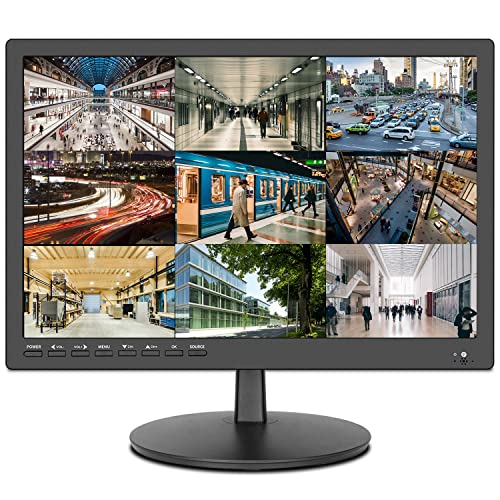
- 17-inch screen for close surveillance viewing
- HDMI, AV, VGA, and audio inputs
- Built-in speakers plus USB media playback
Best For: Small retail counters and office CCTV setups
Flexible Multi-Input Choice
Jexiop 19” Surveillance Monitor

- HDMI, VGA, BNC, and AV inputs
- 19-inch screen with built-in speakers
- Useful for CCTV and other video display tasks
Best For: Security systems that need BNC and multi-source video support
Best 1080p Option
Real HD 27-inch Security Camera Monitor

- 1920 x 1080 Full HD resolution
- 27-inch screen with 178° viewing angle
- HDMI, VGA, and headphone jack
Best For: Wired CCTV or NVR setups that need a larger 1080p display
Compact 10.1-Inch Pick

- 1366x768 IPS screen for live camera viewing
- HDMI, VGA, BNC, and AV inputs
- Built-in speakers and remote included
Best For: Small offices and retail counters with limited space
Full HD Value Monitor
22-Inch 1080P Surveillance Screen

- 1920x1080 Full HD resolution
- HDMI and VGA for CCTV/DVR/NVR use
- 75Hz panel with wide viewing angles
Best For: Larger monitoring setups that need sharper 1080p detail
Flexible 22-Inch Choice
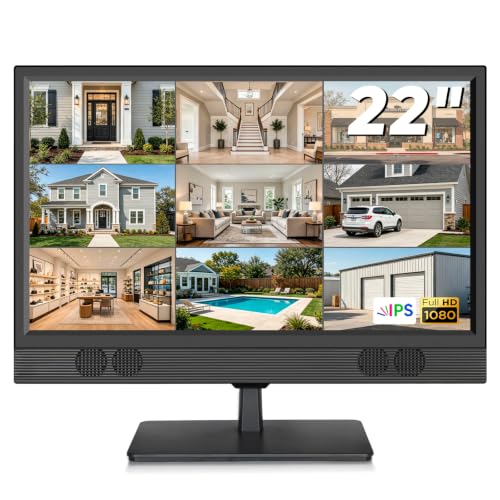
- Full HD IPS panel with 178° viewing
- HDMI, VGA, BNC, and RCA inputs
- Desktop or VESA wall-mount setup
Best For: Businesses needing a versatile display for mixed security gear
Compact HD Pick – Jexiop 12.5-inch Security Monitor
If you want security camera monitors for small businesses without taking up much desk space, this 12.5-inch Jexiop keeps the setup simple. It offers Full HD 1080p resolution, HDMI/VGA inputs, and built-in speakers, so it can handle a basic surveillance station or a small office monitoring nook with minimal hassle.
Best For: Small offices, home offices, or tight surveillance setups that need a compact Full HD monitor.
Pros:
- 1920 x 1080 Full HD resolution with 178° viewing angle
- HDMI and VGA dual input for easy device compatibility
- Built-in stereo speakers for video with audio
- Thin, lightweight design with VESA wall-mount support
Cons:
- Small 12.5-inch size may feel limited for multi-camera viewing
- Only one HDMI port listed
- More compact screen may be less ideal for larger control areas
This is a practical pick if your priority is a small, straightforward monitor for a modest camera setup. Its portability and dual-input flexibility make it easy to fit into a business environment where space matters.
Square Surveillance Workhorse – Eyoyo 17-Inch Security Monitor
For security camera monitors for small businesses that need a little more screen space, the Eyoyo 17-inch model is built around surveillance-friendly features. Its 5:4 display, 1280×1024 resolution, and multiple inputs including HDMI, VGA, AV, BNC, and USB make it easy to connect to common CCTV and DVR systems.
Best For: Shops, offices, and control desks that want a compact but more viewable security monitor with broad connectivity.
Pros:
- 5:4 aspect ratio suits security camera viewing
- Multiple inputs, including HDMI, VGA, AV, BNC, and USB
- 75Hz refresh rate and 250 cd/m² brightness
- Built-in speakers plus remote control and included cables
Cons:
- 1280×1024 resolution is lower than Full HD models
- VESA mount is supported but the mount is not included
- Square format may not suit every desktop preference
This monitor stands out for its surveillance-focused shape and wide connection support. It makes sense for users who value compatibility and practical monitoring more than higher-resolution general-purpose display specs.
Wall-Mount Utility Pick – Jexiop 16-inch Security Monitor
This Jexiop 16-inch model is a practical option for security camera monitors for small businesses that need flexible placement and simple connectivity. It supports HDMI, AV, VGA, and 3.5mm audio connections, includes built-in speakers, and adds a USB media player for playback from a USB disk.
Best For: Small retail, office, or home surveillance setups that need a wall-mountable monitor with basic multimedia support.
Pros:
- Multiple inputs: HDMI, AV, VGA, and audio in/out
- Built-in speakers for monitoring without extra audio gear
- USB port media player for direct video playback
- Wall-mounted or desktop use with included remote
Cons:
- 15.6-inch listed size is smaller than some users may want for multi-camera viewing
- HD+ 1600×900 resolution is not Full HD
- TN panel may be less appealing than IPS-style alternatives
It is a solid utility monitor when you want straightforward camera viewing plus a little playback flexibility. The mix of inputs and mounting options makes it useful in small business environments where installation needs to stay simple.
Large Control-Room Choice – 32-Inch CCTVPRO Security Monitor
When security camera monitors for small businesses need a bigger viewing area, this 32-inch CCTVPRO model is designed for surveillance duty. It delivers Full HD 1080p resolution, 5ms response time, and 24/7 operation support, making it a stronger fit for retail counters, warehouses, garages, or dedicated camera stations.
Best For: Small businesses that want a large, always-on monitor for live CCTV viewing in a control-room style setup.
Pros:
- 32-inch Full HD 1920×1080 display for broader camera visibility
- 5ms response time helps reduce motion blur and ghosting
- Built for 24/7 continuous operation
- HDMI, VGA, and USB connectivity with VESA mountable design
Cons:
- Larger footprint may be too much for tight desks
- No built-in speaker feature is listed
- Best suited to surveillance use rather than general desktop work
If your priority is a large surveillance display that can stay on all day, this model is the most monitoring-focused option here. It is especially appealing for businesses that want clearer detail and a more control-room-like viewing experience.
Compact Wall-Mount Pick – ZOSHING 17-inch CCTV Monitor
If you want security camera monitors for small businesses with a straightforward layout and close-up viewing, this 17-inch ZOSHING model is a practical fit. It is built for CCTV use, includes HDMI, AV, VGA, and 3.5mm audio connections, and adds a USB media player for extra flexibility in an office, shop, or back-room setup.
Best For: Small retail counters, offices, and other spaces that need a compact wall-mounted CCTV display.
Pros:
- 17-inch screen with ultra-fine pixel pitch for close surveillance viewing
- 170° viewing angle helps reduce position limits when checking footage
- HDMI, AV, VGA, and audio input/output support broad device compatibility
- Built-in speakers and USB media playback add useful everyday convenience
Cons:
- HD 1366 x 768 resolution is modest compared with larger 1080p options
- Designed around 4:3 viewing, so it may not suit every modern display preference
Overall, this is a compact security monitor that keeps setup simple while still offering the core connections many small businesses need. Its size and wall-mount design make it especially useful where desk space is limited.
Flexible Multi-Input Choice – Jexiop 19” Surveillance Monitor
For security camera monitors for small businesses that need multiple connection options, the Jexiop 19-inch screen is a flexible pick. It supports HDMI, VGA, BNC, and AV inputs, which makes it useful for CCTV systems as well as other video display jobs in an office, workshop, or home security setup.
Best For: Businesses that want a small surveillance monitor with BNC support and broad video input compatibility.
Pros:
- Rich input mix includes HDMI, VGA, BNC, and AV
- 19-inch size is still compact but gives a little more screen space
- Built-in speakers add basic audio support
- Works with CCTV systems plus other display uses like debug video or FPV monitoring
Cons:
- Native resolution is 800 x 600, so it is not the sharpest option here
- Viewing angle is 160°, which is narrower than some alternatives
This model stands out if your security system uses BNC or you need a monitor that can pull double duty across different video sources. It is a practical, utility-first choice rather than a high-resolution display.
Best 1080p Option – Real HD 27-inch Security Camera Monitor
If sharper image detail matters when comparing security camera monitors for small businesses, this 27-inch Real HD display is the strongest pick in this group. It offers 1920 x 1080 resolution, HDMI and VGA inputs, and a 75Hz refresh rate, making it a good fit for NVR-based CCTV monitoring where you want a larger, clearer screen.
Best For: Shops, offices, and monitoring stations that want a larger 1080p display for CCTV or NVR viewing.
Pros:
- Full HD 1920 x 1080 resolution for clearer camera detail
- 27-inch size gives more room for multi-camera viewing
- 178°/178° viewing angle supports easy viewing from different positions
- HDMI, VGA, and headphone jack cover the basic monitoring setup
Cons:
- Does not support WiFi or Bluetooth, so it is not for wireless camera setups
- Product notes specify 20-inch in the details area, so size information is inconsistent
This is the best choice if your priority is a larger 1080p monitor for wired surveillance systems. It is clearly aimed at professional security monitoring rather than general smart-device use.
Compact 10.1-Inch Pick – 10.1" IPS CCTV Monitor
If you need security camera monitors for small businesses, this 10.1-inch model is a space-saving choice for reception desks, counters, and compact surveillance stations. Its 1366×768 IPS display is built for live camera viewing and recorded footage, with HDMI, VGA, BNC, and AV inputs for common CCTV and DVR/NVR setups.
Best For: Small offices, retail counters, and tight spaces that need a dedicated surveillance screen.
Pros:
- 10.1-inch IPS display with 1366×768 resolution for clear security feeds.
- Multiple input options including HDMI, VGA, BNC, and AV for flexible system hookups.
- Built-in speakers and remote control make day-to-day monitoring easier.
- Compact footprint works well on desks, shelves, and reception counters.
Cons:
- Lower resolution than 1080p options, so fine detail is less sharp.
- USB support is limited to compatible USB functions and should be checked before buying.
This is a practical pick when you want a dedicated monitor for surveillance without giving up much desk space. It offers the core connections and controls small businesses typically need for routine CCTV monitoring.
Full HD Value Monitor – 22-Inch 1080P Surveillance Screen
For small businesses that want sharper security camera monitors for small businesses, this 22-inch display delivers Full HD 1920×1080 clarity with a 75Hz refresh rate and wide 178° viewing angles. It is designed for CCTV use with HDMI and VGA connectivity, making it a straightforward match for many DVR/NVR systems.
Best For: Businesses that want a larger 1080p surveillance display for everyday monitoring.
Pros:
- Full HD 1920×1080 resolution for sharper live feeds and playback.
- 75Hz refresh rate and 178°/178° viewing angles support smooth, clear viewing.
- HDMI and VGA inputs work with many DVR/NVR-based surveillance setups.
- Thin, edgeless design is easy to place in an office or security station.
Cons:
- Does not support WiFi security cameras.
- No Bluetooth functionality.
This model is a good fit when image clarity matters more than extra input types or smart features. It focuses on core surveillance display performance rather than general entertainment use.
Flexible 22-Inch Choice – 22" IPS CCTV Display
Among security camera monitors for small businesses, this 22-inch IPS display stands out for its flexible input support and easy setup. With 1920×1080 Full HD resolution, HDMI, VGA, BNC, and RCA inputs, it can connect to a wide range of CCTV cameras, DVR/NVR systems, and other compatible devices.
Best For: Small businesses that want a versatile monitor for mixed surveillance and general display use.
Pros:
- 22-inch Full HD IPS panel provides clear images and wide 178° viewing.
- HDMI, VGA, BNC, and RCA inputs support a broad range of security equipment.
- Built-in speakers and remote control add convenient daily operation.
- Supports desktop placement and 100×100mm VESA wall mounting.
Cons:
- Wall mount is not included.
- Size may be larger than needed for very tight counters or small desks.
This is the most flexible option in the group if your setup may expand or mix different connection types. It suits businesses that want a dedicated surveillance display with room to grow.
How We Picked the Best Security Camera Monitors for Small Businesses
We looked for Security Camera Monitors for Small Businesses that offer the most useful mix of surveillance-friendly features: multiple input options, sizes that fit common control areas, clear enough resolution for live viewing, and designs intended for long operating hours. We also favored models with built-in speakers, remote control support, and wall-mount flexibility when those features improve daily use.
Quick Comparison
If you want a simple setup, smaller monitors are better for reception desks and compact offices. Mid-size displays work well for back rooms and security stations where one person watches cameras part of the day. Larger 27- to 32-inch screens are better when you need to monitor multiple feeds at once or view details from farther away.
Key Buying Factors for Security Camera Monitors for Small Businesses
Size and Viewing Distance
A 10- to 17-inch monitor is usually enough for a desk or cashier area. A 19- to 22-inch display is a more versatile choice for most small business control points. If you manage several camera tiles at once, 27-inch and 32-inch screens provide more comfortable viewing.
Resolution and Aspect Ratio
For sharper camera images, 1080p is a strong baseline. Some surveillance monitors use 5:4 or other non-widescreen formats, which can be useful in certain CCTV layouts. Make sure the resolution matches how your DVR or NVR outputs video so the image is not stretched or cropped.
Inputs and Compatibility
For Security Camera Monitors for Small Businesses, the most important thing is connection flexibility. HDMI is common, but VGA, BNC, AV, and RCA can be essential if your existing system uses older equipment. USB playback can also help when you need to review footage or display media without extra hardware.
Durability and Daily Use
If the monitor will run for long periods, look for surveillance-grade construction, wall-mount support, and simple controls that reduce wear. Built-in speakers and remote controls are convenient, but compatibility and uptime matter more than extras.
Who Should Buy Which Security Camera Monitors for Small Businesses?
Choose a compact monitor if you need a small, affordable display for a front desk or office shelf. Pick a 17- to 22-inch model if you want the best all-around balance of readability and space efficiency. Go larger if your team checks multiple cameras throughout the day or needs a shared viewing screen for a warehouse, retail floor, or operations room.
In short, the best choice depends on where the monitor sits, how many feeds you review, and which connections your camera system already uses.