The Philips Wi-Fi Smart Door Lock with Handle is aimed at buyers who want a keyless front-door upgrade with multiple entry methods.
If you are comparing a Philips Wi-Fi Smart Door Lock with Handle review against simpler keypad locks, the main draw is flexibility.
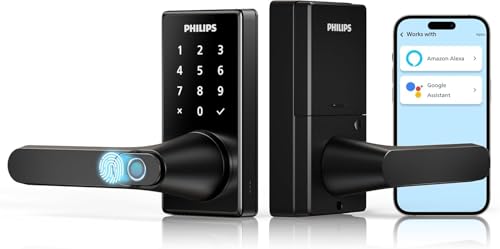
Philips Wi-Fi Smart Door Lock with Handle Review Summary
This Philips Wi-Fi Smart Door Lock with Handle review comes down to one thing: it packs a lot of access options into a single smart lock format without forcing you to commit to only one workflow.
It should suit households that want fingerprint entry for everyday use, app-based control for remote management, and a physical key backup for edge cases.
The combination of Wi-Fi, fingerprint access, keypad entry, voice assistant support, and auto-lock gives it broad appeal for front doors and bedrooms.
It is most compelling for buyers who want convenience first, but still care about security features and fallback options.
Review Scorecard
| Category | Score | Rationale |
|---|---|---|
| Access flexibility | 9/10 | Offers app, fingerprint, PIN, voice, and key unlocking in one lock. |
| Everyday convenience | 9/10 | Fast fingerprint access and adjustable auto-lock reduce friction. |
| Remote control | 8/10 | Wi-Fi app access supports status checks, notifications, and event logs. |
| Installation fit | 8/10 | Sold as an easy-install smart lock with handle and deadbolt-style front door use. |
| Family sharing | 8/10 | Supports up to 50 fingerprints and up to 100 PIN codes. |
| Privacy and control | 8/10 | Includes privacy, passage, and silent modes for different household needs. |
| Backup readiness | 8/10 | Physical key support and configurable modes help when smart features are not ideal. |
Key Features and Specifications of Philips Wi-Fi Smart Door Lock with Handle
The Philips Wi-Fi Smart Door Lock with Handle combines a handle, keypad, fingerprint reader, and smart connectivity in a single front-door lock.
The listing positions it as a smart lever lock with deadbolt-style security features and easy install appeal.
The most useful specifications from the listing are straightforward:
| Feature | Details |
|---|---|
| Brand | Philips |
| Product type | Wi-Fi smart door lock with handle |
| Unlock methods | App, fingerprint, PIN code, Alexa/Google Assistant voice control, key |
| Fingerprint capacity | Up to 50 fingerprints |
| PIN capacity | Up to 100 codes |
| Wi-Fi support | 2.4GHz Wi-Fi only |
| Auto-lock | Adjustable from 5 to 180 seconds |
| Interior modes | Passage Mode, Privacy Mode, Silent Mode |
| Support | 2-year warranty extension and 24/7 email assistance |
The fingerprint reader is one of the main selling points.
The listing says the integrated handle and fingerprint design is built for quick recognition and claims unlock times as fast as 0.3 seconds, which is a strong convenience signal for daily use.
Wi-Fi control is another major part of the package.
Through the Philips HomeAccess App, the lock can show status, provide real-time notifications, and keep event logs, which matters if you want a front-door lock that does more than just open and close.
The lock also gives you control over how it behaves inside the home.
Passage Mode is useful when people are moving in and out often, Privacy Mode is better when you want more control from the inside, and Silent Mode can reduce disruption in quieter settings.
Pros and Cons of Philips Wi-Fi Smart Door Lock with Handle
Pros
- Multiple unlock paths make it easy to adapt to different users and routines.
- Fingerprint access is convenient for frequent use.
- App access adds remote status checks and notifications.
- Auto-lock is adjustable, which helps tune the lock to your habits.
- Privacy, passage, and silent modes give it more household flexibility than a basic keypad lock.
- Physical key backup lowers the risk of being locked out if smart features are unavailable.
Cons
- Wi-Fi support is limited to 2.4GHz, so network compatibility is not universal.
- The large feature set may be more than you need if you only want a simple keypad deadbolt.
- The best value depends on whether you will actually use app control and fingerprint entry.
- Voice assistant support is useful, but it will not matter much to every buyer.
Who Should Buy Philips Wi-Fi Smart Door Lock with Handle?
Buy this Philips Wi-Fi Smart Door Lock with Handle if you want a smart front-door lock that balances convenience and control.
It is a strong fit for busy households, families sharing access, renters or owners who need multiple entry methods, and anyone who likes fingerprint unlock for day-to-day use.
It also makes sense if you want remote visibility into who is coming and going, because the app and event log features go beyond simple local unlocking.
The lock is especially appealing when you want one device to serve as both a modern convenience upgrade and a practical access-management tool.
You should probably skip it if you only need a basic lock and do not care about Wi-Fi, fingerprint access, or app-based monitoring.
It may also be more lock than you need if you are trying to minimize setup complexity or want something that does not depend on a 2.4GHz network.
How Philips Wi-Fi Smart Door Lock with Handle Fits Real Use
Fingerprint for Daily Entry
The fingerprint-first design is the clearest everyday advantage here.
For people who constantly juggle keys, phones, or PINs, a fast biometric unlock path is the kind of feature that can actually change how often you use the lock.
App and Remote Management
Wi-Fi control through the Philips HomeAccess App makes sense if you care about checking lock status, reviewing events, or managing access away from home.
That is not necessary for every household, but it is valuable when you want better visibility than a standard keypad lock can provide.
Auto-Lock and Interior Modes
The adjustable auto-lock timer gives you flexibility from 5 to 180 seconds, so you can tighten security or give yourself a little more time depending on the door and household rhythm.
Passage, Privacy, and Silent modes also make the lock feel more adaptable than a one-mode design.
Security Fallbacks and Practical Limits
The physical key backup is important because it keeps the lock usable when batteries, Wi-Fi, or app access are not the right answer.
The main practical limitation to keep in mind is the 2.4GHz-only Wi-Fi support, which is common in smart-home gear but still something buyers should check before they commit.
Alternatives to Philips Wi-Fi Smart Door Lock with Handle
If you want to compare similar options, these Amazon search pages are sensible starting points:
- Schlage Encode smart lock
- Yale Assure smart lock
- Kwikset Halo smart lock
- Aqara smart lock
- eufy smart lock
Schlage and Yale are especially relevant if you want well-known smart-lock lines with broad ecosystem support.
Kwikset is worth a look if you want a more mainstream keypad-and-app approach, while Aqara and eufy are useful comparisons if you want different combinations of smart-home integration, biometrics, or access management.
Is Philips Wi-Fi Smart Door Lock with Handle Worth It?
Yes, if you want a feature-rich smart lock that prioritizes convenience, fingerprint access, and flexible household use.
The Philips Wi-Fi Smart Door Lock with Handle is worth it for buyers who will use the app, appreciate adjustable auto-lock, and want multiple backup methods instead of a single unlock path.
If you only need a simple keypad lock, this is probably more system than you need.
If you do want a practical all-in-one smart entry solution for a front door or bedroom, it looks like a solid buy.