When it comes to ensuring safety and convenience at home, smart door locks can make a significant difference for seniors. With features like keyless entry, mobile app control, and fingerprint recognition, these locks cater to the unique needs of elderly users. But not all smart locks are created equal. Let’s explore the top options that can enhance security and ease of use, so you can find the perfect fit for your lifestyle.
Philips WiFi Keypad Door Lock with Handle

The Philips WiFi Keypad Door Lock with Handle stands out as an excellent choice for seniors, thanks to its easy-to-use remote management feature through the Philips Home Access App. You can connect directly to your 2.4GHz WiFi, eliminating the need for a hub. With the app, you can lock or open the door, manage user codes and fingerprints, and even monitor access history in real time. Plus, it’s voice assistant compatible, so you can open hands-free. The auto-lock feature guarantees you never forget to secure your home, providing peace of mind whether you’re at home or away.
Best For: Seniors looking for an easy-to-use, secure, and convenient door locking solution.
Pros:
- Seamless remote management through the Philips Home Access App for easy lock/unlock functionality.
- Voice assistant compatibility allows for hands-free operation with Alexa and Google Assistant.
- Auto-lock feature provides added security by ensuring the door locks automatically after leaving.
Cons:
- Requires 8 AA alkaline batteries, which are not included in the package.
- Limited to 2.4GHz WiFi connectivity, potentially excluding users with only 5GHz networks.
- Installation may require some DIY skills, which could be a barrier for less tech-savvy users.
Philips Wi-Fi Smart Door Lock (Keyless Entry Deadbolt)

For seniors looking for convenience and enhanced security, the Philips Wi-Fi Smart Door Lock (Keyless Entry Deadbolt) stands out with its versatile access methods. You can access it using an app, passcode, fingerprint, or even voice commands through Alexa or Google Assistant. It allows multiple family fingerprints and up to 100 custom passcodes for guests, cleaners, or deliveries. With built-in Wi-Fi, you can control it remotely from your smartphone. Plus, its auto-lock feature and Away Mode enhance security. Installation is quick and easy, fitting most doors. Philips also offers excellent customer support for any questions or assistance you may need.
Best For: Seniors looking for convenience and enhanced security in accessing their home.
Pros:
- Flexible unlocking options including app, passcode, fingerprint, and voice control for easy access.
- Remote control capabilities with built-in Wi-Fi, allowing users to lock/unlock from anywhere.
- User-friendly installation that requires only a screwdriver and fits most door sizes.
Cons:
- Requires batteries that are not included, which may be an additional cost for users.
- Limited to 2.4GHz networks, which could affect connectivity for some households.
- Potential learning curve for those unfamiliar with smart technology or apps.
Schlage Encode Smart Wi-Fi Deadbolt Lock with Touchscreen Keypad

Offering keyless entry and app control, the Schlage Encode Smart Wi-Fi Deadbolt Lock with Touchscreen Keypad simplifies home security for seniors. With built-in WiFi, you can manage your lock remotely through the Schlage Home app, allowing you to create up to 100 access codes and monitor lock activity. It’s also compatible with Alexa and Google Home for voice activation. Installation is a breeze—just use a screwdriver, and it fits standard doors. Enjoy features like an auto-lock option and a fingerprint-resistant touchscreen, ensuring your home remains secure without the hassle of traditional keys. Plus, it includes a backup key for extra peace of mind.
Best For: The Schlage Encode Smart Wi-Fi Deadbolt Lock is best for seniors seeking a convenient and secure keyless entry solution for their homes.
Pros:
- User-friendly app control allows for remote management and monitoring of the lock.
- Voice activation compatibility with Alexa and Google Home provides hands-free operation.
- Easy installation with no hardwiring required, fitting standard door sizes.
Cons:
- Battery-operated, which may require periodic battery replacements.
- Dependence on WiFi could pose issues if internet connectivity is lost.
- Touchscreen may be less effective for users with mobility or dexterity challenges.
Philips WiFi Smart Lock with Front Door Handle Set
Designed with seniors in mind, the Philips WiFi Smart Lock with Front Door Handle Set provides a seamless experience through its mobile app, allowing you to lock or access your door remotely. With built-in WiFi, you won’t need an extra gateway. You’ll appreciate the fingerprint release feature, which works in just 0.3 seconds, and the customizable auto-lock timer. Plus, voice control with Alexa and Google Assistant means you can check the lock status hands-free. Installation is easy, and it fits most front doors. Enjoy reliable customer support and a solid warranty, making this lock a smart choice for added security.
Best For: Seniors seeking enhanced security and ease of use with remote access and voice control features.
Pros:
- Built-in WiFi eliminates the need for extra gateways, simplifying installation and connectivity.
- Fast fingerprint unlock in just 0.3 seconds provides quick access without fumbling for keys.
- Customizable auto-lock feature helps ensure your door is securely locked without manual effort.
Cons:
- Compatibility limited to doors 1-3/8 to 1-3/4 inches thick, which may not fit all door types.
- Reliance on WiFi means potential issues if your internet connection is unstable.
- Battery-operated functionality may require regular battery replacements for continued use.
Philips Smart Lock with Keyless Entry and Digital Keypad

The Philips Smart Lock with Keyless Entry and Digital Keypad stands out as an ideal choice for seniors seeking both convenience and security. With four access methods—fingerprints, PIN codes, keys, and a smartphone app—you can easily enter your home. It recognizes up to 50 fingerprints and allows unlimited one-time PINs, providing flexibility for visitors. The auto-lock feature enhances safety, while compatibility with Amazon Alexa and Google Assistant offers voice control. Installation is straightforward, fitting standard doors, and Philips provides robust customer support. Enjoy peace of mind knowing your home is secure and easily accessible with this smart lock.
Best For: Seniors seeking convenience and security in home access.
Pros:
- Four versatile unlocking methods (fingerprints, PIN codes, keys, app) for easy entry.
- Auto-lock feature enhances safety by securing the door automatically when closed.
- Straightforward installation process that fits standard doors, making it accessible for most users.
Cons:
- Requires a separate Philips Wi-Fi Bridge for remote control and voice unlocking features.
- Bluetooth access is limited to a range of 8-10 meters.
- Additional security screw is optional and may be necessary for weak or warped doors.
Philips WiFi Smart Keypad Deadbolt Lock with App Remote Control

For seniors seeking a secure and user-friendly solution, the Philips WiFi Smart Keypad Deadbolt Lock stands out with its keyless entry feature and remote control capabilities. You can easily manage this lock via the Philips Home Access App, allowing you to set permissions and receive notifications. With four access methods, including a mobile app and voice control, you’ll find convenience at your fingertips. The auto-lock feature enhances security while the robust design withstands various weather conditions. Plus, US-based customer support guarantees you get help whenever needed, making this lock a reliable choice for peace of mind.
Best For: Seniors seeking a secure and user-friendly keyless entry solution for their homes.
Pros:
- Convenient remote control via the Philips Home Access App for managing lock settings and permissions.
- Multiple unlocking methods including voice control, mobile app, and physical buttons for added accessibility.
- Robust security features such as auto-lock and alarm prompts for incorrect password entries.
Cons:
- Requires 8 AA batteries which need to be replaced periodically, adding to maintenance.
- Limited support hours for phone assistance, potentially inconvenient for urgent issues.
- Initial setup may be challenging for those unfamiliar with smart home technology.
Philips Wi-Fi Smart Door Lock with Keypad and Fingerprint Entry
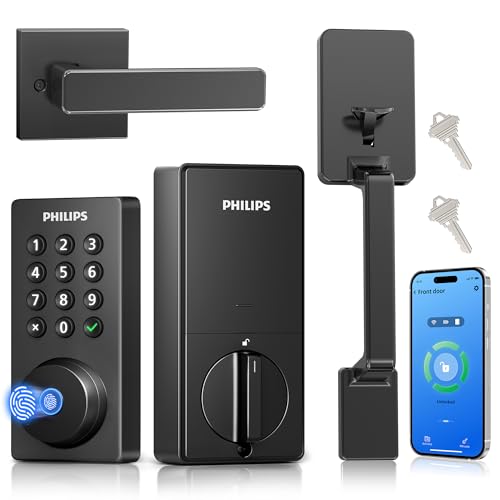
Featuring quick fingerprint access and an easy-to-use keypad, the Philips Wi-Fi Smart Door Lock is an ideal choice for seniors seeking convenience and security. You can open it in just 0.3 seconds, ensuring quick entry for family members. With five opening methods, including app control and voice commands via Alexa or Google Assistant, you’ll have flexible access tailored to your needs. The smart passcode management lets you create up to 100 passcodes, perfect for managing visitors. Plus, the auto-lock feature and real-time alerts enhance your home security. Installation is straightforward, and U.S.-based support is readily available.
Best For: The Philips Wi-Fi Smart Door Lock is best for seniors seeking a convenient and secure entry solution for their homes.
Pros:
- Quick fingerprint access allows for entry in just 0.3 seconds.
- Multiple unlocking methods, including app control and voice commands, provide flexibility.
- Smart passcode management enables easy visitor access with up to 100 customizable codes.
Cons:
- Requires batteries for operation, which may need regular replacement.
- The installation process might be challenging for those unfamiliar with DIY home improvement.
- Compatibility with smart home systems may vary, potentially limiting some functionalities.
Philips Built-in WiFi Smart Lock with Keyless Entry

With its built-in Wi-Fi, the Philips Smart Lock offers seniors the convenience of keyless entry and remote access without needing a separate hub. You can open your door using five methods: the app, fingerprint, PIN code, voice assistant, or a physical key. Manage user access and receive real-time notifications right on your smartphone. The lock features an auto-lock function with customizable timer settings for added security. Plus, with 360° fingerprint recognition, it opens in just 0.3 seconds. Enjoy peace of mind knowing that 24/7 support and a 24-month warranty are included for your convenience.
Best For: Seniors and individuals seeking a keyless, convenient, and secure entry solution for their homes.
Pros:
- Built-in Wi-Fi allows for easy remote control without needing a hub.
- Multiple unlocking options provide flexibility and convenience for different users.
- Fast fingerprint recognition unlocks the door in just 0.3 seconds, enhancing accessibility.
Cons:
- Initial setup may be challenging for users who are not tech-savvy.
- Dependence on Wi-Fi connectivity could be a limitation in case of outages.
- Physical key option may feel outdated for some users who prefer completely digital solutions.
eufy Security Smart Lock C33, Keypad Door Lock with Handle

The eufy Security Smart Lock C33 stands out as an ideal choice for seniors seeking convenience and enhanced security in their homes. With its advanced fingerprint recognition, you can open your door instantly without fumbling for keys. The integrated Wi-Fi allows remote control through an app, letting you manage access and receive notifications effortlessly. Installation is a breeze, taking only 15 minutes and requiring no drilling. The lock’s auto-lock feature and back-lit keypad guarantee safety and ease of use at any time. Plus, with 24/7 customer support and an 18-month warranty, you can trust in its reliability.
Best For: The eufy Security Smart Lock C33 is best for seniors seeking a convenient and secure keyless entry solution for their homes.
Pros:
- Advanced fingerprint recognition allows for instant unlocking without keys.
- Integrated Wi-Fi enables remote control and access management through an app.
- Hassle-free installation takes only 15 minutes with no drilling required.
Cons:
- Requires 8 AA batteries which may need regular replacement.
- May not be compatible with all door designs and configurations.
- Dependence on Wi-Fi can limit functionality during internet outages.
eufy Security Smart Lock E31, Fingerprint Keyless Entry Door Lock

For seniors seeking convenience and security, the eufy Security Smart Lock E31 stands out with its fingerprint keyless entry system, allowing quick access in less than 0.3 seconds. You can gain entry using your fingerprint, an app, a keypad, or even voice commands with Siri, Alexa, or Google Assistant. The built-in WiFi deadbolt connects seamlessly with smart home systems, and the 10,000mAh rechargeable battery lasts up to 14 months. Plus, installation takes just 15 minutes with no drilling required. With 24/7 customer support and a solid warranty, this lock offers peace of mind for you and your family.
Best For: Seniors looking for a convenient and secure way to access their homes without the hassle of traditional keys.
Pros:
- Quick access: Unlocks in less than 0.3 seconds using fingerprint recognition.
- Multiple unlocking options: Provides flexibility with app control, keypad, physical key, and voice commands.
- Long battery life: The 10,000mAh rechargeable battery lasts up to 14 months on average.
Cons:
- Reliance on technology: May be challenging for those who are not tech-savvy or comfortable with smart devices.
- Initial setup required: Users need to install the lock, though it’s designed to be easy and quick.
- Limited to specific smart home systems: While compatible with many platforms, it may not work with all smart home ecosystems.
Factors to Consider When Choosing Smart Door Locks for the Elderly
When choosing a smart door lock for seniors, you’ll want to focus on ease of use and accessibility features. Consider how secure the lock is and whether it offers remote control options that make managing access simpler. Installation simplicity is also key, ensuring that the lock can be set up without hassle.
Ease of Use
Choosing the right smart door lock for seniors involves considering several key factors that enhance ease of use. First, look for locks that offer multiple access methods like fingerprint recognition, passcodes, and mobile app access. This variety caters to different preferences and abilities. Quick access times, preferably under 0.3 seconds, are important for those with limited dexterity. Additionally, verify the lock is compatible with voice assistants for hands-free operation. A user-friendly mobile app is vital for remote management, making it easy for you or caregivers to control access and receive alerts. Features like auto-lock and customizable notifications add extra peace of mind, so you can focus on enjoying life without constantly worrying about security.
Accessibility Features
Considering accessibility features is essential in selecting smart door locks for seniors. Look for locks that offer multiple access methods, like fingerprint recognition, keypad entry, and app control. These options cater to varying levels of dexterity and tech familiarity. Voice control compatibility with virtual assistants can also enhance accessibility, allowing hands-free access. Features like auto-locking help prevent accidental leave-open scenarios, ensuring safety. Real-time alerts and notifications provide caregivers with peace of mind, letting them monitor door activity. Additionally, choose locks with user-friendly interfaces and clear visual indicators, such as backlit keypads, to reduce frustration and enhance usability. Prioritizing these features can make a significant difference in your daily convenience and security.
Security Measures
While selecting smart door locks for seniors, it’s crucial to prioritize security measures that enhance safety and provide peace of mind. Look for locks offering multiple access methods, like fingerprint recognition, passcodes, and mobile app control. This flexibility makes it easier for elderly users. Auto-lock features are essential too; they automatically secure the door after a short period, removing the need for manual effort. Consider locks that send real-time alerts about door activity, enabling caregivers to monitor access. Voice control compatibility with popular assistants allows hands-free access, reducing physical strain. Finally, verify the lock has a solid security rating and includes alarm prompts for unauthorized access attempts, boosting safety for vulnerable individuals.
Remote Control Options
When it comes to smart door locks for seniors, the ability to control access remotely can greatly enhance convenience and security. Many locks offer built-in Wi-Fi, allowing you to manage access through smartphone apps without needing extra hubs. You can lock or release doors and receive real-time notifications about door activity. If you prefer voice control, look for compatibility with assistants like Alexa and Google Assistant for hands-free operation. Some locks even let you create temporary access codes, granting caregivers or visitors entry without being home. Plus, customizable auto-lock features guarantee doors secure themselves after a set time, helping reduce the risk of forgetting to lock up. These remote control options make managing security simpler and more effective.
Installation Simplicity
Remote control options greatly enhance the usability of smart door locks, but installation simplicity is just as important for seniors. Look for locks that only require basic tools like a screwdriver for setup, making it user-friendly. Clear installation instructions and instructional videos can help you follow along without needing assistance. Verify the lock is compatible with standard door sizes, typically 1-3/8 to 2 inches thick, to avoid unnecessary modifications. Some smart locks allow for DIY installation in just minutes, reducing the need for professional help and minimizing frustration. Additionally, choosing a lock that includes a complete handle set can streamline the process, eliminating the hassle of purchasing and installing separate components.