When it comes to enhancing your smart home security, choosing the right smart door lock is essential. You want a lock that integrates seamlessly with Google Home while offering convenience and peace of mind. From keyless entry to app control, there are many options available to suit your needs. But with so many choices, how do you decide which one is best for you? Let’s explore the top contenders that could transform your home security.
Philips Wi-Fi Smart Door Lock (Keyless Entry Deadbolt)

If you’re looking for a convenient and secure way to manage access to your home, the Philips Wi-Fi Smart Door Lock is an excellent choice. You can gain entry using multiple methods, including an app, passcode, fingerprint, or even your voice through Alexa or Google Assistant. This lock supports up to 100 custom passcodes and unlimited one-time codes, perfect for guests or deliveries. With built-in Wi-Fi, you can control it remotely from your smartphone. Plus, its auto-lock feature and Away Mode provide added security. Installation is quick, and Philips offers reliable customer support to assist you whenever needed.
Best For: Homeowners seeking a versatile and secure keyless entry solution for easy access management.
Pros:
- Multiple unlocking options provide flexibility for different user preferences, including app, passcode, and fingerprint access.
- Remote control capabilities via built-in Wi-Fi allow for easy locking and unlocking from anywhere without needing a hub.
- Enhanced security features such as auto-lock and Away Mode ensure peace of mind when leaving home.
Cons:
- Requires batteries that are not included, which can be an extra cost and maintenance concern.
- May need a stable Wi-Fi connection and proper router placement for optimal performance.
- Limited compatibility with doors outside the specified thickness range (1-3/8 to 2 inches).
Schlage Encode Smart Wi-Fi Deadbolt Lock

The Schlage Encode Smart Wi-Fi Deadbolt Lock is an ideal choice for tech-savvy homeowners seeking seamless integration with their smart home systems. With built-in WiFi, you can control and monitor your lock remotely via the Schlage Home app. You’ll appreciate managing up to 100 access codes and receiving customizable notifications. Plus, it’s compatible with both Alexa and Google Home for convenient voice activation. Installation is straightforward, requiring just a screwdriver, and its durable, fingerprint-resistant touchscreen enhances security. The auto-lock feature and low-battery indicator guarantee peace of mind, making it a reliable addition to your smart home security.
Best For: Tech-savvy homeowners looking for a secure, convenient, and smart door lock solution.
Pros:
- Built-in WiFi allows for remote control and monitoring via the Schlage Home app.
- Compatible with Alexa and Google Home for hands-free operation and voice activation.
- Easy installation with no hardwiring required, fitting standard door sizes.
Cons:
- Battery-operated which may require periodic battery replacement.
- Limited to one physical backup key, which may not be sufficient for larger households.
- Price point may be higher compared to traditional locks without smart features.
Philips WiFi Smart Keypad Deadbolt Lock with App Control

For those seeking a seamless integration of security and convenience, the Philips WiFi Smart Keypad Deadbolt Lock with App Control stands out. With built-in WiFi, you can connect directly to your home network without needing a hub. You’ll appreciate the four access methods—voice, keys, passcode, or mobile app—making entry easy for everyone. The Philips Home Access App lets you manage permissions, receive notifications, and view event history. Plus, it features an auto lock function and alerts for low battery. With solid customer support and a sleek satin nickel finish, this lock enhances your home’s security effortlessly.
Best For: Homeowners looking for a secure, convenient, and technologically advanced locking system for easy access and management.
Pros:
- Built-in WiFi eliminates the need for a hub, simplifying setup.
- Multiple unlocking methods provide flexibility for various users.
- Comprehensive app control allows for remote management and monitoring.
Cons:
- Requires 8 AA batteries, which may need frequent replacement.
- Potential compatibility issues with older home WiFi networks.
- Limited to 100 custom passwords, which may not be sufficient for larger households or properties.
Philips WiFi Keypad Door Lock with Handle

Looking for a smart door lock that seamlessly integrates with your Google Home? The Philips WiFi Keypad Door Lock with Handle offers direct 2.4GHz WiFi connectivity, eliminating the need for a hub. You can manage your lock remotely using the Philips Home Access App, allowing you to lock, open, and monitor access history in real time. Opening options include voice commands via Google Assistant, quick fingerprint access, and customizable passcodes. With an auto-lock feature, it guarantees your door secures itself after a specified time. Installation is simple, and US-based customer support is ready to assist you whenever needed.
Best For: Those looking for a smart, user-friendly door lock that offers remote management and multiple unlocking options for enhanced security.
Pros:
- Direct 2.4GHz WiFi connectivity allows for easy installation without the need for a hub.
- Multiple unlocking methods including voice commands, fingerprint access, and customizable passcodes enhance convenience and security.
- Auto-lock feature ensures the door secures itself, providing peace of mind.
Cons:
- Requires 8 AA alkaline batteries, which are not included, adding to initial setup costs.
- Limited compatibility with doors that are only 1-3/8 to 1-3/4 inches thick, potentially excluding some users.
- Dependence on WiFi means that if the internet goes down, remote access may be compromised.
Philips Wi-Fi Smart Door Lock with Keypad and Fingerprint Entry

If you want a seamless way to secure your home while enjoying the convenience of smart technology, the Philips Wi-Fi Smart Door Lock with Keypad and Fingerprint Entry is an ideal choice. With five access methods, including fingerprint and app control, you can enter your home in just 0.3 seconds. Create up to 100 customizable passcodes for guests and receive real-time alerts when someone opens the door. Its auto-lock feature guarantees security, while the IP53 waterproof rating makes it durable. Easy installation and U.S.-based support mean you’ll have everything you need for a secure, smart home setup.
Best For: Homeowners seeking a secure and convenient smart lock solution for easy access and enhanced security.
Pros:
- Versatile unlocking methods including fingerprint, app control, and voice commands for flexibility.
- Ability to create and manage up to 100 customizable passcodes for guests and service providers.
- Real-time alerts and auto-lock feature enhance security and peace of mind.
Cons:
- Requires batteries (1.5V alkaline) which need periodic replacement.
- Installation may require adjustments for left-handed doors and careful handling to avoid over-tightening screws.
- Potential compatibility issues with some existing door hardware or smart home systems.
Google Nest x Yale Smart Lock – Keyless Entry Deadbolt

The Google Nest x Yale Smart Lock is perfect for homeowners seeking a seamless blend of security and convenience. This tamper-proof deadbolt replaces your existing lock, providing keyless entry with an LED keypad. You’ll appreciate the chimes confirming your actions and the Privacy Mode that disables keypad access when you want extra security. With remote access, you can open the door for guests using your smartphone, assign unique passcodes, and schedule access times. Plus, you’ll receive alerts for locking, opening, and any tampering attempts. Installation is easy, but you can opt for a Nest Pro if you need assistance.
Best For: Homeowners looking for a secure, keyless entry solution that offers convenience and remote access.
Pros:
- Keyless entry with an LED keypad enhances convenience and security.
- Remote access allows homeowners to manage guest entry from anywhere via smartphone.
- Integration with Nest products provides additional security features and alerts.
Cons:
- Requires replacement of existing deadbolt, which may not be suitable for all door types.
- Dependence on smartphone for remote access may be inconvenient for some users.
- Potential additional costs if professional installation is required.
Philips WiFi Smart Door Lock with Handle
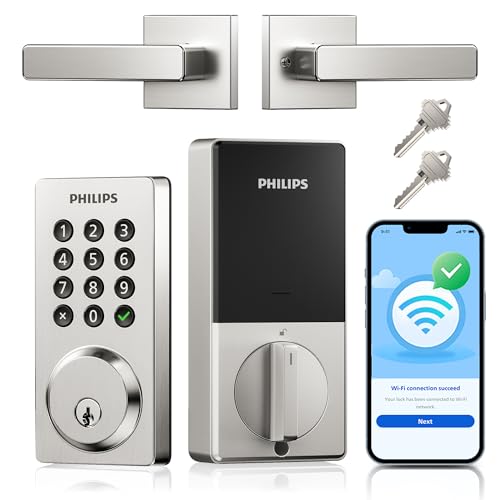
For tech-savvy homeowners seeking advanced security solutions, the Philips WiFi Smart Door Lock with Handle stands out with its convenient remote control features. You can easily manage your lock from anywhere using the Philips Home Access App, allowing you to lock/open, set access permissions, and receive real-time notifications. With four opening options, including voice commands, you’ll enjoy flexibility and reliability. The auto-lock function enhances security, while the durable design guarantees it withstands extreme temperatures. Plus, installation is a breeze, taking just about 15 minutes. With a solid 4.5-star rating, it’s a smart choice for your home.
Best For: Tech-savvy homeowners seeking a convenient and secure way to manage their door locks remotely.
Pros:
- Remote control via the Philips Home Access App allows for easy management from anywhere.
- Multiple unlocking options including voice commands, keys, passcode, and mobile app for added flexibility.
- Durable design that withstands extreme temperatures and includes an auto-lock feature for enhanced security.
Cons:
- Requires 8 AA batteries which are not included, leading to additional costs.
- Limited compatibility with only standard US deadbolts, which may not fit all door types.
- Battery life may be shorter with heavy usage, potentially requiring frequent replacements.
Philips Wi-Fi Smart Lock with Handles

Offering a blend of advanced security and convenience, the Philips Wi-Fi Smart Lock with Handles is perfect for tech-savvy homeowners looking to integrate smart technology into their daily routines. This keyless entry system features multiple access methods, including fingerprint recognition, PIN codes, traditional keys, and a mobile app. You can manage the lock remotely through the Philips App, receive real-time notifications, and enjoy hands-free operation with Google Assistant. Designed for standard doors, it includes two lever handles, installation hardware, and batteries. With a robust customer rating and dependable support, this lock enhances your home’s security effortlessly.
Best For: Tech-savvy homeowners looking for a secure and convenient keyless entry system for their front door.
Pros:
- Multiple unlocking methods: Offers fingerprint recognition, PIN codes, traditional keys, and mobile app access for versatility.
- Remote management: Control the lock from anywhere with the Philips App and receive real-time notifications.
- Easy installation: Fits most standard doors and includes all necessary installation hardware.
Cons:
- Dependent on Wi-Fi: Requires a stable 2.4GHz Wi-Fi connection for full functionality.
- Limited compatibility: May not fit non-standard door sizes or styles.
- Battery reliance: Operates on AA batteries, which may require regular replacements.
Philips WiFi Smart Lock with Front Door Handle Set
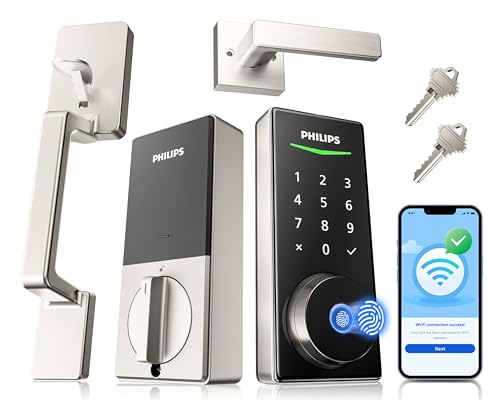
If you’re looking for a smart lock that blends convenience with cutting-edge technology, the Philips WiFi Smart Lock with Front Door Handle Set is a top contender. With built-in WiFi, you won’t need an extra gateway. You can easily manage it through a mobile app, allowing you to lock/open remotely and share access. It boasts a lightning-fast fingerprint open feature and various passcode options for added flexibility. Plus, voice control compatibility with Alexa and Google Assistant offers hands-free convenience. Installation is a breeze, compatible with most front doors, ensuring your home stays secure with minimal effort.
Best For: Homeowners seeking a secure and convenient smart lock solution with advanced features and easy installation.
Pros:
- Built-in WiFi eliminates the need for additional gateways, simplifying setup and management.
- Fast fingerprint recognition allows for quick access in just 0.3 seconds.
- Voice control compatibility with Alexa and Google Assistant offers hands-free operation.
Cons:
- Limited to specific door sizes (1-3/8 to 1-3/4 inches thick), which may not fit all front doors.
- Reliance on mobile app for full functionality may not appeal to those who prefer traditional locking methods.
- Battery-operated design may require regular battery changes for consistent performance.
Philips Wi-Fi Smart Door Lock with Handle
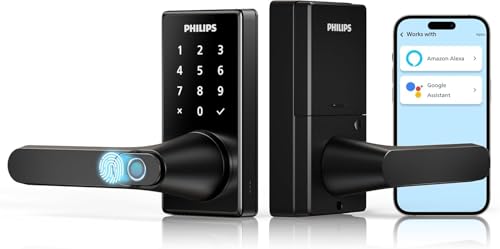
The Philips Wi-Fi Smart Door Lock with Handle is an excellent choice for those seeking a seamless blend of security and convenience, particularly for tech-savvy homeowners. You’ll enjoy keyless entry with multiple access methods, including fingerprint recognition, a mobile app, and voice control through Google Assistant. This lock features an adjustable auto-lock timer and three operational modes to suit your needs. With Wi-Fi connectivity, you can monitor and manage your lock remotely via the Philips HomeAccess App. Plus, it offers a 2-year warranty and 24/7 customer support, ensuring peace of mind for your home’s security.
Best For: Tech-savvy homeowners looking for a secure and convenient keyless entry solution for their doors.
Pros:
- Multiple unlocking methods including fingerprint, mobile app, PIN code, voice control, and traditional key for flexibility.
- Wi-Fi connectivity allows for remote monitoring and management through the Philips HomeAccess App.
- Adjustable auto-lock timer and various operational modes enhance usability and security.
Cons:
- Requires 8 AA LR6 alkaline batteries, which are not included with the purchase.
- Limited to 2.4GHz Wi-Fi, which may not be compatible with all home networks.
- Installation may be challenging for some users without prior experience in smart home devices.
Factors to Consider When Choosing Smart Door Locks for Google Home
When choosing smart door locks for Google Home, you’ve got several important factors to think about. Consider compatibility with your existing setup, the opening methods available, and whether you want remote access features. Don’t forget to evaluate the security integrations and how easy the installation process is for you.
Compatibility With Google Home
Choosing a smart door lock that works seamlessly with Google Home can greatly enhance your home automation experience. First, verify the lock explicitly states compatibility with Google Home, allowing for effortless control through voice commands. Look for locks that feature a compatible mobile app, enabling remote access and management. It’s crucial to confirm that the lock supports 2.4GHz Wi-Fi connectivity, as most smart home devices operate on this frequency. Additionally, consider locks offering voice control functionality with Google Assistant, providing hands-free operation for locking and opening. Finally, opt for locks that send real-time alerts and notifications through the Google Home app, enhancing your home’s security and monitoring capabilities. This attention to compatibility will guarantee a smooth integration into your smart home system.
Unlocking Methods Available
Smart door locks offer a variety of access methods, making it easier to find one that fits your lifestyle and security needs. You can control locks via mobile apps, use fingerprint recognition, enter passcodes, or even rely on traditional keys. If you prefer hands-free access, many locks support voice activation through Google Assistant, so you can open your door with just your voice. You can also create custom passcodes for different users, allowing for permanent, one-time, or timed access. Advanced biometric locks can recognize multiple fingerprints, providing quick entry for family and trusted guests. This flexibility guarantees your smart lock enhances both convenience and security, tailoring to your unique requirements.
Remote Access Features
Remote access features can greatly enhance your home security and convenience. With smart door locks, you can lock and open your doors from anywhere using a smartphone app, giving you peace of mind when you’re away. Many systems support guest management, allowing you to create unique passcodes for family, friends, or service providers, which can be scheduled for specific time frames. You’ll receive real-time notifications about door activity, keeping you informed of who’s entering or exiting your home. Some locks integrate seamlessly with smart home platforms, enabling hands-free access through voice commands. Just make sure you have a reliable Wi-Fi connection, as most devices perform best on 2.4GHz networks for ideal connectivity.
Security Integrations Offered
When enhancing your home security, the integrations offered by smart door locks play a vital role. Look for features like real-time alerts for unauthorized access attempts and a detailed access history, so you can monitor who enters or exits your property. Many smart locks let you customize alarm settings for door movement or forced entry, boosting your overall security. Compatibility with Google Assistant means you can lock or open your door using voice commands, adding convenience. Advanced biometric recognition technology allows multiple fingerprints for quick access by family members while keeping your home secure. Finally, confirm your smart lock provides secure, encrypted connections to protect against hacking and unauthorized access, safeguarding your data and home security.
Installation Process Ease
Choosing a smart door lock for your Google Home setup involves considering how easy it is to install. Many locks can be set up using just a screwdriver, making them perfect for DIY enthusiasts. Most are designed to fit standard door sizes, accommodating doors from 1-3/8 to 2 inches thick. Some smart locks come with detailed installation guides or videos, boosting your confidence during setup. Plus, many don’t require additional hubs or complex wiring, which streamlines the process and cuts down on setup time. With user-friendly designs and clear instructions, you can typically complete the installation in under 30 minutes, getting you back to enjoying your smart home security in no time.
Battery Life Considerations
Considering battery life is essential for ensuring your smart door lock operates smoothly in your Google Home setup. Most smart locks require 4 to 8 AA alkaline batteries, lasting anywhere from 6 months to a year, depending on how often you use them. Look for locks that provide low battery alerts through their app, notifying you when levels drop below 10%. Frequent use or activating features like Wi-Fi can drain battery life quicker. To maximize longevity, consider models with energy-saving modes or auto-lock features that conserve power. Finally, pay attention to the type of batteries needed and their estimated lifespan to avoid frequent replacements, ensuring your smart lock remains reliable.
Voice Control Capabilities
How can you enhance your smart home experience with voice control capabilities for your door locks? When choosing a smart lock for Google Home, make sure it’s compatible with Google Assistant to enable seamless voice commands. Look for locks that allow hands-free operation, so you can lock or open your doors without needing to touch anything. Many options support various voice activation methods, including Alexa, adding versatility to your smart home setup. It’s important to confirm that the smart lock can respond to specific commands, like checking lock status or managing access codes. Additionally, consider locks that provide features like temporary access codes for guests, which you can easily manage through voice commands.
Durability and Weather Resistance
Durability and weather resistance are essential factors when selecting a smart door lock for your Google Home setup. Look for locks with high durability ratings, such as pressure resistance of 2200N and waterproof levels like IP54, to guarantee they can handle various weather conditions. It’s also important to choose locks that operate effectively in extreme temperatures, typically ranging from -31°F to 150°F. Evaluate the materials used; high-quality metals and finishes will enhance longevity and resist corrosion. Additionally, confirm your lock features anti-drill protection and other security measures for added durability. Finally, check for industry certifications, like BHMA ratings, which indicate the lock’s reliability and durability for residential use.