When it comes to home security, smart door locks with keypads offer a blend of convenience and peace of mind. Imagine controlling access to your home with just a touch or a code. These locks not only enhance security but also integrate seamlessly into your smart home setup. With various features available, you might wonder which ones stand out. Let’s explore the top options that could redefine your entry experience.
Philips WiFi Keypad Door Lock with Handle

The Philips WiFi Keypad Door Lock with Handle is the ideal choice for tech-savvy homeowners who value convenience and security. You can connect it directly to your 2.4GHz WiFi without needing a hub, allowing you to manage your door remotely via the Philips Home Access App. With options like fingerprint access in just 0.3 seconds and support for various passcodes, accessing your home is a breeze. Plus, the auto-lock feature guarantees your door locks automatically after you leave. Installation is simple, compatible with most doors, and US-based customer support is just a call away for any help you might need.
Best For: Tech-savvy homeowners looking for a convenient and secure way to manage their door access remotely.
Pros:
- Direct WiFi Connectivity: Connects to 2.4GHz WiFi without the need for a hub.
- Multiple Unlocking Methods: Offers fingerprint access, voice assistant compatibility, and various passcode options for flexibility.
- Auto-Lock Feature: Automatically locks the door after a set period, providing peace of mind.
Cons:
- Battery Requirement: Requires 8 AA alkaline batteries, which are not included.
- Limited Door Compatibility: Only compatible with doors 1-3/8 to 1-3/4 inches thick.
- No Hub Support for 5GHz WiFi: Only connects via 2.4GHz, which may limit network options.
Schlage Encode Smart Wi-Fi Deadbolt Lock with Touchscreen Keypad

For those seeking a seamless blend of convenience and security, the Schlage Encode Smart Wi-Fi Deadbolt Lock with Touchscreen Keypad stands out as an ideal choice. This lock offers keyless entry and app control, allowing you to manage up to 100 access codes and receive real-time notifications. With built-in WiFi, you can control and monitor your lock remotely via the Schlage Home app. It’s compatible with Alexa and Google Home for voice activation. Installation is a breeze—no hardwiring needed. Plus, the fingerprint-resistant touchscreen and customizable alarm enhance security, making this lock a high-quality option for your home.
Best For: Homeowners looking for a secure and convenient smart lock solution with remote access and voice control capabilities.
Pros:
- Easy installation with no hardwiring required, fitting standard door sizes.
- Remote control and monitoring via the Schlage Home app, allowing management of multiple locks.
- High security features including a fingerprint-resistant touchscreen and customizable alarm settings.
Cons:
- Dependent on WiFi connectivity, which may be a concern in areas with poor internet service.
- Battery-operated, requiring periodic battery replacement every six months.
- Initial setup may require a learning curve for users unfamiliar with smart home technology.
Philips Wi-Fi Smart Door Lock with Keypad and Fingerprint Entry

Looking for a smart locking solution that combines convenience and security? The Philips Wi-Fi Smart Door Lock with Keypad and Fingerprint Entry is your answer. With five access methods—fingerprint, app control, passcode, mechanical key, and voice control—you’ll enjoy versatile access. Open in just 0.3 seconds, and manage up to 100 passcodes via the app, perfect for guests or service providers. Its auto-lock feature keeps your home secure, while real-time alerts notify you when the door is accessed. Plus, installation is simple with U.S.-based support, making it an ideal choice for modern smart homes.
Best For: Individuals looking for a secure and convenient smart locking solution for their homes.
Pros:
- Offers five versatile unlocking methods for maximum convenience.
- Allows management of up to 100 passcodes, ideal for guests and service providers.
- Provides real-time alerts and an auto-lock feature for enhanced security.
Cons:
- Requires batteries for operation, which may need regular replacement.
- Installation may require adjustments for left-handed doors.
- Dependence on Wi-Fi connectivity for app control and notifications.
Philips Wi-Fi Door Lock, Smart Lock Keyless Entry

Philips Wi-Fi Door Lock stands out as an ideal choice for tech-savvy homeowners seeking seamless security and convenience. With its sleek aluminum design and dimensions of 6 x 2 x 1.5 inches, this keyless entry deadbolt offers multiple opening methods, including fingerprint, passcode, and voice control via Google Assistant and Alexa. You can easily manage users and share access codes. The built-in WiFi allows for remote locking and monitoring, giving you instant alerts and real-time status checks. Plus, its fast biometric recognition guarantees quick access, making it a smart choice for enhancing your home’s security while you’re away.
Best For: Tech-savvy homeowners seeking seamless security and convenience through smart technology.
Pros:
- Multiple unlocking methods offer flexibility and ease of access, including fingerprint recognition and voice control via smart assistants.
- Remote access capabilities allow you to lock/unlock and monitor your door from anywhere using a mobile app.
- Fast biometric recognition ensures quick access, even with wet or dry fingers, enhancing user experience.
Cons:
- Dependency on WiFi may lead to potential security risks if the network is compromised.
- Requires regular battery checks and replacement, as low-battery alerts are necessary to avoid lockouts.
- Installation may require professional help for those unfamiliar with smart home devices, potentially increasing setup costs.
Philips Smart Lock with Keyless Entry and Digital Keypad

If you value convenience and security in your home, the Philips Smart Lock with Keyless Entry and Digital Keypad stands out as an excellent choice. This lock offers four access methods: fingerprints, PIN codes, traditional keys, and a smartphone app. You can store up to 50 fingerprints and create unlimited one-time PINs for guests. With easy installation and compatibility with standard doors, enhancing your security has never been simpler. Plus, the auto-lock feature engages automatically, ensuring peace of mind. Philips also provides robust customer support, so you can feel confident in your purchase.
Best For: Homeowners seeking a convenient, secure, and modern keyless entry solution for their doors.
Pros:
- Easy installation compatible with standard doors and minimal tools required.
- Multiple unlocking methods including fingerprints and smartphone app for versatile access.
- Auto-lock feature enhances security by automatically locking the door when closed.
Cons:
- Requires a separate Philips Wi-Fi Bridge for remote control and voice unlocking capabilities.
- May not be suitable for non-standard door sizes without additional modifications.
- Dependence on batteries for operation, which may require periodic replacements.
Philips WiFi Smart Lock with Front Door Handle Set
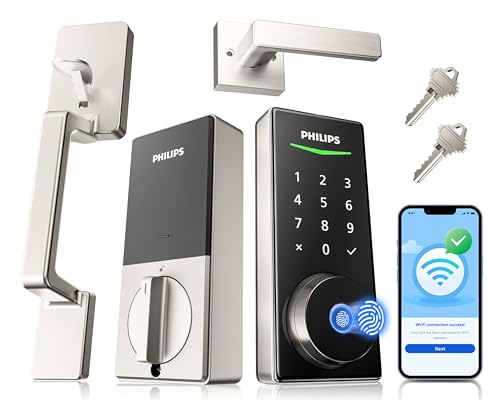
For tech-savvy homeowners seeking convenience and security, the Philips WiFi Smart Lock with Front Door Handle Set stands out as an ideal choice. With built-in WiFi, you won’t need an extra gateway, and the mobile app lets you lock or secure your door remotely. Enjoy real-time alerts, customizable passcodes, and a lightning-fast fingerprint access in just 0.3 seconds. Plus, it integrates seamlessly with Alexa and Google Assistant for voice control. Installation is a breeze, compatible with most standard doors, and supported by excellent customer service. With a sleek design and advanced features, it’s a reliable addition to your home security.
Best For: Tech-savvy homeowners looking for a convenient and secure smart lock solution for their front door.
Pros:
- Built-in WiFi eliminates the need for an extra gateway, simplifying setup.
- Lightning-fast fingerprint unlocking in just 0.3 seconds enhances accessibility and security.
- Seamless voice control integration with Alexa and Google Assistant offers hands-free convenience.
Cons:
- Compatibility limited to standard door thicknesses of 1-3/8 to 1-3/4 inches.
- Requires smartphone app for full functionality, which may not appeal to all users.
- Potential reliance on WiFi may pose issues during network outages.
Philips Wi-Fi Smart Door Lock with Handle
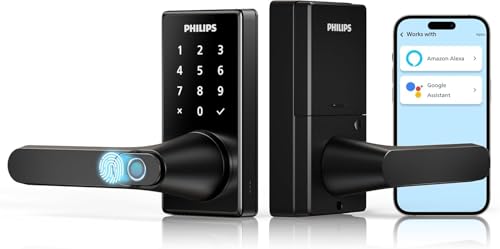
The Philips Wi-Fi Smart Door Lock with Handle is perfect for tech-savvy homeowners seeking enhanced security and convenience. This innovative lock features a fingerprint door knob, keypad deadbolt, and mobile app control, allowing you to open your door in just 0.3 seconds. With five entry methods, including voice control via Alexa or Google Assistant, you’ll never struggle to enter your home. The adjustable auto-lock timer guarantees hands-free locking, while the Philips HomeAccess App lets you monitor access remotely. Plus, with a 2-year warranty and 24/7 support, you can trust Philips to keep your home secure.
Best For: Tech-savvy homeowners seeking enhanced security and convenience through keyless entry solutions.
Pros:
- Provides five unlocking methods, including fingerprint, PIN code, mobile app, voice control, and traditional key.
- Features adjustable auto-lock timer for hands-free locking and three operational modes for customized access.
- Offers remote management and real-time notifications via the Philips HomeAccess App.
Cons:
- Requires 8 AA LR6 alkaline batteries, which are not included with the purchase.
- Wi-Fi functionality is limited to 2.4GHz, potentially restricting connection options for some users.
- Customer support is only available Monday to Friday, which may not be convenient for all customers.
eufy Security Smart Lock C220, Fingerprint Keyless Entry Door Lock

Designed for those who value convenience and security, the eufy Security Smart Lock C220 offers a fingerprint keyless entry system that opens in under 1.5 seconds. With built-in Wi-Fi and app remote control, you can access your door in six different ways, including via your Apple Watch or voice commands. Its easy 15-minute installation fits most standard US and CA deadbolts without drilling. Plus, the lock has a robust battery life of up to eight months. You’ll appreciate the added security features, like alarms for unusual attempts and support available 24/7, ensuring peace of mind for you and your home.
Best For: Individuals seeking a convenient and secure keyless entry solution for their home.
Pros:
- Easy installation in just 15 minutes without the need for drilling.
- Multiple unlocking options including fingerprint, app control, and voice commands for enhanced convenience.
- Robust security features such as alarm alerts for unusual entry attempts and 24/7 customer support.
Cons:
- Battery life may vary based on usage frequency, potentially requiring more frequent battery changes.
- Limited to compatibility with standard US and CA deadbolts, which may not fit all door types.
- Reliance on Wi-Fi and battery power could pose challenges during outages or technical issues.
eufy Security Smart Lock C33, Keypad Door Lock with Fingerprint

If you’re looking for a smart lock that combines advanced security with user-friendly features, the eufy Security Smart Lock C33 is an excellent choice. This electronic deadbolt offers quick fingerprint recognition and a back-lit keypad for easy access. With integrated Wi-Fi, you can control the lock remotely and manage access via your smartphone. Installation is a breeze, taking just 15 minutes with no drilling required. It’s compatible with both left- and right-hand doors, and the auto-lock feature adds convenience. Plus, with 24/7 customer support and an 18-month warranty, you can feel confident in your purchase.
Best For: Those seeking a secure, convenient, and easy-to-install smart lock for their home.
Pros:
- Quick fingerprint recognition allows for instant access without the need for keys.
- Remote control via app enables access management from anywhere, enhancing convenience.
- Hassle-free installation with no drilling required, making it accessible for DIY enthusiasts.
Cons:
- Dependent on battery power, requiring regular battery replacements to ensure functionality.
- Limited compatibility with certain smart home systems outside of Amazon Alexa and Google Assistant.
- Some users may find the price point higher compared to traditional locks without smart features.
Philips WiFi Smart Keypad Deadbolt Lock with App Control

For homeowners seeking a seamless blend of convenience and security, the Philips WiFi Smart Keypad Deadbolt Lock stands out with its direct WiFi connectivity, eliminating the need for a hub. You can manage your lock remotely using the Philips Home Access App, set permissions, and receive notifications right on your phone. With four access methods—including voice, keys, passcode, and mobile app—you have flexibility at your fingertips. It supports up to 100 custom passwords and features auto-locking for added security. Plus, you’ll get low battery alerts, ensuring you’re always in control of your home’s safety.
Best For: Homeowners looking for a secure, keyless entry solution that offers remote management and customizable access options.
Pros:
- Direct WiFi connectivity eliminates the need for additional hubs, simplifying setup and use.
- Multiple unlocking methods provide flexibility and convenience for different user preferences.
- Custom password support allows for tailored access for family, friends, or service personnel.
Cons:
- Requires 8 AA batteries, which need to be replaced periodically, adding to maintenance.
- Dependent on WiFi; if the internet goes down, remote access may be compromised.
- Physical buttons may be less intuitive than touchscreen options for some users.
Factors to Consider When Choosing Smart Door Locks With Keypad
When choosing smart door locks with a keypad, you’ll want to contemplate several key factors. Think about the connectivity options available, the security features offered, and the variety of accessing methods. Also, don’t overlook the installation process and how well the app functions for control.
Connectivity Options Available
As you explore smart door locks with keypads, it’s crucial to reflect on the various connectivity options available, since these features greatly influence how you interact with your lock. Many smart locks connect directly to your home Wi-Fi network, allowing for remote control and monitoring without needing a separate hub. Most support 2.4GHz Wi-Fi, ensuring compatibility with most routers and enhancing stability. Additionally, some models offer Bluetooth connectivity, giving you smartphone access within a limited range of 8-10 meters. Voice control compatibility with popular smart home assistants allows for hands-free access through voice commands. Finally, dedicated mobile apps enable you to manage lock permissions, receive notifications, and view access history in real-time, enhancing your overall security experience.
Security Features Offered
Choosing the right smart door lock with a keypad involves considering several essential security features that can greatly enhance your home’s safety. Look for locks with customizable alarm settings to alert you of any unauthorized access attempts or door movement. Advanced biometric recognition, like fingerprint scanning, can provide quick access while ensuring only authorized users can gain entry to the door. An auto-lock feature is also vital; it can be programmed to engage after a set time, reducing the risk of leaving your door unlatched. Finally, check for security ratings and certifications from industry bodies, as these indicate the lock’s durability and resistance to tampering or forced entry, giving you peace of mind in your security choice.
Unlocking Methods Variety
A variety of opening methods can considerably enhance your experience with smart door locks featuring keypads. Many models allow you to gain entry to your door using fingerprint recognition, passcodes, physical keys, mobile apps, or even voice commands through smart assistants. You can store multiple fingerprints—some locks support up to 50—making access easy for family and trusted visitors. Flexibility also comes with passcodes; you can create permanent, one-time, temporary, or recurring codes to suit different situations. Advanced features like anti-peeping passcodes and customizable auto-lock timing improve both convenience and security. Plus, with instant alerts and event history tracking, you can monitor who accessed your lock and when, providing an extra layer of safety.
Installation Process Simplified
When it comes to installing smart door locks with keypads, ensuring compatibility with your door is essential for a smooth setup. Most smart locks are designed for easy installation, typically needing just basic tools like a screwdriver and fitting standard door preparations of 1-3/8 to 1-3/4 inches thick. Before you purchase, check your door’s thickness and backset measurements to guarantee a proper fit. Many models come with clear instructions or videos, making the process accessible for DIY enthusiasts. Some even include a complete handle set for a seamless upgrade. Additionally, look for models offering extra screws for reinforcement on weak or warped doors, enhancing your lock’s overall security during installation.
App Functionality and Control
While selecting a smart door lock with a keypad, pay close attention to the app’s functionality and control options. Look for locks that come with a dedicated mobile app, allowing you to lock and open your doors, manage user access, and receive real-time notifications about door activity. Make sure the app is compatible with both iOS and Android devices for convenience. Features like access history monitoring are essential, as they let you track who accessed the lock and when. Check if the app allows you to manage multiple user codes and temporary access codes for visitors. Finally, confirm that the app integrates with voice assistants like Alexa or Google Assistant for hands-free operation and seamless smart home connectivity.