A smart lock with access logs does more than replace your keys—it shows who entered, when they arrived, and whether your door was secured afterward. That makes these locks useful for families, rentals, home offices, and anyone who wants greater visibility at the front door.
We’ve selected 10 models with different combinations of Wi-Fi control, fingerprints, palm recognition, keypads, auto-locking, and guest access. The right choice depends on your door setup, preferred entry method, battery expectations, and how much remote control you need.
Best 10 Smart Lock with Access Logs Picks for 2026
Best Rental-Ready Pick

- Built-in Wi-Fi needs no gateway
- Supports up to 200 passcodes
- Includes manager portal and auto-booking
Best For: Vacation rentals, shared homes, and small businesses
Best Fingerprint Option

- Stores up to 100 fingerprints
- Offers six access methods
- Rechargeable battery lasts up to one year
Best For: Homes needing biometric entry and scheduled guest access
Best Access-History Controls

- Monitors access history in real time
- Supports four types of PIN schedules
- Includes fingerprint entry and handle set
Best For: Front doors, rentals, and households needing detailed access control
Best Durable Deadbolt

- Built-in Wi-Fi requires no bridge
- Offers six unlocking methods
- Includes Grade 3 certification and IP53 rating
Best For: Exterior doors and eufy-connected homes
Best Fingerprint Access
ULTRALOQ Bolt Fingerprint WiFi Smart Lock
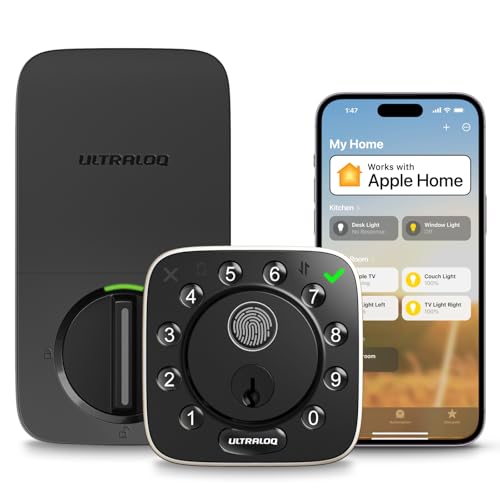
- Stores up to 100 fingerprints and 50 passcodes
- Remote Wi-Fi access without an extra hub
- ANSI/BHMA Grade 1 and IP65 weather resistance
Best For: Homeowners and rental hosts wanting biometric entry and flexible remote access
Best for Activity Tracking
Tapo DL100 Smart Wi-Fi Deadbolt

- Timestamped activity shows who accessed the door and when
- Supports up to 200 customizable access codes
- Includes auto-lock, alerts, and remote Wi-Fi control
Best For: Households wanting detailed entry history and high code capacity
Best Contactless Entry
Wyze Palm Lock with Palm Vein Recognition
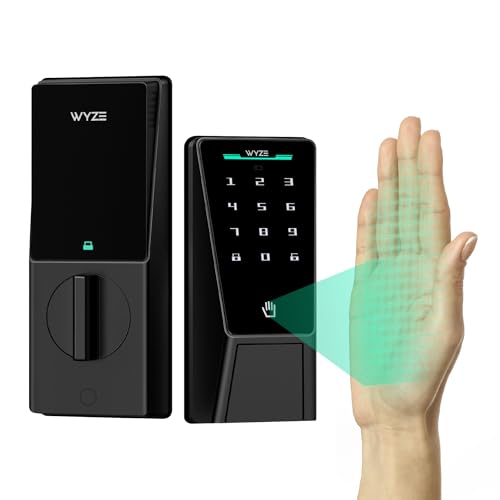
- Contactless palm vein recognition for keyless entry
- Supports up to 50 unique or one-time guest codes
- Dual-battery system with USB-C emergency charging
Best For: Users who prefer touch-free biometric access and remote monitoring
Best Wi-Fi Access Logs

- Access history and real-time alerts
- Built-in Wi-Fi with no hub required
- Fingerprint, passcode, app, key, and voice entry
Best For: Families needing flexible entry and remote access records
Best for Rentals
Sifely Fingerprint Smart Door Lock

- App access records for guest management
- Guest codes via app or web
- Gateway enables remote and voice control
Best For: Airbnb hosts and rental-property managers
Best Battery Backup

- Built-in Wi-Fi app management
- Fast, learning fingerprint scanner
- Eight batteries plus USB-C emergency power
Best For: Homeowners prioritizing biometric speed and battery resilience
Best Rental-Ready Pick – Sifely WiFi Smart Lock
This Sifely model is a practical smart lock with access logs for homes, vacation rentals, and small businesses. Built-in Wi-Fi enables remote control without a gateway, while multiple entry methods and user-management features make it flexible for families and guests.
Best For: Vacation rentals, shared homes, offices, and users who need remote access management.
Pros:
- Built-in Wi-Fi supports remote unlocking without a separate hub.
- Offers access by app, code, card, key, or compatible smart speaker.
- Supports up to 200 passcodes and includes manager-portal and auto-booking features.
- Includes auto-lock, intrusion detection, a backlit keypad, and Type-C backup power.
Cons:
- Battery life is rated for up to six months, shorter than some competing models.
- Advanced management tools may be more than a single-user household needs.
Choose this lock when flexible guest access and centralized code management matter more than biometric entry. Its handle-style design and broad access options make it especially useful for rental-property workflows.
Best Fingerprint Option – Tapo DL110 Smart Lock
The Tapo DL110 combines a smart lock with access logs and biometric convenience. It supports remote Wi-Fi management, scheduled guest codes, and fast fingerprint recognition, giving households several ways to control and monitor entry.
Best For: Homes that want fingerprint access, scheduled guest permissions, and long battery life.
Pros:
- Provides six access methods, including fingerprint, passcode, Wi-Fi, Bluetooth, voice assistant, and key.
- Recognizes fingerprints in approximately 0.42 seconds and stores up to 100 fingerprints.
- Supports permanent resident codes plus one-time or scheduled guest codes.
- Uses a removable rechargeable battery rated for up to one year.
Cons:
- Its deadbolt format may not suit doors requiring a complete handle set.
- The product details list a weight of 2.09 kg, which may be substantial for some installations.
This is a strong choice for families who prefer touch-free entry while still needing temporary access controls. The rechargeable battery and in-app scheduled-access monitoring also reduce routine maintenance.
Best Access-History Controls – Philips 4200 Series WiFi Lock
The Philips 4200 Series is a smart lock with access logs designed for homeowners and rental hosts who want real-time status checks and access-history monitoring. Its built-in 2.4GHz Wi-Fi, fingerprint reader, and varied PIN settings support both everyday and temporary users.
Best For: Front-door upgrades requiring access-history monitoring, fingerprints, and flexible PIN schedules.
Pros:
- Provides remote lock control, real-time status, and access-history monitoring through the app.
- Supports permanent, one-time, periodic, and recurring PIN codes.
- Fingerprint access is rated at approximately 0.3 seconds.
- Includes a matching handle set and adjustable auto-lock timing from 0 to 180 seconds.
Cons:
- Requires a nearby 2.4GHz Wi-Fi connection within the stated 33-foot range.
- Batteries are not included, and the manufacturer specifies standard 1.5V alkaline batteries.
- Auto-lock is off by default and must be enabled in the app.
Consider this model if access history and detailed code scheduling are central to your buying decision. The included handle set makes it a convenient all-in-one upgrade, though installation requires attention to door direction and wiring.
Best Durable Deadbolt – eufy Security Smart Lock C220
The eufy Security C220 is a durable smart lock with access logs that adds built-in Wi-Fi control, fingerprint entry, and real-time notifications. Its deadbolt design, broad temperature range, and IP53 rating make it a practical option for exterior entry doors.
Best For: Front, apartment, office, and exterior doors where durability and multiple unlock methods matter.
Pros:
- Offers six unlocking methods, including fingerprint, app, keypad, key, Apple Watch, and voice assistant.
- Built-in Wi-Fi enables remote control without a bridge.
- Runs for around eight months on eight AA batteries and includes the batteries.
- Has BHMA Grade 3 certification, IP53 water resistance, and unusual-attempt alarms.
Cons:
- Battery life varies with how frequently the lock is used.
- Its deadbolt-only format may require separate hardware for doors needing a handle set.
- Fingerprint recognition improves through self-learning, so performance may develop over repeated use.
The C220 stands out for buyers who want a rugged deadbolt with remote control and several backup entry methods. It is particularly appealing within the eufy ecosystem, where the lock can be incorporated into routines with compatible eufy devices.
Best Fingerprint Access – ULTRALOQ Bolt Fingerprint WiFi Smart Lock
For shoppers seeking a smart lock with access logs and flexible entry options, the ULTRALOQ Bolt combines fingerprint recognition, PIN codes, app control, and remote Wi-Fi access. Its built-in Wi-Fi supports remote locking, guest access sharing, and real-time alerts without requiring an extra hub.
Best For: Homeowners, Airbnb hosts, property managers, and busy households that want biometric entry and remotely managed access.
Pros:
- Supports up to 100 fingerprints and 50 passcodes, including permanent, scheduled, recurring, and one-time codes.
- Provides remote control, eKey sharing, web portal access, and real-time alerts over 2.4GHz Wi-Fi.
- Offers auto-lock, auto-unlock, voice-control compatibility, and ANSI/BHMA Grade 1 security.
- Weather-resistant IP65 construction and installation using only a screwdriver.
Cons:
- Supports 2.4GHz Wi-Fi only.
- Router placement may need to be within about 70 feet for better connectivity.
The ULTRALOQ is a strong fit when fast fingerprint entry and detailed access management matter most. It is especially practical for households or rentals that need to issue different credentials while monitoring lock activity remotely.
Best for Activity Tracking – Tapo DL100 Smart Wi-Fi Deadbolt
The Tapo DL100 is a practical smart lock with access logs for households that want timestamped activity records, remote control, and multiple unlocking methods. Its keypad, Bluetooth, Wi-Fi, voice control, and backup keys provide flexibility for everyday users and guests.
Best For: Families and homeowners who prioritize timestamped access tracking, customizable codes, and straightforward keypad entry.
Pros:
- Tracks activity with timestamps so you can see who accessed the door and when.
- Supports up to 200 customizable codes, plus Bluetooth, remote Wi-Fi, voice commands with PIN verification, and backup keys.
- Includes auto-lock settings, a PIN attempt limiter, anti-peeping password entry, and real-time door alerts.
- Offers USB-C emergency power and compatibility with Alexa, Google Home, and SmartThings.
Cons:
- Its BHMA Grade 3 rating is below the Grade 1 rating offered by some residential smart locks.
- IP54 weather resistance provides less protection than higher-rated alternatives.
Choose the Tapo DL100 if access history is a central buying factor. The combination of timestamped activity, generous code capacity, and remote status checks makes it well suited to managing family, guest, and visitor access.
Best Contactless Entry – Wyze Palm Lock with Palm Vein Recognition
The Wyze Palm Lock offers a distinctive approach to a smart lock with access logs, combining contactless palm vein recognition with keypad codes and Wi-Fi monitoring. It also adds auto-lock, tamper alerts, ajar notifications, and emergency charging for added day-to-day convenience.
Best For: Home and office users who want contactless biometric entry, shareable guest codes, and remote lock-status monitoring.
Pros:
- Uses contactless palm vein recognition, allowing users to unlock by hovering a hand over the reader.
- Creates up to 50 unique or one-time guest codes with anti-peep PIN protection.
- Dual-battery design provides a six-month main battery plus a two-week secondary battery, with USB-C emergency charging.
- Includes door-angle-based auto-lock, tamper and ajar alarms, Wi-Fi control, and Alexa or Google Assistant support.
Cons:
- Its BHMA Grade 3 rating is lower than Grade 1 residential locks.
- IP53 weather resistance is more limited than the higher ratings on some competing models.
- The supplied notes do not specify a numerical access-log capacity.
The Wyze Palm Lock stands out for touch-free biometric access and layered battery protection. It is a compelling option for users who prefer palm recognition over fingerprints while still needing guest codes and app-based monitoring.
Best Wi-Fi Access Logs – Philips Wi-Fi Smart Deadbolt
If you want a smart lock with access logs, the Philips Wi-Fi Smart Deadbolt combines remote control with a record of who unlocked the door and when. It supports app, fingerprint, passcode, key, and voice entry, though it requires a 2.4GHz network and AA alkaline batteries, which are not included.
Best For: Families and homeowners who want multiple entry methods, remote access, and a full access history without adding a separate hub.
Pros:
- Supports app, passcode, fingerprint, physical key, Alexa, and Google Assistant entry.
- Built-in Wi-Fi enables remote locking and unlocking without an extra hub.
- Provides real-time alerts and a history of who accessed the home and when.
- Offers up to 100 custom passcodes, plus one-time and scheduled guest codes.
Cons:
- Batteries are not included, and the lock requires AA alkaline batteries.
- Supports only 2.4GHz Wi-Fi, with the router and lock recommended within 65 feet.
- Does not include a door sensor.
This is a feature-rich choice when access records and flexible guest management matter most. Its built-in Wi-Fi is convenient, but buyers should confirm their network setup and door compatibility before installation.
Best for Rentals – Sifely Fingerprint Smart Door Lock
For hosts comparing a smart lock with access logs, the Sifely Fingerprint Smart Door Lock is designed around guest and user management. It supports app-based access records, generated guest codes, and several local unlocking methods, while remote control requires the optional Sifely WiFi Gateway.
Best For: Airbnb hosts, rental-property owners, families, and users who want a handle-style lock with app-managed guest access.
Pros:
- Offers fingerprint, keypad, app, key fob, key-card, and physical-key entry.
- Supports guest access codes and remote access logs for rental management.
- Designed for DIY installation on most standard doors without extra drilling.
- Works with Alexa and Google Assistant when paired with the optional WiFi Gateway.
Cons:
- Remote unlocking and voice control require the optional Sifely WiFi Gateway.
- Without the gateway, app connectivity is Bluetooth-based rather than built-in remote Wi-Fi.
The Sifely stands out for rental workflows because it combines access records with guest-code management and a reversible handle. Factor in the extra gateway cost if you need control from anywhere or voice integration.
Best Battery Backup – Wyze Auto-Lock Bolt v2
The Wyze Auto-Lock Bolt v2 is a practical smart lock with access logs for homeowners who want built-in Wi-Fi and straightforward entry options. Its fingerprint scanner, app, keypad, and backup keys cover everyday use, while the supplied batteries and USB-C emergency power option help address battery concerns.
Best For: Homeowners seeking fast fingerprint entry, app-based lock management, and a long-running deadbolt with emergency power support.
Pros:
- Built-in Wi-Fi lets you remotely check and manage the lock through the Wyze app.
- Fingerprint scanner can unlock the door in 0.5 seconds and learns from use.
- Includes eight AA batteries rated for up to eight months of use.
- USB-C emergency power can unlock the door from a common power bank if batteries die.
Cons:
- The supplied notes do not specify the details or retention period of its access logs.
- Voice control is listed, but compatibility with specific voice assistants is not provided.
This Wyze model is appealing if fast biometric entry and battery resilience are higher priorities than extensive documented access-log details. Its built-in Wi-Fi and emergency USB-C power add useful everyday reassurance.
How We Picked the Best Smart Lock with Access Logs
We focused on models that provide access history or event tracking alongside practical keyless entry. Our selection includes Wi-Fi deadbolts, locks with handles, fingerprint readers, palm recognition, keypads, and app-based controls. We also considered installation style, remote access, auto-lock features, backup entry options, battery design, and suitability for families, rentals, and short-term guests.
Because compatibility varies, confirm your door measurements, deadbolt type, hub requirements, and app support before ordering. A lock that performs well on one door may not fit another without additional hardware.
Quick Comparison
| Best For | Look For |
|---|---|
| Most entry flexibility | Fingerprint, keypad, app, card, key, and voice support |
| Fingerprint access | Fast biometric recognition with app-based activity records |
| Remote management | Built-in Wi-Fi and no separate hub requirement |
| Rental or guest use | Temporary codes, remote unlocking, and detailed logs |
| Simple everyday entry | Tactile buttons, auto-locking, and dependable backup keys |
Key Buying Factors for a Smart Lock with Access Logs
Log Detail and App Quality
Access logs are only useful when they are easy to review. Check whether the app records unlock method, user identity, timestamps, failed attempts, and locking events. Also consider notification controls and whether activity history is stored locally, in the cloud, or only for a limited period.
Connectivity and Remote Access
Built-in Wi-Fi lets you lock, unlock, issue codes, and review activity from away from home. Bluetooth-only models may need a separate bridge or hub for remote features. Confirm that the lock works with your home network and preferred phone platform.
Entry Methods and Guest Control
Fingerprint readers are convenient for household members, while keypads are often better for guests, cleaners, and children. Temporary codes can be safer than sharing keys, but look for controls that let you limit schedules, revoke access, and identify individual users.
Installation, Power, and Security
Measure the door before buying, especially when choosing a model with a full handle assembly. Review battery life, low-power alerts, emergency charging, and mechanical key access. Features such as auto-lock, tamper alerts, encrypted communication, and recognized security certifications add practical value.
Who Should Buy Which Smart Lock with Access Logs?
Choose a fingerprint-focused model if household members want quick entry without remembering codes. A Wi-Fi keypad deadbolt is a strong fit for families and rentals that need remote code management. Locks with handles suit buyers replacing the entire entry set, while compact deadbolts are better for straightforward upgrades. If you frequently manage guests or service providers, prioritize clear access logs, scheduled codes, and reliable remote control over extra biometric features.