Choosing a smart lock without Wi-Fi can simplify keyless entry while avoiding constant cloud connectivity, complicated setup, and some ongoing privacy concerns. These locks typically use keypads, fingerprints, apps over Bluetooth, or traditional keys for access.
We selected 10 options covering basic keypad deadbolts, fingerprint models, smart handles, and connected locks with different access features. Use the guide below to compare compatibility, security, power, and everyday convenience before buying.
Best 10 Smart Lock Without Wifi Picks for 2026
Best Value Keypad Lock

- 20 user codes plus a single-use guest PIN
- 10–99-second auto-lock and one-touch locking
- IP54 protection, low-battery alert, and backup keys
Best For: Families, rentals, garages, and exterior doors
Most Versatile Fingerprint Knob
Veise VE018 Fingerprint Door Knob

- Fingerprint, Bluetooth, keypad, IC card, and key access
- Stores up to 20 fingerprints and 100-plus codes
- Local encryption, activity logs, and Type-C emergency power
Best For: Apartments, rentals, bedrooms, and home offices
Best Simple Keypad Deadbolt
Yale Code Digital Keypad Deadbolt

- No app, phone setup, or WiFi required
- Creates up to 20 unique entry codes
- Backlit keypad, auto-lock, backup key, and Grade 3 rating
Best For: Homeowners wanting straightforward keyless entry
Best Managed Fingerprint Lock
Veise VE017 Fingerprint Smart Lock

- Fingerprint, app, fob, code, voice, and key access
- Permanent, recurring, duration, and one-time codes
- Activity logs, AES-128 local encryption, and intrusion alerts
Best For: Property managers, multi-tenant homes, and families
Best Connected Option
eufy C220 Fingerprint Deadbolt

- Six unlocking methods, including fingerprint and keypad
- Built-in Wi-Fi enables remote app control without a bridge
- Around eight months of battery life
Best For: Remote access and eufy ecosystem users
Best Offline Pick
TEEHO TE002 Fingerprint Keypad Lock

- Nonconnected design works without Wi-Fi or an app
- Supports 20 fingerprints, 20 passcodes, and one-time PINs
- Up to 365 days of battery life on four AA batteries
Best For: Renters and households wanting local keyless entry
Best Battery Life
DESLOC B200 Fingerprint Deadbolt

- Up to 12 months of battery life with USB-C emergency power
- Supports up to 50 fingerprints and multiple access methods
- Bluetooth app control works locally without built-in Wi-Fi
Best For: Families prioritizing battery life and flexible access
Best Direct-WiFi Pick

- Direct 2.4GHz Wi-Fi with no hub
- Remote app, fingerprint, code, and voice access
- Supports alerts, logs, and auto-lock
Best For: Families and rentals needing flexible remote access
Best Hub-Free Bluetooth Alternative
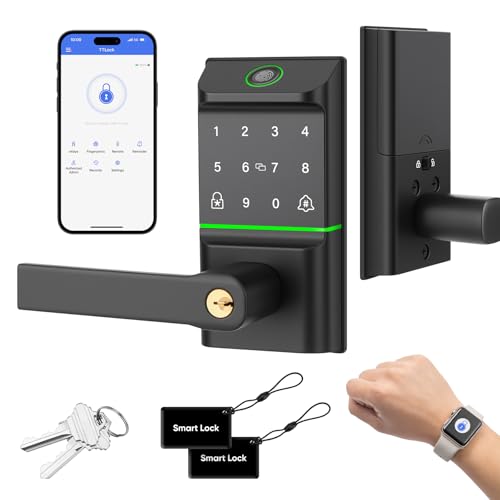
- Bluetooth app access without built-in Wi-Fi
- Stores local activity records nearby
- Supports 100 fingerprints and 100 codes
Best For: Users preferring local access and high user capacity
Best Voice-Controlled Wi-Fi Pick

- Built-in Wi-Fi with remote app management
- Alexa and Google Assistant voice control
- IP54 rating with auto-lock and emergency charging
Best For: Smart-home users wanting remote and voice access
Best Value Keypad Lock – TEEHO TE001 Keypad Deadbolt
If you want a smart lock without WiFi, the TEEHO TE001 keeps entry simple with keypad codes rather than an app or internet connection. It supports up to 20 user codes, a single-use guest PIN, one-touch locking, and optional automatic locking.
Best For: Families, rentals, garages, and exterior doors needing straightforward code-based access.
Pros:
- Stores 20 individual user codes plus a one-time guest code.
- Automatic locking can be set from 10 to 99 seconds, with one-touch locking also available.
- Offers anti-peeping code protection, a low-battery indicator, IP54 weather resistance, and two backup keys.
- Designed for screwdriver installation and includes a two-year warranty.
Cons:
- Four AA batteries are required but not included.
- Compatibility is limited to 2-1/8-inch door holes and is not suitable for 38mm holes.
- The lock must be reset before first use to detect door handing.
The TE001 is a practical pick when you want keyless convenience without connected features. Its code capacity and weather-resistant construction make it versatile, provided your door meets the installation requirements.
Most Versatile Fingerprint Knob – Veise VE018 Fingerprint Door Knob
The Veise VE018 is a flexible smart lock without WiFi for users who want more than keypad entry. It combines fingerprint recognition, Bluetooth app control, passwords, IC cards, mechanical keys, and other access options, while a separate gateway enables remote smart-home features.
Best For: Bedrooms, apartments, home offices, hotels, and rental properties needing multiple access methods.
Pros:
- Provides fingerprint, app Bluetooth, keypad, IC card, password, remote authorization, and mechanical-key access.
- Recognizes fingerprints in about 0.2 seconds and stores up to 20 fingerprints.
- Supports access schedules, auto-lock settings from 10 to 180 seconds, activity logs, and up to 100-plus codes.
- Offers local AES encryption, intrusion alerts, up to 16 months of battery life, and a Type-C emergency port.
Cons:
- Remote control and Alexa or Google Assistant compatibility require the separately sold Veise G1 Gateway.
- Four AA batteries are not included.
- Its broader feature set may be more than needed for a simple interior door.
The VE018 stands out for access flexibility and detailed user management while retaining local, non-WiFi operation. Choose it when fingerprint entry and multiple credential types matter more than a basic keypad.
Best Simple Keypad Deadbolt – Yale Code Digital Keypad Deadbolt
For shoppers seeking a smart lock without WiFi, the Yale Code deadbolt offers a deliberately simple setup: install it, create entry codes, and use the backlit keypad without an app, phone, or internet connection. It also includes auto-locking and a backup key.
Best For: Homeowners who want dependable keyless entry without connected features or phone setup.
Pros:
- Works without an app, phone setup, or WiFi.
- Creates up to 20 unique entry codes for family, guests, or service providers.
- Backlit keypad supports easier code entry in low light.
- Includes auto-lock, a backup key, low-power alerts, and BHMA Grade 3 certification.
Cons:
- It does not provide app control, activity logs, or remote access.
- Only a single backup key is identified in the supplied notes.
- Battery replacement is required when low-power alerts appear.
The Yale Code is a strong fit for buyers who value simplicity over connected controls. Its 20-code capacity and Grade 3 residential construction cover everyday keyless entry without adding smart-home complexity.
Best Managed Fingerprint Lock – Veise VE017 Fingerprint Smart Lock
The Veise VE017 is a capable smart lock without WiFi when used through its local lock features, with app-based management adding another layer of control. It supports fingerprints, codes, fobs, app access, authorized sharing, and a mechanical key, making it useful for homes and multi-tenant properties.
Best For: Property managers, multi-tenant homes, and families needing flexible permissions and access records.
Pros:
- Offers fingerprint, app, authorized access, fob, code, shared-code, voice-assistant, and mechanical-key unlocking.
- Supports permanent, recurring, duration, and one-time codes with permission controls.
- Provides activity logs, event alerts, local AES-128 encryption, anti-peeping PIN entry, and intrusion protection.
- Fingerprint recognition is rated at under 0.2 seconds, with auto-lock settings from 0 to 180 seconds.
Cons:
- Alexa and Google Assistant compatibility requires the separately sold G1 Gateway.
- The supplied notes do not specify the complete battery capacity or included battery status.
- Its management features may be excessive for buyers seeking only a basic keypad lock.
The VE017 is designed for controlled access rather than simple entry alone. Its permission tools, code types, and audit logs make it especially appealing where several people need different levels of access.
Best Connected Option – eufy C220 Fingerprint Deadbolt
The eufy Security Smart Lock C220 is a strong choice if you want a smart lock without wifi limitations—but still prefer built-in Wi-Fi for remote access. It supports fingerprint, keypad, app, physical-key, Apple Watch, and voice unlocking, while its 8-month battery rating and straightforward installation add everyday convenience.
Best For: Homeowners who want remote app control, fingerprint entry, and integration with other eufy devices.
Pros:
- Offers six unlocking methods, including fingerprint, keypad, app, key, Apple Watch, and voice control.
- Built-in Wi-Fi enables remote control without a separate bridge.
- Runs for around eight months on eight AA batteries.
- BHMA Grade 3 certification, IP53 water resistance, and a 15-minute installation design.
Cons:
- Uses eight AA batteries, more than the other listed models.
- Its remote-control features depend on Wi-Fi, so it may not suit shoppers specifically avoiding connected locks.
The C220 is the most feature-rich option here for users who want broad access methods and remote management. Choose it over a purely offline lock when eufy ecosystem integration and app access matter more than minimizing connectivity.
Best Offline Pick – TEEHO TE002 Fingerprint Keypad Lock
The TEEHO TE002 is a practical fit for shoppers seeking a smart lock without wifi. Its nonconnected design keeps access local through fingerprints, passcodes, one-time PINs, and physical keys, while auto-lock, anti-peep codes, and vacation mode add useful security controls without an app or hub.
Best For: Apartments, rentals, and households wanting simple offline keyless entry with fingerprint access.
Pros:
- Nonconnected operation avoids Wi-Fi, apps, and bridge requirements.
- Stores up to 20 fingerprints and 20 passcodes, plus one-time PINs.
- Fingerprint recognition can unlock in about one second, with auto-lock and one-touch locking.
- Up to 365 days of battery life from four AA batteries, with a low-battery indicator.
Cons:
- Requires 2-1/8-inch, 54mm door holes only.
- Batteries are not included.
- Does not provide remote app control or remote monitoring.
For a genuinely offline smart-lock setup, the TE002 is the clearest match in this roundup. It gives you convenient biometric and keypad entry while retaining physical-key backup and avoiding the complexity of networked controls.
Best Battery Life – DESLOC B200 Fingerprint Deadbolt
The DESLOC B200 offers a flexible alternative for shoppers comparing a smart lock without wifi. It connects locally through Bluetooth to the TTLock app and supports fingerprint, PIN, key fob, eKey, physical-key, and optional voice access, with a claimed 12-month battery life and USB-C emergency power.
Best For: Families wanting multiple local access methods, long battery life, and optional Bluetooth app management.
Pros:
- Supports up to 50 fingerprints and unlocks in less than 0.3 seconds according to the supplied specifications.
- Offers fingerprint, PIN, app, eKey, key fob, physical-key, and optional voice control.
- Up to 12 months of battery life, plus a low-battery indicator and USB-C emergency power port.
- BHMA Grade 3 construction, IP54 water resistance, and operation from -22°F to 158°F.
Cons:
- Voice control requires the separately sold G2 Gateway.
- Bluetooth app management is intended for close range; gateway requirements apply for expanded functionality.
- Four AA batteries are not included.
The B200 is a versatile middle ground: it can function with local credentials and Bluetooth while leaving expanded smart-home control optional. Its long battery rating and USB-C backup make it especially appealing for busy households that want fewer battery-related interruptions.
Best Direct-WiFi Pick – Veise VE027-L Smart Lock
If you want a smart lock without wifi hubs or extra setup, the Veise VE027-L connects directly to a 2.4GHz network. It combines remote app access, fingerprint entry, passcodes, voice control, IC cards, and physical keys in a handle-set design.
Best For: Families, rentals, and homeowners who want extensive remote access controls without buying a separate hub.
Pros:
- Direct Wi-Fi connection with no additional hub required.
- Supports remote control, access logs, alerts, temporary codes, and auto-lock settings.
- Offers fingerprint entry for up to 20 fingerprints and Alexa or Google Assistant compatibility.
- Stores access data locally with AES128 encryption, according to the supplied notes.
Cons:
- Requires eight AA batteries, which are not included.
- Direct Wi-Fi functionality requires a compatible 2.4GHz home network.
- The feature set may be more than needed for shoppers seeking a simple keypad lock.
The VE027-L is a feature-rich choice for shoppers prioritizing direct connectivity and flexible user management. Its handle set and multiple entry methods make it especially practical for busy households and rental access.
Best Hub-Free Bluetooth Alternative – Smart Fingerprint Door Lock
For shoppers searching for a smart lock without wifi, this model uses local Bluetooth-based control through the TT LOCK app rather than built-in Wi-Fi. It adds fingerprint, code, fob, eKey, Apple Watch, and mechanical-key entry for flexible everyday use.
Best For: Homeowners who prefer local Bluetooth access, high user capacity, and a straightforward screwdriver installation.
Pros:
- Provides seven access methods, including fingerprint, app, Apple Watch, fobs, codes, eKeys, and a mechanical key.
- Stores local activity records viewable when the phone is within the lock’s range.
- Supports up to 100 fingerprints and 100 user codes, including one-time passwords.
- Fits 35–50 mm doors and is designed for installation with a screwdriver.
Cons:
- It does not provide the supplied products’ built-in Wi-Fi remote access.
- Apple Watch unlocking is currently limited to Apple Watch; GPS models still require the phone.
- Four AA batteries are not included.
This lock is a sensible pick if you specifically want to avoid Wi-Fi connectivity and prefer nearby Bluetooth management. Its large user capacity and doorbell function add useful features for families and guests.
Best Voice-Controlled Wi-Fi Pick – LNDU T225 Smart Lock
The LNDU T225 is a practical option for shoppers comparing a smart lock without wifi to a connected model with built-in networking. It connects directly to home Wi-Fi for remote app management and supports voice control, fingerprints, passcodes, FOB cards, and mechanical keys.
Best For: Smart-home users who want Alexa or Google Assistant control, remote code management, and a weather-resistant keypad handle.
Pros:
- Built-in Wi-Fi enables remote locking, unlocking, access logs, and code creation without an extra gateway.
- Supports up to 50 fingerprints and 50 custom passcodes.
- Works with Alexa and Google Assistant for voice control.
- Includes auto-lock, one-touch locking, IP54 water resistance, and an emergency charging port.
Cons:
- Eight AA batteries are required and provide up to eight months of battery life according to the supplied notes.
- Its Wi-Fi and voice features may be unnecessary for shoppers specifically seeking an offline smart lock.
- The supplied notes identify it as ANSI Grade 3 rather than a higher residential grade.
The T225 stands out when remote access and voice assistants matter more than avoiding Wi-Fi. Its multiple entry methods, weather resistance, and code-management tools make it well suited to connected front-door use.
How We Picked the Best Smart Lock Without Wifi
We focused on locks that can provide keyless entry without requiring a continuous Wi-Fi connection for basic operation. The selection includes keypad deadbolts, fingerprint locks, smart door knobs, and models that may add Bluetooth or optional Wi-Fi features. We considered access methods, emergency entry, installation requirements, battery design, exterior durability, and suitability for common residential doors.
Because product capabilities vary, check the listing carefully before purchase. Some locks marketed as smart may require a hub, gateway, or Wi-Fi connection for remote access, voice control, notifications, or app-based management.
Quick Comparison
| Lock Type | Best For | Typical Access Methods | Wi-Fi Required for Basic Entry? |
|---|---|---|---|
| Keypad deadbolt | Simple daily access | PIN, key | No |
| Fingerprint deadbolt | Fast hands-free entry | Fingerprint, PIN, key | No |
| Smart door knob | Interior or secondary doors | Fingerprint, PIN, key | No |
| Bluetooth-enabled lock | Local app control | App, PIN, fingerprint, key | Usually no |
| Wi-Fi-connected lock | Remote monitoring and voice control | App, PIN, voice, key | Often required for smart features |
Key Buying Factors for a Smart Lock Without Wi-Fi
Door Compatibility
Confirm your door thickness, backset, borehole size, handing, and existing deadbolt or handle configuration. A deadbolt replacement and a full handleset are not interchangeable. Measure before ordering, especially for older doors or unusual frames.
Access and Backup Options
Keypads are dependable for families and guests, while fingerprint readers can be faster when your hands are full. Look for programmable user codes, one-time codes, and a physical key or exterior backup power option. Avoid relying on a single biometric method if household members may have trouble registering or reading fingerprints.
Power and Maintenance
Battery life depends on usage, temperature, motor resistance, and connectivity. Choose a model with low-battery alerts and an emergency USB or battery-contact feature when available. Keep a mechanical key accessible and replace batteries promptly.
Security and Privacy
Review the lock’s construction, tamper alarms, auto-lock settings, and code-management controls. A smart lock without Wi-Fi can reduce remote attack exposure, but it still needs strong installation and a secure PIN. Disable predictable codes and avoid sharing administrator credentials.
Connectivity Features
Local Bluetooth access may support setup, logs, or user management without internet service. Wi-Fi models can offer remote unlocking, alerts, Alexa, or Google Assistant integration, but those features may introduce cloud accounts, hubs, and additional privacy or reliability considerations.
Who Should Buy Which Smart Lock Without Wifi?
Choose a keypad deadbolt if you want straightforward keyless entry with minimal setup. Choose a fingerprint deadbolt if speed and convenience matter most. Choose a smart knob for a bedroom, office, or secondary entry where a full deadbolt replacement is unnecessary.
Choose a Bluetooth model if you want local app management without depending on home internet. Choose a Wi-Fi lock only when remote access, activity notifications, or voice-assistant integration justify the extra connectivity. For any model, verify door fit and keep a backup entry method available.