The best smart locks for apartments make keyless entry more convenient without forcing you into a complicated installation or a permanent door modification.
This roundup compares 10 options across retrofit designs, keypad deadbolts, fingerprint access, built-in Wi-Fi, remote control, and handlesets. Before choosing, confirm your door and deadbolt compatibility, lease requirements, and preferred entry method.
Best 10 Smart Locks for Apartments Picks for 2026
Best Connected Pick
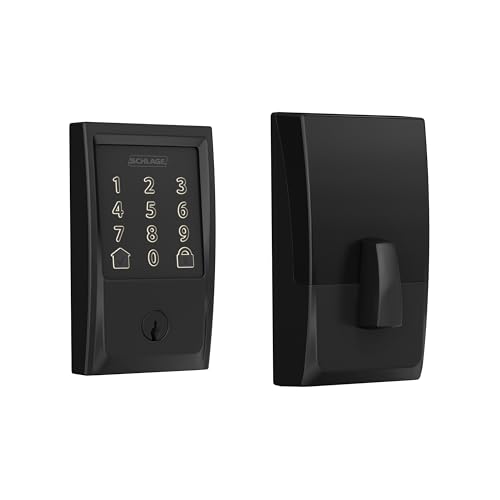
- Built-in Wi-Fi with remote app control
- Stores up to 100 access codes
- Includes alarm, auto-lock, and backup key
Best For: Remote access and extensive code management
Best Handle Set

- Includes a matching handle set
- Offers fingerprint and flexible PIN access
- Remote control needs no separate hub
Best For: Complete front-door hardware upgrades
Best Multi-Access Model

- Offers six ways to unlock
- Built-in Wi-Fi needs no bridge
- Includes eight-month battery and Grade 3 rating
Best For: Households wanting flexible entry options
Best Rechargeable Option

- Rechargeable battery rated for one year
- Supports six access methods
- Stores up to 100 fingerprints
Best For: Low-maintenance apartment access
Best Interior-Door Pick
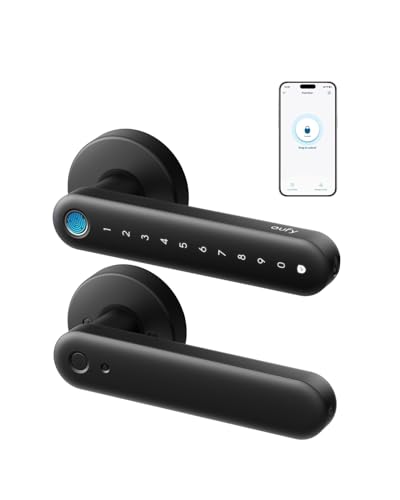
- 0.3-second fingerprint unlocking
- Built-in Wi-Fi for remote management
- USB-C emergency backup
Best For: Interior apartment doors and rooms
Best Feature-Rich Deadbolt

- Five flexible entry methods
- 100 custom passcodes
- Remote access without a hub
Best For: Apartment front doors and guest access
Best Connected Keypad Lock

- Keypad, app, Bluetooth, voice, and backup-key entry
- Up to 200 codes with access logs and guest profiles
- No-drill installation on compatible standard lock holes
Best For: Flexible apartment access with remote monitoring
Best Fingerprint Entry

- Fingerprint, keypad, app, fob, key-card, and key access
- Guest codes and access records through the app
- Optional gateway enables remote access and voice control
Best For: Families and rental hosts seeking biometric entry
Best Existing-Deadbolt Retrofit
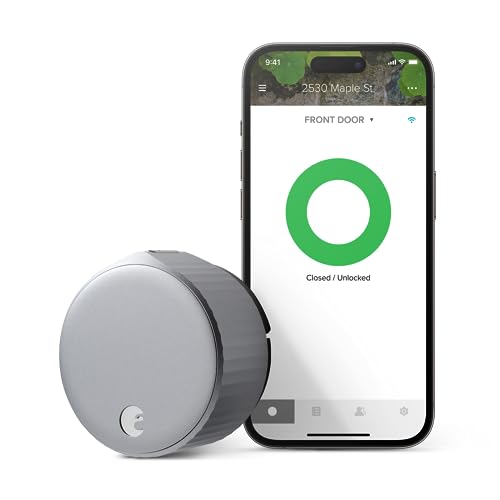
- Installs inside over most single-cylinder deadbolts
- Keeps the exterior door appearance unchanged
- Built-in Wi-Fi with sharing, Auto-Lock, and optional Auto-Unlock
Best For: Discreet apartment upgrades using an existing deadbolt
Best Connected Pick – Schlage Encode WiFi Deadbolt
The Schlage Encode is a practical choice for apartments where built-in Wi-Fi, remote monitoring, and established security features matter. It supports app-based control from anywhere, keypad entry, voice assistants, and up to 100 access codes.
Best For: Apartment residents who want dependable remote access and extensive code management.
Pros:
- Built-in Wi-Fi enables remote locking, unlocking, notifications, and lock-history viewing.
- Supports up to 100 access codes and works with Alexa and Google Home.
- Installs with a screwdriver and includes auto-lock, an alarm, and a physical backup key.
- Uses four included AA batteries with up to six months of typical battery life.
Cons:
- Battery life is shorter than some rechargeable alternatives.
- It is a deadbolt-only design, so it does not include a matching handle set.
- Remote features require the Schlage Home app and a secure Wi-Fi connection.
Choose this model if broad app controls, many guest codes, and a familiar deadbolt format are more important than rechargeable power. Its simple installation and physical key backup also suit renters who want a straightforward upgrade.
Best Handle Set – Philips WiFi Keypad Deadbolt
The Philips 4200 Series is one of the more complete smart locks for apartments because it combines a keypad deadbolt with a matching handle set. Built-in 2.4GHz Wi-Fi enables remote app control without a separate hub, while fingerprint access adds a quick entry option.
Best For: Apartment door upgrades that need a complete handle-and-deadbolt set with biometric entry.
Pros:
- Includes a matching handle set, so additional handle hardware is not required.
- Supports fingerprint, permanent, one-time, periodic, and recurring passcodes.
- Offers remote status checks, access history, and control through the Philips Home Access App.
- Fingerprint unlocking is rated at 0.3 seconds, and auto-lock can be set from 0 to 180 seconds.
Cons:
- Requires a 2.4GHz Wi-Fi network and should remain within 33 feet of the router.
- Batteries are not included, and the manufacturer specifies standard 1.5V alkaline batteries.
- The lock is designed for right-opening doors by default and may require resetting for left-opening doors.
This Philips model stands out when replacing more than just the deadbolt. Verify your door swing, Wi-Fi placement, and handle compatibility before buying, then use the flexible code options for household members or recurring visitors.
Best Multi-Access Model – eufy Security Smart Lock C220
The eufy Security Smart Lock C220 gives apartment residents six entry methods, including fingerprint, keypad, app, physical key, Apple Watch, and voice control. Its built-in Wi-Fi, eight-month battery rating, and compatibility with many standard deadbolts make it a versatile apartment-door option.
Best For: Households that want the widest range of convenient entry methods and eufy ecosystem integration.
Pros:
- Provides six unlocking methods, including fingerprint, app, keypad, Apple Watch, voice, and key.
- Built-in Wi-Fi enables control from anywhere without a bridge.
- Includes eight AA batteries and offers around eight months of battery life.
- Installs in about 15 minutes without drilling and carries BHMA Grade 3 certification.
Cons:
- Battery life varies with how frequently the lock is used.
- Compatibility depends on the existing deadbolt and bore dimensions.
- Its ecosystem features are most useful for households already using eufy devices.
The C220 is a strong all-around pick when different residents prefer different ways to unlock the door. Its combination of remote access, biometric entry, physical-key backup, and weather resistance adds flexibility without requiring a bridge.
Best Rechargeable Option – Tapo DL110 Smart Wi-Fi Lock
The Tapo DL110 is a rechargeable fingerprint smart lock designed for low-maintenance apartment access. It supports six access methods, scheduled or one-time guest codes, Wi-Fi and Bluetooth connectivity, and a claimed one-year battery runtime.
Best For: Apartment residents who prioritize long battery life and rechargeable convenience.
Pros:
- Removable rechargeable battery is rated for up to one year of operation.
- Offers fingerprint, passcode, Wi-Fi, Bluetooth, voice-assistant, and physical-key access.
- Recognizes fingerprints in about 0.42 seconds and stores up to 100 fingerprints.
- Supports resident profiles plus one-time or scheduled guest codes.
Cons:
- It is a deadbolt and does not include a matching handle set.
- Recharging requires removing or accessing the battery and using the USB-C port.
- The supplied specifications identify it as BHMA Grade 2, below the Grade 3 rating listed for the eufy C220.
Pick the DL110 if minimizing routine battery changes is a priority. Its rechargeable design and scheduled-access tools are especially useful for busy households, while the backup keys and multiple wireless options provide alternatives when needed.
Best Interior-Door Pick – eufy FamiLock C32
For smart locks for apartments, the eufy FamiLock C32 is a practical choice for interior doors where fast biometric access and remote management matter. Its built-in Wi-Fi, fingerprint reader, and simple screwdriver installation make it convenient for bedrooms, offices, storage rooms, and garage entries.
Best For: Interior apartment doors, bedrooms, offices, and storage areas.
Pros:
- Unlocks by fingerprint in approximately 0.3 seconds and supports 360-degree recognition.
- Built-in 2.4 GHz Wi-Fi enables remote authorization and lock management without an extra hub.
- Four AA batteries last over five months, with USB-C emergency power support.
- Installs in about 15 minutes with a screwdriver and works with Alexa and Google Assistant.
Cons:
- Not recommended for front doors.
- Rekeying is not supported.
- Uses four AA batteries rather than a rechargeable battery.
The C32 stands out when you want quick fingerprint entry and remote control for an interior apartment door. Its limitations make it less suitable for a primary exterior entrance, but its easy installation and emergency USB-C backup add everyday convenience.
Best Feature-Rich Deadbolt – Philips Wi-Fi Smart Deadbolt
Among smart locks for apartments, the Philips Wi-Fi Smart Deadbolt offers flexible entry methods and useful access management for a primary door. It supports fingerprints, passcodes, app control, physical keys, and voice assistants, while built-in Wi-Fi allows remote operation without a separate hub.
Best For: Apartment front doors, families, renters, and hosts managing guest access.
Pros:
- Offers app, passcode, fingerprint, physical-key, and Alexa or Google Assistant entry.
- Built-in Wi-Fi supports remote locking and unlocking without an additional hub.
- Supports up to 100 custom passcodes plus one-time or scheduled guest codes.
- Includes access history, real-time alerts, adjustable auto-lock, and Away Mode.
Cons:
- Batteries are not included and AA alkaline LR6 batteries are recommended.
- Only supports 2.4 GHz Wi-Fi, with the router and lock recommended within 65 feet.
- Does not include a door sensor.
This Philips deadbolt is a strong fit when remote access and temporary codes are priorities. Its broad access options suit shared apartments and rentals, though the 2.4 GHz requirement and lack of a door sensor should be considered before installation.
Best for Rentals – Bluetooth Fingerprint Lock with Handle
For smart locks for apartments, this Bluetooth fingerprint lock is geared toward flexible household and rental access. It combines fingerprint, keypad, FOB, code, app, and physical-key entry with DIY installation, making it useful for apartments, Airbnb properties, and multi-family units.
Best For: Rental properties, Airbnb units, apartments with frequent guests, and family access.
Pros:
- Provides six entry methods, including fingerprint, keypad, FOB, code, app, and physical key.
- Fits most US doors from 1-3/8 to 2-1/4 inches thick and installs with a screwdriver without drilling.
- Supports permanent, one-time, and time-limited guest codes.
- Offers auto-lock, one-touch locking, access history, and Alexa or Google compatibility with a gateway.
Cons:
- Voice control requires pairing with a gateway.
- The supplied notes do not specify battery life.
- Compatibility depends on the door meeting the stated thickness range.
This lock is especially practical for landlords, hosts, and apartment residents who need multiple ways to share access. Its broad door compatibility and no-drill installation are appealing, while gateway-dependent voice control adds an extra requirement for smart-home use.
Best Connected Keypad Lock – Tapo DL100
For apartments with a compatible standard deadbolt, the Tapo DL100 is a practical pick among smart locks for apartments. It combines keypad, Bluetooth, app, voice, and backup-key entry, while Wi-Fi access enables remote control and activity monitoring.
Best For: Renters or apartment residents who want flexible keyless entry, remote access, and detailed access management.
Pros:
- Offers keypad, Bluetooth, Wi-Fi, voice, and backup-key unlocking.
- Supports up to 200 customizable codes with guest and family access groups.
- Includes auto-lock, activity timestamps, PIN attempt limiting, and a USB-C emergency-power option.
- Installs without drilling on compatible standard lock holes.
Cons:
- Uses a deadbolt format, so door compatibility must be checked before purchase.
- Battery life is shorter in Wi-Fi mode than in Bluetooth mode.
The DL100 is a well-rounded choice when remote monitoring and multiple entry methods matter. Its BHMA Grade 3 certification and IP54 rating add durability, while compatibility with Alexa, Google Home, and SmartThings broadens smart-home integration.
Best Fingerprint Entry – Sifely Smart Door Lock
The Sifely fingerprint lock stands out among smart locks for apartments by offering several ways to enter without carrying a traditional key. Fingerprint, keypad, app, fob, key-card, and key access make it adaptable for households, guests, and rental use.
Best For: Families, Airbnb hosts, and apartment or rental-property users who want fingerprint access and flexible guest management.
Pros:
- Supports fingerprint, keypad, app, fob, key-card, and physical-key entry.
- Provides access records and guest-code management through the app.
- Designed for DIY installation on most standard doors, with a reversible handle for left- or right-handed doors.
- Includes auto-lock, one-touch locking, anti-peeping passwords, and a backlit keypad.
Cons:
- Remote access and voice control require the optional Sifely Wi-Fi Gateway.
- Its handle-and-lock design may require more door-hardware compatibility checks than an interior retrofit.
This model is especially useful when biometric entry is more convenient than codes or phones. The optional gateway adds remote and voice features, but buyers should account for that extra accessory if those functions are essential.
Best Existing-Deadbolt Retrofit – August Wi-Fi Smart Lock
The August Wi-Fi Smart Lock is a strong option for apartment residents who want smart locks for apartments without changing the exterior appearance of the door. It installs on the inside over most single-cylinder deadbolts and keeps the existing key system in place.
Best For: Apartment users who want a discreet retrofit, built-in Wi-Fi, app-based sharing, and automatic locking or unlocking.
Pros:
- Retrofits most single-cylinder deadbolts and installs from the inside in about 10 minutes.
- Preserves the outside appearance of the existing door hardware.
- Built-in Wi-Fi supports remote app access and voice assistants without a separate hub.
- Offers scheduled or temporary access, Auto-Lock, DoorSense, and optional Auto-Unlock.
Cons:
- A keypad for code entry is sold separately.
- Requires the August app, a compatible smartphone, and a Wi-Fi connection.
- Compatibility depends on having a suitable single-cylinder deadbolt.
Choose the August when maintaining the door’s existing exterior is a priority. It delivers a discreet retrofit and strong connected features, although users who need built-in keypad entry will need to add the separately sold Smart Keypad.
How We Picked the Best Smart Locks for Apartments
We focused on the features that matter most in an apartment: installation requirements, compatibility with common U.S. doors, dependable entry methods, remote access, battery convenience, and the ability to share access with household members or guests. We also included both retrofit locks, which work with an existing deadbolt, and complete deadbolt or handleset replacements.
Because apartment doors and lease policies vary, no single lock is right for every renter. A retrofit model may be the least disruptive choice, while a full replacement can offer a cleaner appearance and integrated fingerprint or keypad hardware.
Quick Comparison
| Lock type | Best for | Main advantage | Watch for |
|---|---|---|---|
| Retrofit smart lock | Renters and minimal installation | Uses the existing exterior deadbolt | Interior clearance and deadbolt compatibility |
| Keypad deadbolt | Families and shared access | Code entry without a phone | Full replacement may be required |
| Fingerprint lock | Fast personal entry | Convenient biometric access | Fingerprint performance can vary |
| Wi-Fi lock | Remote monitoring and control | Connects directly for away-from-home access | Higher battery use and more setup |
| Bluetooth-only lock | Local phone control | Often simpler and more efficient | Remote control may need a separate bridge |
Key Buying Factors for Smart Locks for Apartments
Installation and Lease Approval
Start by checking whether your landlord allows a lock replacement. If you must preserve the original hardware, prioritize a retrofit design such as the August option. For full replacements, verify that the door has a standard single-cylinder deadbolt or the required handleset configuration.
Entry Methods
Keypads are practical for children, cleaners, and guests because they do not require a phone. Fingerprint readers offer quick everyday access, while app control is useful for managing codes and checking lock status. Keep a physical key or another backup method available for emergencies.
Connectivity and Power
Built-in Wi-Fi enables remote locking, unlocking, notifications, and guest management from outside the home, but it can increase battery consumption. Bluetooth models may be preferable if you mainly unlock locally. Check battery type, low-battery warnings, and whether the lock remains usable if Wi-Fi is unavailable.
Door Compatibility and Security
Measure the backset, door thickness, clearance around the deadbolt, and interior space before ordering. Look for auto-lock controls, tamper alerts, encrypted app connections, and temporary access codes. A smart lock should complement, not replace, good door alignment and a strong strike plate.
Who Should Buy Which Smart Locks for Apartments?
- Renters who want minimal changes: Choose a retrofit lock that fits over the existing deadbolt.
- Families and frequent guests: Pick a keypad model with multiple codes and auto-lock scheduling.
- Users who want the fastest entry: Consider a fingerprint lock, ideally with a keypad or physical-key backup.
- Remote hosts and landlords: Look for built-in Wi-Fi, activity notifications, and easy code management.
- Budget-focused local users: A Bluetooth or keypad model can provide keyless access without paying for features you will not use.
For the best result, match the lock to your door first and your preferred access method second. Compatibility and reliable backup entry matter more than having the longest feature list.