As you think about upgrading your home security, smart door locks with deadbolts are a solid choice for the future. In 2026, these devices will offer advanced features like biometric recognition and seamless integration with voice assistants. You’ll want to evaluate convenience and control when choosing the right model. Some locks stand out for their easy installation and robust features. Curious about which ones make the top 10 list?
Schlage Encode Smart Wi-Fi Deadbolt Lock with Touchscreen Keypad

The Schlage Encode Smart Wi-Fi Deadbolt Lock with Touchscreen Keypad is an ideal choice for tech-savvy homeowners who value convenience and security. With keyless entry and app control, you can manage up to 100 access codes right from your smartphone. Its compatibility with Alexa and Google Home means you can open your door hands-free. The built-in Wi-Fi allows secure remote monitoring, while customizable alerts keep you informed of any activity. Easy installation requires just a screwdriver, and the battery-operated design guarantees long-lasting use. With its fingerprint-resistant touchscreen and robust security features, your home’s safety is in good hands.
Best For: Tech-savvy homeowners seeking a convenient and secure keyless entry solution.
Pros:
- Convenient keyless entry with up to 100 customizable access codes.
- Remote monitoring and control through the Schlage Home app and compatibility with smart home devices like Alexa and Google Home.
- Easy installation that requires no hardwiring and can fit standard doors.
Cons:
- Battery-operated, which may require periodic battery changes.
- Dependent on Wi-Fi for remote access, which could be an issue during internet outages.
- Higher initial cost compared to traditional locks, potentially making it less accessible for some homeowners.
Philips WiFi Keypad Door Lock with Handle

For homeowners seeking a seamless blend of security and convenience, the Philips WiFi Keypad Door Lock with Handle stands out as an ideal choice. It connects directly to 2.4GHz WiFi, allowing you to manage your door remotely through the Philips Home Access App. With voice assistant compatibility, gaining access becomes effortless. Enjoy quick 0.3-second fingerprint access and a variety of customizable passcode options. The auto-lock feature guarantees peace of mind, automatically securing your door after you leave. Installation is simple, requiring just a screwdriver, and US-based customer support is readily available to assist you whenever needed.
Best For: Homeowners looking for a secure, convenient, and user-friendly smart door lock solution.
Pros:
- Direct WiFi connectivity eliminates the need for a hub, making setup easy.
- Multiple unlocking methods, including fingerprint access and voice assistant compatibility, enhance convenience.
- Customizable auto-lock feature provides peace of mind by automatically securing the door after leaving.
Cons:
- Requires 8 AA alkaline batteries, which are not included with the purchase.
- Limited to compatibility with doors between 1-3/8 to 1-3/4 inches thick.
- Customer support hours may be limited for urgent issues outside of designated times.
Philips Wi-Fi Smart Lock for Keyless Entry

Looking for a seamless way to enhance your home security? The Philips Wi-Fi Smart Lock for Keyless Entry is your answer. This sleek aluminum deadbolt (DDL242X-1HW) offers multiple opening methods, including fingerprint, passcode, and voice control via Google Assistant or Alexa. With built-in Wi-Fi, you can remotely lock or open your door and receive instant alerts on door activity. Plus, manage access for multiple users effortlessly. Its fast biometric recognition guarantees quick access, while security features like an anti-tamper alarm and customizable auto-lock keep your home safe, even during power outages. Upgrade your security with this top-rated smart lock!
Best For: Individuals seeking a high-tech, convenient, and secure solution for home entry and management.
Pros:
- Fast biometric fingerprint recognition allows for quick and easy access.
- Built-in WiFi enables remote locking, unlocking, and monitoring from anywhere.
- Compatible with smart home systems like Amazon Alexa and Google Assistant for hands-free operation.
Cons:
- Dependence on WiFi connectivity may be a concern during outages.
- Initial setup may require technical knowledge for integration with smart home systems.
- Higher price point compared to traditional locks.
Philips WiFi Smart Lock with Front Door Handle Set
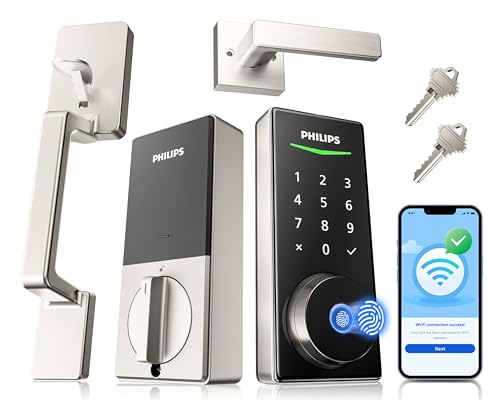
Equipped with built-in WiFi, the Philips WiFi Smart Lock with Front Door Handle Set is perfect for tech-savvy homeowners who value convenience and security. You can manage your lock remotely through a mobile app, allowing you to lock or open doors and share access effortlessly. Enjoy real-time alerts for every lock/open event and keep track of access history. With a lightning-fast fingerprint open feature, customizable passcodes, and an auto-lock option, this lock adapts to your lifestyle. Plus, it integrates seamlessly with Alexa and Google Assistant for hands-free control, making your home smarter and safer.
Best For: Tech-savvy homeowners who prioritize convenience and security in their entry systems.
Pros:
- Advanced biometric recognition allows for lightning-fast fingerprint unlock in just 0.3 seconds.
- Built-in WiFi enables easy remote management without needing an extra gateway.
- Seamless integration with smart home systems using voice control through Alexa and Google Assistant.
Cons:
- Installation may require DIY skills, which could be a barrier for some users.
- The lock’s dimensions may not fit all door sizes, requiring a pre-purchase compatibility check.
- Limited customer reviews may raise questions about long-term reliability.
Philips Wi-Fi Smart Door Lock with Keypad and Fingerprint Entry

The Philips Wi-Fi Smart Door Lock with Keypad and Fingerprint Entry is perfect for tech-savvy homeowners who value convenience and security. With five access methods, including fingerprint and app control, you can enter your home quickly and easily. It opens in just 0.3 seconds, making it ideal for busy families. Plus, you can manage up to 100 passcodes and set expiration dates for guests. The auto-lock feature adds an extra layer of security, ensuring your door is secure. Installation is straightforward, and you’ll receive U.S.-based support if you need help. Stay connected and protected with this innovative door lock.
Best For: Tech-savvy homeowners seeking convenience and enhanced security in their entry systems.
Pros:
- Versatile Access Methods: Offers five unlocking options including fingerprint, app control, and voice commands for flexibility.
- Smart Passcode Management: Allows for creating and managing up to 100 passcodes with expiration settings, ideal for temporary access.
- Quick and Secure Entry: Unlocks in just 0.3 seconds with an auto-lock feature to enhance security.
Cons:
- Battery Dependent: Requires batteries for operation, which may need regular replacement.
- Installation Complexity: While installation is straightforward, it may still pose challenges for those unfamiliar with door hardware.
- Limited Compatibility: Designed for standard door preparations, which may not suit all door types.
Philips Smart Lock with Keyless Entry and Digital Keypad

If you’re seeking a seamless blend of security and convenience, the Philips Smart Lock with Keyless Entry and Digital Keypad is your ideal solution. This advanced lock features four access methods: fingerprints, PIN codes, keys, and an app, allowing you to choose what suits you best. You can store up to 50 fingerprints and create unlimited one-time PINs for guests. Installation is simple, fitting standard doors with ease. Plus, the auto-lock feature guarantees your door secures itself. With compatibility for Amazon Alexa and Google Assistant, managing access has never been easier. Enjoy peace of mind with Philips’ reliable customer support and warranty.
Best For: Those seeking a secure and convenient keyless entry solution for their home.
Pros:
- Offers multiple unlocking methods including fingerprints, PIN codes, and mobile app access for flexibility.
- Easy installation process and compatibility with standard doors makes upgrading simple.
- The auto-lock feature enhances security by ensuring the door locks automatically after closing.
Cons:
- Requires a separate Philips Wi-Fi Bridge for remote access and voice unlocking with smart assistants.
- Limited Bluetooth range (8-10 meters) may restrict smartphone access from a distance.
- Potential reliance on technology may not appeal to users who prefer traditional locking methods.
Philips WiFi Smart Keypad Deadbolt Lock with App Control

For homeowners seeking a seamless blend of security and convenience, the Philips WiFi Smart Keypad Deadbolt Lock offers an impressive solution. This keyless entry lock features built-in WiFi, allowing you to control it via the Philips Home Access App without needing a hub. You can access it using voice commands, a passcode, or your mobile app, supporting up to 100 custom passwords. With an auto-lock feature and alerts for incorrect entries, your home stays secure. Plus, its robust design withstands extreme temperatures and weather, ensuring reliable performance year-round. Enjoy peace of mind with its solid customer support and warranty.
Best For: Homeowners looking for a secure and convenient keyless entry solution that can be easily controlled via smartphone or voice commands.
Pros:
- Built-in WiFi allows direct connection to home network without the need for a hub.
- Supports multiple unlocking methods, including voice, app, and custom passcodes for flexibility.
- Robust security features such as auto-lock and incorrect entry alerts enhance home safety.
Cons:
- Requires 8 AA batteries (not included) which may necessitate frequent replacements.
- Limited battery life of up to 6 months with regular use could lead to unexpected lockouts.
- Installation may require additional tools or expertise, making it less user-friendly for some homeowners.
eufy Security Smart Lock FamiLock S3 Max with Palm Vein Recognition and Doorbell Camera

Looking for a smart door lock that combines advanced security with user-friendly features? The eufy Security Smart Lock FamiLock S3 Max is your answer. With palm vein recognition boasting 99.9% accuracy in just 0.6 seconds, you’ll enjoy keyless entry that’s forgery-proof. Its 2K HDR doorbell camera provides clear visibility day or night, while the rear lock video screen allows you to check your front door’s status without your smartphone. Plus, it integrates seamlessly with the eufy ecosystem and supports Matter for smart home compatibility. Enjoy peace of mind with this innovative lock that prioritizes your security and convenience.
Best For: Homeowners seeking a secure, keyless entry solution with advanced features like palm vein recognition and a high-definition doorbell camera.
Pros:
- Highly secure: Palm vein recognition offers 99.9% accuracy and is forgery-proof.
- User-friendly: Rear lock video screen allows easy access to door status without needing a smartphone.
- Smart home compatibility: Integrates with eufy ecosystem and supports Matter for seamless connection with other smart devices.
Cons:
- Camera streaming limitations: Camera streams are not supported via Matter, requiring the eufy app for full functionality.
- Weight: At 1043 grams, the lock may feel bulky for some users.
- Compatibility issues: Not compatible with HomeBase 2, which may limit integration options for some users.
eufy Security Smart Lock C220, Fingerprint Keyless Entry Door Lock

The eufy Security Smart Lock C220 is an ideal choice for tech-savvy homeowners who prioritize convenience and security. With its fingerprint recognition opening in under 1.5 seconds, you’ll enjoy quick access. You can control it from anywhere using the eufy Security app, thanks to built-in Wi-Fi—no bridge required. The lock offers six opening methods, including voice commands via Alexa and Google Assistant. Plus, installation is a breeze, taking just 15 minutes with no drilling needed. Built to last, it’s IP53 waterproof and has an impressive battery life of up to eight months, ensuring your home stays secure year-round.
Best For: Tech-savvy homeowners seeking a convenient and secure keyless entry solution for their front door.
Pros:
- Quick access with fingerprint recognition in under 1.5 seconds.
- Easy installation with no drilling required, taking just 15 minutes.
- Versatile unlocking methods, including voice commands and remote control via app.
Cons:
- Battery life may vary based on usage frequency, with a maximum of 8 months.
- Limited compatibility with non-standard deadbolts.
- Potential reliance on Wi-Fi connectivity for remote features.
myQ Secure View™ 3-in-1 Smart Lock with Video Doorbell Camera

If you want an all-encompassing solution for home security, the myQ Secure View™ 3-in-1 Smart Lock with Video Doorbell Camera is an ideal choice. This innovative device combines a smart deadbolt, video doorbell, and a 2K HDR camera, providing clear visibility and two-way audio communication. With features like Face Access, fingerprint recognition, and customizable motion alerts, you can manage your home’s security effortlessly through the myQ app. Installation is a breeze, and the rechargeable battery lasts 4–6 months. Plus, it integrates seamlessly with the myQ ecosystem, enhancing your smart home experience. Secure your home with confidence!
Best For: Homeowners looking for a comprehensive security solution that combines smart locking, video monitoring, and two-way communication.
Pros:
- Versatile Functionality: Integrates a smart deadbolt, video doorbell, and high-definition camera into one device.
- Remote Access: Easily control locking/unlocking and monitor activity from anywhere via the myQ app.
- User-Friendly Installation: Designed for easy DIY setup with a long-lasting rechargeable battery.
Cons:
- Limited Battery Life: The rechargeable battery lasts only 4–6 months, requiring periodic charging.
- Dependence on App: Full functionality relies on the myQ app, which may not be convenient for all users.
- Weather Sensitivity: While durable, extreme weather conditions may affect performance over time.
Factors to Consider When Choosing Smart Door Locks With Deadbolt
When choosing smart door locks with deadbolts, you should consider several key factors. Security features are essential for protecting your home, while the installation process can vary in complexity. Additionally, think about connectivity options, access methods, and how well the lock integrates with your existing smart home setup.
Security Features Importance
Choosing the right smart door lock with deadbolt security features is essential for guaranteeing your home’s safety. Look for customizable alarms that alert you to door movement or forced entry attempts, deterring potential intruders. Biometric fingerprint recognition adds convenience, allowing quick access for authorized users—often in just 0.3 seconds. Real-time alerts and notifications about locking and unfastening events let you monitor your property remotely, increasing your peace of mind. Additionally, an auto-lock feature can be programmed to engage after a certain time, helping prevent accidental openings. Finally, verify the lock uses encrypted connections to protect against unauthorized access and hacking attempts. These features combine to create a robust security system for your home.
Installation Process Complexity
Installing a smart door lock can be straightforward, especially since many models fit standard door sizes and require just a screwdriver. You’ll find that some locks come with complete handle sets, making installation even easier while improving your door’s appearance. Consider how certain models connect directly to Wi-Fi without needing extra hubs, simplifying your setup. However, keep in mind that installation complexity varies; locks with features like fingerprint recognition may demand precise alignment, which could add to your workload. Additionally, think about battery requirements—some locks need multiple AA batteries, and you’ll need to factor in battery installation as part of the process. By weighing these aspects, you can choose a lock that suits your DIY skills.
Connectivity Options Available
After you’ve figured out the installation process, the next key factor to evaluate is the connectivity options available with smart door locks. Many models feature built-in WiFi, allowing you to connect directly to your home network without extra hubs, making remote access easy. Look for locks that support dual-band connectivity, as this enhances performance on both 2.4GHz and 5GHz networks. Bluetooth is another common feature, letting you open doors via your smartphone within an 8-10 meter range. Additionally, integration with voice assistants like Alexa and Google Assistant enables hands-free control. Remote control through dedicated apps is standard, allowing you to lock/open doors, manage access codes, and receive real-time notifications from anywhere with an internet connection.
Unlocking Methods Variety
When it comes to smart door locks, the variety of access methods can greatly enhance your home security and convenience. Look for locks offering fingerprint recognition, passcodes, physical keys, and remote app control. This flexibility makes it easier for you to access your home. If you have family members or trusted visitors, choose a lock that stores multiple fingerprints for quick entry without needing a key. Temporary or one-time passcodes are perfect for guests or service providers, ensuring security isn’t compromised. Additionally, consider locks with customizable auto-lock timers, allowing you to set specific delays for automatic locking after you close the door. These features not only boost convenience but also enhance your overall security.
Smart Home Compatibility
Choosing a smart door lock that fits seamlessly into your existing smart home ecosystem can greatly enhance both convenience and security. Look for models that integrate with popular voice assistants like Amazon Alexa and Google Assistant, allowing you to lock and open hands-free. Many smart locks enable centralized control through a single app or hub, streamlining your home management. Remote access management features let you monitor entry through dedicated apps, providing real-time notifications and access history. Additionally, consider locks that support multiple user access codes and fingerprints for easy management, perfect for families or short-term rentals. Finally, verify compatibility with other smart devices like security cameras and alarms, creating an all-encompassing security solution for your home.
Battery Life Considerations
Battery life is an essential factor to take into account as you evaluate smart door locks, especially since many models rely on AA batteries that typically last between 4 to 8 months. Your usage frequency and features like Wi-Fi connectivity can greatly impact this lifespan. A low battery indicator is a helpful feature, alerting you when levels drop below about 10%. Consider locks that offer emergency power options, like a backup key or rechargeable battery, to guarantee you’re never locked out. To maximize battery longevity, opt for high-quality alkaline or lithium batteries and regularly check the battery status through the lock’s app. This way, you can maintain security and avoid unexpected battery failures.
App Control Functionality
While evaluating smart door locks, the app control functionality should be a top priority. This feature lets you remotely lock or open your doors, offering convenience and enhanced security from anywhere with internet access. Many locks allow you to manage user access codes and monitor lock activity in real-time through dedicated mobile apps. You’ll receive notifications and alerts about door status changes, like when the lock is engaged or if there’s an unauthorized access attempt. Some smart locks enable you to manage multiple locks from a single app interface, simplifying access management. Plus, customizable settings let you adjust auto-lock timing and access permissions, tailoring security features to fit your specific needs.