When it comes to securing your home, choosing the right fingerprint door lock can make all the difference. These innovative locks offer not just advanced security but also unparalleled convenience. With features like rapid fingerprint recognition and smart remote management, you can enjoy peace of mind without sacrificing style. Curious about which options stand out in today’s market? Let’s explore some of the best choices that blend technology with design.
Philips WiFi Keypad Door Lock with Handle

If you’re looking for a smart security solution that combines convenience and advanced technology, the Philips WiFi Keypad Door Lock with Handle is an excellent choice. It connects directly to your 2.4GHz WiFi without needing a hub, allowing you to manage your door remotely through the Philips Home Access App. You can lock or open the door, set user codes, and check the lock status anytime. With fingerprint access in just 0.3 seconds and voice assistant compatibility, you’ll enjoy hands-free convenience. Plus, the auto-lock feature guarantees your door secures automatically, giving you peace of mind when you leave home.
Best For: Those seeking a secure, smart home solution that offers remote management and convenient access options.
Pros:
- Direct WiFi connectivity eliminates the need for a separate hub, simplifying installation and usage.
- Multiple unlocking methods including fingerprints and voice assistants provide flexibility and ease of access.
- Auto-lock feature ensures your door locks automatically, enhancing security and peace of mind.
Cons:
- Requires 8 AA alkaline batteries, which may need frequent replacement depending on usage.
- Limited compatibility with doors only within the thickness range of 1-3/8 to 1-3/4 inches.
- Self-installation may be challenging for those without DIY experience or tools.
Philips Wi-Fi Smart Door Lock with Keyless Entry

The Philips Wi-Fi Smart Door Lock with Keyless Entry is an ideal choice for tech-savvy homeowners looking for enhanced security and convenience. This sleek aluminum deadbolt offers multiple opening methods, including fingerprint recognition, passcodes, and voice commands via Google Assistant or Alexa. With built-in WiFi, you can monitor your door remotely, receive instant alerts, and manage access for multiple users. Fast biometric recognition guarantees quick access, even with wet fingers. Plus, customizable auto-lock settings and security features like anti-tamper alarms provide peace of mind. Enjoy seamless smart home integration and stay connected, no matter where you are.
Best For: Tech-savvy homeowners seeking enhanced security and convenience for their entryways.
Pros:
- Multiple unlocking methods including fingerprint recognition, passcodes, and voice control for flexibility.
- Built-in WiFi allows for remote access and monitoring, providing real-time alerts and door status checks.
- Fast biometric recognition ensures quick access, even with wet or dry fingers.
Cons:
- Requires WiFi connectivity for full functionality, which may be a limitation in areas with poor internet service.
- Higher initial cost compared to traditional locks may deter some buyers.
- Dependence on electronic systems may pose challenges during power outages if backup options are not used.
Philips Smart Lock with Keyless Entry and Digital Keypad

For those seeking an efficient and secure way to protect their home, the Philips Smart Lock with Keyless Entry and Digital Keypad stands out with its versatile access methods. You can gain entry using fingerprints, PIN codes, traditional keys, or even via an app. With the ability to store up to 50 fingerprints and create unlimited one-time PIN codes, it offers flexibility for family and guests. Its auto-lock feature enhances security, while built-in Bluetooth allows smartphone access within 8-10 meters. Plus, installation is a breeze, fitting standard doors with ease, ensuring peace of mind for you and your loved ones.
Best For: Individuals and families looking for a secure and convenient way to manage access to their home without the need for traditional keys.
Pros:
- Versatile unlocking methods including fingerprints, PIN codes, keys, and smartphone app.
- Easy installation that fits standard doors, making it accessible for most homeowners.
- Auto-lock feature enhances security by ensuring the door locks automatically when closed.
Cons:
- Requires a separate Philips Wi-Fi Bridge for remote control and voice unlocking capabilities.
- Bluetooth access is limited to a range of 8-10 meters, which may not be sufficient for larger properties.
- Initial setup may require some technical familiarity, especially for those less comfortable with smart devices.
Philips Wi-Fi Smart Door Lock with Keypad and Fingerprint Entry

Looking for a reliable and convenient way to secure your home? The Philips Wi-Fi Smart Door Lock with Keypad and Fingerprint Entry is an excellent choice. With five entry methods—fingerprint, app control, passcode, mechanical key, and voice commands via Alexa or Google Assistant—you’ll enjoy flexibility and security. It opens in just 0.3 seconds, providing quick access for family. Plus, you can create up to 100 customizable passcodes, ideal for managing temporary access. The auto-lock feature guarantees your door stays secure, while real-time alerts keep you informed. Installation is straightforward, and you’ll receive U.S.-based support if needed.
Best For: Homeowners seeking a versatile and secure smart lock solution for easy access and management of entry points.
Pros:
- Offers five unlocking methods, providing flexibility for different user preferences.
- Quick unlock time of just 0.3 seconds ensures immediate access for family members.
- Allows creation of up to 100 customizable passcodes, perfect for managing temporary access for guests and service personnel.
Cons:
- Requires batteries (1.5V alkaline) for operation, which may need regular replacement.
- Installation may require adjustments for left-handed doors, which could complicate setup for some users.
- The app control feature may not be user-friendly for all, particularly those less tech-savvy.
Philips WiFi Smart Lock with Keyless Entry and Remote Control
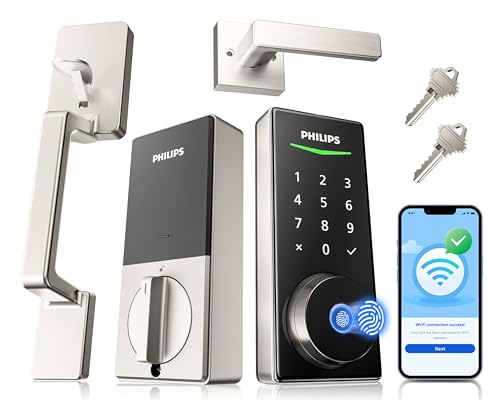
Experience the convenience of keyless entry with the Philips WiFi Smart Lock, designed for tech-savvy homeowners seeking enhanced security and ease of use. This smart lock features built-in WiFi, allowing remote management via a mobile app. You can lock or open your door, share access, and receive real-time alerts about events. With advanced fingerprint recognition, it opens in just 0.3 seconds. Voice control with Alexa and Google Assistant adds hands-free convenience. Plus, installation is a breeze—just grab a screwdriver! Enjoy customer support and warranty options, making this smart lock a reliable choice for your front door.
Best For: Tech-savvy homeowners looking for enhanced security and convenience with keyless entry options.
Pros:
- Built-in WiFi allows for remote management without the need for an additional gateway.
- Advanced fingerprint recognition unlocks the door in just 0.3 seconds for quick access.
- Voice control compatibility with Alexa and Google Assistant offers hands-free convenience.
Cons:
- Installation requires a screwdriver and may not be suitable for those uncomfortable with DIY tasks.
- Compatibility is limited to doors with specific thicknesses (1-3/8 to 1-3/4 inches).
- The smart lock’s reliance on WiFi may pose security concerns for some users.
Philips Wi-Fi Smart Lock with Handle

The Philips Wi-Fi Smart Lock with Handle stands out as the ideal choice for tech-savvy homeowners who value convenience and security. With five access methods—app, fingerprints, PIN codes, keys, and voice commands via Alexa or Google Assistant—you’ll never struggle to enter your home. The fingerprint recognition grants access to your door in just 0.3 seconds with 99.99% accuracy. Plus, you can manage everything remotely through the Philips App, receiving real-time notifications and managing access for family. Installation is straightforward, and with a reliable support team, you’ll feel confident in your choice. Secure your home with style and smart technology!
Best For: Tech-savvy homeowners seeking a blend of convenience, style, and advanced security features.
Pros:
- Offers multiple unlocking methods for versatile access options.
- Fast fingerprint recognition with high accuracy ensures quick and secure entry.
- Remote management via the Philips App allows for easy monitoring and control of door access.
Cons:
- May require confirmation of door compatibility before installation.
- Installation might be challenging for those unfamiliar with DIY projects.
- Relies on Wi-Fi connectivity for full functionality, which could be a limitation in areas with poor internet access.
eufy Security Smart Lock C33, Keyless Entry Door Lock

For those seeking a seamless blend of security and convenience, the eufy Security Smart Lock C33 stands out as an ideal choice. This sleek, black keypad door lock features advanced fingerprint recognition for instant access and integrated Wi-Fi for remote management via app. You’ll appreciate the 15-minute, hassle-free installation with no drilling required. The electronic deadbolt includes additional features like anti-peeping passwords and auto-lock functionality. Plus, it’s compatible with Amazon Alexa and Google Assistant for voice control. With a solid customer rating of 4.2 stars, the C33 is a reliable addition to your home security arsenal.
Best For: Those looking for a secure, convenient, and easy-to-install keyless entry solution for their home.
Pros:
- Advanced fingerprint recognition for quick and secure access.
- Integrated Wi-Fi enables remote control and management via a smartphone app.
- Hassle-free installation with no drilling required, taking only about 15 minutes.
Cons:
- Operates on batteries, which may require regular replacement.
- Some users may experience connectivity issues with the app.
- Limited compatibility with certain smart home systems beyond Alexa and Google Assistant.
Philips Built-in WiFi Smart Lock with Keyless Entry, Compatible with Alexa & Google

If you seek a smart lock that combines advanced security with convenience, the Philips Built-in WiFi Smart Lock is an excellent choice. With built-in Wi-Fi, you can control it remotely via your smartphone without needing a hub. It offers five access options—including fingerprint, PIN code, and voice assistant—making entry easy for everyone. The 360° fingerprint recognition releases in just 0.3 seconds and can store multiple fingerprints for family and friends. Plus, the auto-lock feature guarantees hands-free security. Compatible with Alexa and Google Assistant, this smart lock makes your life simpler while keeping your home secure. Enjoy 24/7 support and a 24-month warranty!
Best For: Homeowners looking for a secure and convenient keyless entry solution that integrates with smart home systems.
Pros:
- Offers multiple access methods including app, fingerprint, PIN code, voice assistant, and physical key for versatile entry options.
- Built-in Wi-Fi allows for remote control and monitoring without the need for an additional hub.
- Auto-lock feature enhances security by automatically securing the door after a set time.
Cons:
- May require a stable Wi-Fi connection for full functionality, potentially limiting use in areas with poor connectivity.
- Initial setup and configuration may be complex for users who are not tech-savvy.
- Higher upfront cost compared to traditional locks.
eufy Security Smart Lock C220, Fingerprint Keyless Entry Door Lock

Looking for a reliable and convenient way to secure your front door? The eufy Security Smart Lock C220 is designed for you. With built-in Wi-Fi, you can control it from anywhere using the eufy Security app—no bridge needed. Enjoy six access methods, including speedy fingerprint recognition in under 1.5 seconds. It’s also compatible with Apple Watch and voice commands via Alexa or Google Assistant. Installation is a breeze, taking just 15 minutes, with no drilling required. Plus, its IP53 waterproof rating guarantees durability. With 24/7 customer support, you’ll have peace of mind every step of the way.
Best For: Homeowners seeking a secure, smart, and convenient solution for keyless entry to their front doors.
Pros:
- Multiple Unlocking Methods: Offers six access options including fingerprint recognition, app control, and voice commands.
- Easy Installation: Can be set up in just 15 minutes without the need for drilling.
- Durable Design: IP53 waterproof rating ensures reliability in various weather conditions.
Cons:
- Battery Dependency: Requires 8 AA batteries, which may need to be replaced every 8 months depending on usage.
- Limited Compatibility: Designed primarily for standard US & CA deadbolt systems, which may not fit all doors.
- Potential Connectivity Issues: While built-in Wi-Fi is convenient, reliance on network connectivity may pose challenges for some users.
Philips Wi-Fi Smart Door Lock with Handle and Keyless Entry
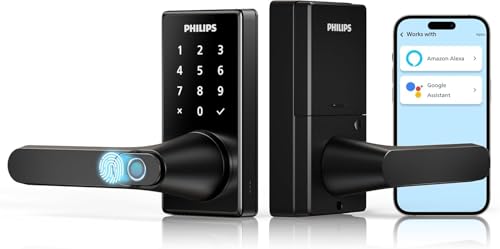
The Philips Wi-Fi Smart Door Lock with Handle and Keyless Entry stands out as the ideal choice for tech-savvy homeowners seeking enhanced security and convenience. With five access methods—including fingerprints, PIN codes, and voice control—you’re covered no matter your preference. The advanced biometric technology grants entry in just 0.3 seconds, ensuring quick access. Plus, you can manage it remotely via the Philips HomeAccess App, receiving real-time notifications. The adjustable auto-lock feature and multiple operational modes add to its versatility. Backed by a 2-year warranty and 24/7 support, this lock combines reliability with cutting-edge technology for your peace of mind.
Best For: Tech-savvy homeowners looking for enhanced security and convenience with multiple access options.
Pros:
- Five unlocking methods provide flexibility, including biometric, PIN, app, voice control, and traditional key access.
- Remote management via the Philips HomeAccess App allows for real-time notifications and event monitoring.
- Adjustable auto-lock and multiple operational modes cater to various user needs and preferences.
Cons:
- Requires 8 AA LR6 alkaline batteries that are not included, adding to initial setup costs.
- Limited to 2.4GHz Wi-Fi, which may not be compatible with all home networks.
- The lock may be pricey compared to traditional locks, potentially making it less accessible for budget-conscious consumers.
Factors to Consider When Choosing Fingerprint Door Locks for Front Door
When choosing a fingerprint door lock for your front door, think about the variety of opening methods available to you. You’ll also want to contemplate how complex the installation process is and what security features are included. Additionally, check for remote access capabilities and compatibility with your smart home system to guarantee seamless integration.
Unlocking Methods Variety
How do you choose the right fingerprint door lock for your front door? Start by considering models that offer various opening methods. Look for locks that combine fingerprint recognition, passcodes, mobile app access, and even voice control for added convenience. It’s also wise to select locks that can store multiple fingerprints, so family members and trusted visitors can access your home securely. Advanced models may allow temporary or one-time PIN codes for guests or service personnel, enhancing flexibility without sacrificing security. Speed matters too; many locks open in as little as 0.3 seconds, providing quick access when you need it. Finally, verify the lock supports remote management through a mobile app, so you can monitor access from anywhere.
Installation Complexity
Choosing a fingerprint door lock involves more than just features; installation complexity is an essential factor to take into account. Many locks are designed for easy installation, fitting standard door sizes of 1-3/8 to 2 inches thick, and often require just a screwdriver. Look for models that provide detailed installation guides or videos to simplify the process. It’s vital to check compatibility with your existing hardware, as some locks may need specific adjustments for the best fit. While most DIY installations can be completed in under an hour, more complex systems might involve extra steps or tools. Consider locks that offer additional stability features for weak or warped doors, which may require extra screws during installation.
Security Features
After ensuring a smooth installation process, the next critical aspect to contemplate is the security features of fingerprint door locks. Look for models that provide fast biometric recognition, opening in less than one second for quick access. It’s also wise to choose locks that offer multiple opening methods, like fingerprint, passcode, physical key, and voice commands, enhancing versatility. Evaluate the accuracy of the fingerprint technology; high-quality systems can boast up to 99.99% accuracy, reducing false rejections or acceptances. Customizable auto-lock settings are essential, ensuring the door secures automatically after a set time. Finally, check for additional security features like anti-tamper alarms, low-battery alerts, and emergency key access for extra protection against unauthorized entry.
Remote Access Capabilities
When you consider fingerprint door locks for your front door, remote access capabilities can greatly enhance both convenience and security. With a mobile app, you can lock or open your door from anywhere, making it easy to manage access. Many locks also provide real-time notifications about door activity, so you’ll know who enters or exits your home. You’ll appreciate the ability to manage user access remotely, allowing you to create, modify, or delete user codes and fingerprints without being there. Plus, some locks offer temporary access codes for visitors or service personnel, eliminating the need for physical keys. These features guarantee that you’re always in control of your home’s security, no matter where you are.
Compatibility With Smart Homes
As the demand for smart home technology grows, guaranteeing your fingerprint door lock is compatible with your existing systems becomes essential. Look for locks that integrate seamlessly with popular voice assistants like Amazon Alexa and Google Assistant, allowing hands-free operation. You’ll also want locks that support remote management via mobile apps, giving you control and monitoring from anywhere. Confirm the lock operates on 2.4GHz Wi-Fi, which is commonly supported by smart devices for easy connectivity. Additionally, consider options that can store multiple user fingerprints, perfect for families or trusted visitors. Customizable features like auto-lock timers and passcode management can further enhance security and convenience, making your smart home experience even better.