When it comes to enhancing your home security, smart door locks with Wi-Fi are at the forefront in 2026. These devices not only offer convenience but also integrate seamlessly with your smart home ecosystem. With various options available, you can find a lock that suits your needs. Let’s explore the top 10 smart locks that could redefine how you secure your home and manage access for your family and guests.
Philips WiFi Keypad Door Lock with Handle

If you’re looking for a smart door lock that combines convenience and security, the Philips WiFi Keypad Door Lock with Handle is an excellent choice. It connects directly to your 2.4GHz WiFi, letting you manage your door remotely through the Philips Home Access App. You can easily lock/unlock, manage user codes, and monitor access history in real time. With quick fingerprint access and compatibility with voice assistants like Alexa and Google Assistant, you’ll enjoy hands-free operation. Plus, the auto-lock feature guarantees your door secures itself, giving you peace of mind. Installation is straightforward, and US-based customer support is always ready to assist.
Best For: Those seeking a convenient and secure smart door lock solution with remote access and multiple unlocking methods.
Pros:
- Direct WiFi connectivity allows for easy management without the need for a hub.
- Multiple unlocking options, including fingerprint access and voice assistant compatibility, enhance convenience.
- Auto-lock feature provides added security by ensuring the door locks automatically after use.
Cons:
- Requires 8 AA alkaline batteries, which are not included, adding to initial setup costs.
- Compatibility limited to most doors within the 1-3/8 to 1-3/4 inches thickness range.
- Self-installation may not be suitable for all users, especially those unfamiliar with DIY projects.
Schlage Encode Smart Wi-Fi Deadbolt Lock

The Schlage Encode Smart Wi-Fi Deadbolt Lock is the perfect choice for tech-savvy homeowners seeking a blend of security and convenience. With its built-in Wi-Fi, you can control your lock remotely through the Schlage Home app, managing up to 100 access codes and receiving notifications. Compatible with Alexa and Google Home, it offers hands-free operation too. Installation is a breeze, requiring just a screwdriver, and it fits standard doors. Plus, its fingerprint-resistant touchscreen and customizable alarm enhance security. With a battery life of up to six months, you’ll enjoy peace of mind and easy access to your home.
Best For: Tech-savvy homeowners who prioritize security and convenience in their entry systems.
Pros:
- Remote control and monitoring through the Schlage Home app, allowing management of up to 100 access codes.
- Hands-free operation compatible with Alexa and Google Home for added convenience.
- Easy installation that fits standard doors with no hardwiring required.
Cons:
- Battery-operated, requiring periodic battery replacement every six months.
- Dependent on Wi-Fi connectivity, which may pose issues during outages or weak signals.
- Cost may be higher compared to traditional deadbolt locks without smart features.
Philips Wi-Fi Smart Door Lock, Keyless Entry Deadbolt

Looking for a convenient and secure way to protect your home? The Philips Wi-Fi Smart Door Lock, Keyless Entry Deadbolt is your solution. With multiple entry options—fingerprint, passcode, key, or voice control with Google Assistant and Alexa—you’ll never struggle to get in again. Its built-in WiFi lets you lock or access remotely, plus you’ll receive instant alerts about door activity. The fast biometric recognition guarantees quick access, while customizable security features keep your home safe. At just 6 x 2 x 1.5 inches, it’s sleek and functional, making it an excellent addition to your smart home system.
Best For: Homeowners looking for a secure, convenient, and smart way to manage entry to their homes.
Pros:
- Multiple unlocking methods provide flexibility, including fingerprint, passcode, key, and voice control.
- Remote access and monitoring capabilities allow users to lock/unlock and receive alerts from anywhere via WiFi.
- Fast biometric recognition ensures quick entry, even with wet or dry fingers, enhancing convenience.
Cons:
- Requires WiFi connectivity for full functionality, which may be a limitation in areas with poor internet service.
- Initial setup may be complex for non-tech-savvy users who are unfamiliar with smart home devices.
- Dependence on batteries means potential inconvenience during low battery situations if not monitored regularly.
Philips Built-in WiFi Smart Lock with App and Fingerprint Access

For tech-savvy homeowners who value convenience and security, the Philips Built-in WiFi Smart Lock is an excellent choice. With built-in Wi-Fi, you can control it remotely via your smartphone without needing a hub. You’ll appreciate the five access options: app, fingerprint, PIN code, voice assistant, or physical key. The 360° fingerprint recognition grants entry in just 0.3 seconds, ensuring easy access for family and trusted visitors. Plus, its auto-lock feature enhances security. You can manage multiple user access and receive real-time notifications. With 24/7 support and a 24-month warranty, this smart lock offers peace of mind you can rely on.
Best For: Tech-savvy homeowners who prioritize convenience and enhanced security features in their home access systems.
Pros:
- Convenient remote access via smartphone without the need for a hub.
- Multiple unlocking options (app, fingerprint, PIN code, voice assistant, physical key) cater to various user preferences.
- Fast fingerprint recognition (0.3 seconds) and auto-lock feature improve security and ease of use.
Cons:
- Requires Wi-Fi connectivity, which may not be ideal for all users.
- Potential compatibility issues with certain smart home systems, limiting integration options.
- Fingerprint sensor may require recalibration if used frequently by multiple users, leading to occasional access delays.
Philips Wi-Fi Smart Door Lock with Handle Set
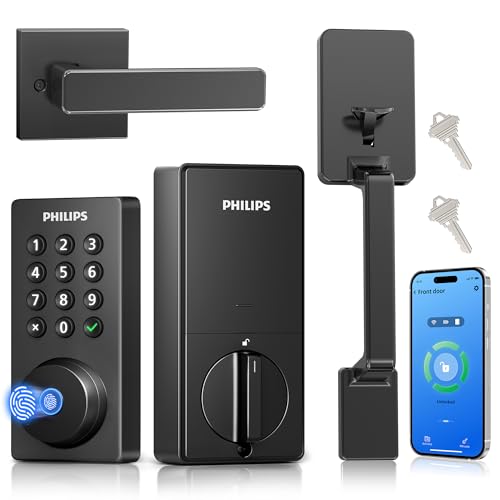
With its impressive fingerprint keyless entry, the Philips Wi-Fi Smart Door Lock with Handle Set is perfect for families seeking convenience and security in their busy lives. You’ll enjoy five opening methods, including app control and voice activation with Alexa or Google Assistant. With the ability to create up to 100 passcodes, managing access for guests or service providers is a breeze. The auto-lock feature enhances security, ensuring your door locks automatically after a set time. Plus, you’ll receive real-time alerts about who accessed the door, keeping you informed whether you’re home or away. Installation is straightforward, with U.S.-based support available.
Best For: Families looking for a convenient and secure entry solution for their busy lifestyles.
Pros:
- Versatile unlocking methods: Offers five ways to unlock, including fingerprint, app control, and voice activation.
- Smart passcode management: Create up to 100 customizable passcodes with expiration options for guests or service providers.
- Enhanced security features: Real-time alerts and auto-lock capabilities provide peace of mind when at home or away.
Cons:
- Batteries required: Operates on 1.5V alkaline batteries, which will need regular replacement.
- Installation may require adjustments: Standard door preparations are needed, and left-handed doors may need specific adjustments.
- App dependency: Full functionality relies on smartphone app usage, which may not be ideal for all users.
Philips Wi-Fi Smart Door Lock with Handle
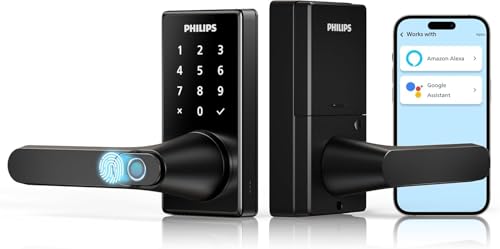
The Philips Wi-Fi Smart Door Lock with Handle is an excellent choice for tech-savvy homeowners who prioritize convenience and security. With five access methods, including fingerprint, PIN code, and mobile app entry, you’ll enjoy seamless entry. Its advanced biometric technology releases in just 0.3 seconds, while the anti-peeping feature keeps your codes safe. You can manage the lock remotely through the Philips HomeAccess App, receiving real-time notifications. The adjustable auto-lock timer and multiple operational modes enhance usability. Plus, with a 2-year warranty and U.S.-based customer support, you can have peace of mind with your purchase.
Best For: Tech-savvy homeowners seeking enhanced convenience and security in their entry systems.
Pros:
- Multiple unlocking methods: Offers fingerprint, PIN code, mobile app, voice control, and traditional key options for versatile access.
- Advanced security features: Includes an anti-peeping passcode and real-time notifications for peace of mind.
- Easy installation and usability: Adjustable auto-lock timer and various operational modes make it user-friendly.
Cons:
- Requires Wi-Fi: Only supports 2.4GHz Wi-Fi, which may limit connectivity for some users.
- Battery-operated: Requires 8 AA LR6 alkaline batteries, which are not included and may need frequent replacement.
- Limited customer support hours: U.S.-based support is only available Monday to Friday, which may not suit all customers.
Philips WiFi Smart Lock with Front Door Handle Set
Enjoy peace of mind knowing your home is secure with the Philips WiFi Smart Lock and Front Door Handle Set, designed for tech-savvy homeowners who value convenience and control. With built-in WiFi, you don’t need an extra gateway, allowing you to lock and open your door remotely via a mobile app. You’ll receive real-time alerts and can access detailed event history. The fingerprint access feature works in just 0.3 seconds, while voice control with Alexa and Google Assistant provides hands-free operation. Installation is a breeze, compatible with most front doors, and comes with excellent customer support. Upgrade your home security effortlessly!
Best For: Tech-savvy homeowners seeking a convenient and secure smart lock solution for their front door.
Pros:
- Built-in WiFi allows for remote locking and unlocking without needing an extra gateway.
- Fast fingerprint unlock in just 0.3 seconds for quick access.
- Voice control compatibility with Alexa and Google Assistant for hands-free operation.
Cons:
- May require WiFi connectivity to function optimally, which could be a limitation in some areas.
- Installation might not be suitable for doors outside the specified thickness range.
- Some users may prefer traditional locking mechanisms over smart locks for simplicity.
eufy Security Smart Lock C220, Fingerprint Keyless Entry Door Lock
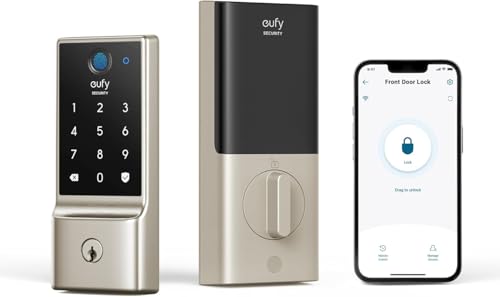
For those seeking a seamless blend of convenience and security, the eufy Security Smart Lock C220 stands out as an ideal choice. This fingerprint keyless entry lock offers six access methods, including fast fingerprint recognition in under 1.5 seconds. With built-in Wi-Fi, you can control it from anywhere via the eufy Security app—no bridge needed. Installation is a breeze, taking just 15 minutes, and it’s compatible with most standard deadbolts. Plus, you’ll enjoy 24/7 customer support and an impressive 8-month battery life. With its robust security features, the C220 guarantees your home remains safe and accessible.
Best For: Individuals seeking a secure, convenient, and modern way to manage access to their home without traditional keys.
Pros:
- Fast unlocking with fingerprint recognition in less than 1.5 seconds.
- Built-in Wi-Fi allows for remote control via the eufy Security app without the need for a bridge.
- Easy installation that takes just 15 minutes and requires no drilling, compatible with most standard deadbolts.
Cons:
- Battery life may vary based on usage, with a maximum of 8 months on 8 AA batteries.
- Limited to standard US & CA deadbolts, which may exclude some older or non-standard locks.
- Reliance on Wi-Fi connectivity could be a drawback in areas with unstable internet access.
Philips Wi-Fi Smart Lock with Handles

Looking for a seamless blend of security and convenience? The Philips Wi-Fi Smart Lock with Handles offers just that. With four access methods—fingerprints, PIN codes, traditional keys, and a mobile app—you’ll enjoy versatile entry. It supports up to 50 fingerprints, making access quick and easy. Plus, built-in Wi-Fi means no hub is required, allowing remote management through the Philips App. The auto-lock feature adds an extra layer of security, engaging automatically when the door closes. Installation is straightforward, fitting most standard doors. With a solid customer rating of 4.6 stars, you can trust this smart lock to enhance your home’s security.
Best For: Those seeking a secure, convenient, and tech-savvy solution for home entry.
Pros:
- Supports multiple unlocking methods, including fingerprints and mobile app access for versatile entry.
- Built-in Wi-Fi allows for remote management without the need for an additional hub.
- High customer rating (4.6 stars) indicates strong satisfaction with the product.
Cons:
- Installation may require some technical knowledge, especially for those unfamiliar with smart locks.
- The auto-lock feature may engage unintentionally if the door is not fully closed.
- Limited compatibility with doors outside the standard thickness range (1-3/8 to 1-3/4 inches).
Philips WiFi Smart Keypad Deadbolt Lock with App Control

The Philips WiFi Smart Keypad Deadbolt Lock is an excellent choice for tech-savvy homeowners who prioritize convenience and security. This sleek satin nickel lock connects directly to your home Wi-Fi, eliminating the need for a hub. With the Philips Home Access App, you can manage access, receive notifications, and even control it using Alexa or Google Assistant. It offers four access methods, including mobile app and passcodes, supporting up to 100 custom passwords. With features like auto-lock and low battery alerts, you can feel secure knowing your home is protected, all while enjoying the ease of smart technology.
Best For: Tech-savvy homeowners looking for a convenient and secure keyless entry solution.
Pros:
- Built-in WiFi allows direct connection to home network without the need for a hub.
- Supports up to 100 custom passwords for flexible access management.
- Compatible with voice control via Alexa and Google Assistant for added convenience.
Cons:
- Requires 8 AA batteries that need to be replaced approximately every 6 months.
- May be less reliable in extreme temperatures beyond its operating range.
- Installation may require additional tools or expertise for some users.
Factors to Consider When Choosing Smart Door Locks With Wifi
When choosing a smart door lock with Wi-Fi, you need to evaluate several key factors. Security features and access methods are essential for your peace of mind, while remote access capabilities can enhance convenience. Don’t forget to check compatibility with your smart home system and the ease of installation to guarantee a smooth setup.
Security Features and Protocols
Choosing a smart door lock with Wi-Fi involves considering several critical security features and protocols that can safeguard your home. Look for customizable alarms that alert you to unauthorized access or tampering attempts. Confirm the lock uses secure, encrypted connections to protect against hacking and unauthorized remote access. Real-time notifications and access logs are essential; they let you monitor who enters or exits your home. An auto-lock feature, which engages automatically after a specified time, adds extra confidence that your door is secured. While you’ll want flexibility in opening methods like fingerprint recognition and PIN codes, prioritizing security is key. By focusing on these features, you can enhance your home’s safety considerably.
Unlocking Methods and Convenience
Smart door locks with Wi-Fi offer a variety of opening methods that enhance convenience and accessibility. You can gain entry to your door using fingerprint recognition, passcodes, mobile app controls, traditional keys, or even voice activation through smart assistants like Alexa and Google Assistant. With advanced biometric locks, you can gain access in as little as 0.3 seconds, ensuring quick entry. You can also manage multiple user profiles, creating temporary or recurring access codes for family, friends, or service providers—all easily controlled via an app. Plus, many smart locks come with customizable auto-lock capabilities, engaging automatically after a set period to enhance security without any manual effort. Enjoy a seamless and secure entry experience tailored to your lifestyle!
Remote Access Capabilities
The convenience of smart door locks with Wi-Fi extends beyond various access methods; remote access capabilities greatly enhance your home security and management. With a mobile app, you can lock or open your doors from anywhere, ensuring peace of mind. Many smart locks send real-time notifications, alerting you to any door activity, like when the lock is engaged or disengaged. You can also manage access permissions remotely by creating or modifying user codes and fingerprints, making it easy to control who enters your home. Advanced models even let you check access history, giving you insight into who’s been in and out. Plus, compatibility with voice assistants allows for hands-free operation, making your smart lock even more convenient.
Compatibility With Smart Homes
Have you considered how well a smart door lock fits into your existing smart home setup? Compatibility is key. Make sure the lock integrates smoothly with your ecosystem, whether it’s Amazon Alexa or Google Assistant, for easy voice control. It’s also important to check that the lock connects to the standard 2.4GHz Wi-Fi band, as many locks don’t support the 5GHz band. Look for locks that let you manage access remotely through a dedicated app, providing real-time control. Consider options that allow multiple user access and temporary codes for guests or service providers. Finally, verify the lock’s ability to integrate with other smart security systems, enhancing your overall home automation and security solutions.
Installation Requirements and Ease
When choosing a Wi-Fi door lock, considering installation requirements and ease of setup can save you time and hassle. Most smart locks fit standard door thicknesses of 1-3/8 to 1-3/4 inches, making them compatible with a variety of residential doors. You’ll typically only need a screwdriver for installation, allowing you to tackle it as a DIY project without hiring a professional. Many models come with complete handle sets and detailed installation guides or videos to help you through the process. Just remember to check compatibility with your existing hardware, as some locks may require specific backset measurements or adjustments for left-handed doors. This attention to detail will guarantee a smooth setup experience.
Battery Life and Maintenance
While you might focus on features and security when choosing a smart door lock, battery life and maintenance are equally important. Most smart locks use AA or lithium batteries, requiring between 4 to 8 batteries. Depending on how frequently you use the lock, batteries can last from 6 months to over a year. Look for models that offer low battery alerts through a mobile app or a physical indicator to keep you informed. Regularly check the battery status and be prepared for potential software updates. Remember that extreme temperatures can affect battery performance, so opt for locks designed for various climates. Finally, some smart locks include backup key options or emergency power methods, ensuring access even during battery failure.
Alerts and Notifications
Smart door locks with Wi-Fi offer a significant boost in security by providing real-time alerts and notifications directly to your smartphone. You’ll know instantly when the lock is engaged or disengaged, enhancing your security awareness. Many models also notify you of unauthorized access attempts, keeping you informed about unusual activity around your door. Plus, you can receive reminders to lock the door after a designated time, reducing the risk of forgetting. Some smart locks even provide event history logs, so you can review who accessed the lock and when, adding accountability. With customizable alerts, you can set specific notifications for different types of access, such as temporary or one-time user codes, ensuring you’re always in control.
Warranty and Support Options
As you explore smart door locks with Wi-Fi, warranty and support options play a vital role in your decision-making process. Look for warranties that last between 12 to 24 months, as they reflect the manufacturer’s confidence in their product. Customer support is essential too; check if live phone assistance is available during specific hours and if 24/7 email support exists for troubleshooting. Installation assistance can be a lifesaver if you’re not a DIY expert, ensuring proper setup. Also, consider the return policy—many locks offer a 30-day guarantee to test the product. Finally, access to online resources like installation videos and user manuals can make your experience smoother and more enjoyable.