When it comes to securing your home, smart door locks without WiFi offer a practical solution. You can enjoy keyless entry, fingerprint recognition, and customizable codes, all while maintaining offline functionality. The convenience of these locks makes them a smart choice for anyone looking to enhance their home security. Explore the top options available, and discover which one might be the perfect fit for your needs.
TEEHO TE001 Keyless Entry Door Lock with Keypad

The TEEHO TE001 Keyless Entry Door Lock with Keypad is perfect for those who want a reliable and secure entry solution without the need for WiFi. This smart deadbolt lock features a sturdy aluminum alloy construction, ensuring your home stays safe. You can create up to 20 access codes for family and a temporary code for guests, which automatically deletes after use. The one-touch auto-lock feature makes securing your home effortless. Installation is a breeze, taking just minutes with a screwdriver. With a battery life of up to 365 days and a 2-year warranty, you’ll enjoy peace of mind all year round.
Best For: Individuals seeking a secure and user-friendly entry solution without relying on WiFi.
Pros:
- Easy installation that requires just a screwdriver and takes only minutes.
- Offers a variety of access codes for family and temporary codes for guests, enhancing convenience.
- Long battery life of up to 365 days with a low battery indicator for timely replacements.
Cons:
- Requires 4 AA batteries, which are not included in the package.
- Not compatible with 38mm door holes, limiting installation options for some doors.
- Lacks WiFi connectivity, which may be a drawback for those seeking smart home integration.
Philips Smart Lock with Keyless Entry and Digital Keypad

For those seeking a reliable and convenient locking solution without the need for WiFi, the Philips Smart Lock with Keyless Entry and Digital Keypad stands out. You’ll enjoy four access methods: fingerprints, PIN codes, traditional keys, and even a smartphone app when paired with a Philips WiFi gateway. With the ability to store up to 50 fingerprints and unlimited one-time PINs, security is both flexible and robust. The lock auto-engages when the door closes, ensuring peace of mind. Plus, installation is straightforward, fitting standard doors with basic tools. Philips offers solid customer support and a warranty for added assurance.
Best For: Individuals seeking a secure and convenient keyless entry solution for their home without relying on WiFi.
Pros:
- Multiple unlocking methods provide flexibility and convenience, accommodating various preferences.
- Easy installation requires only basic tools and fits standard door sizes, making it accessible for most homeowners.
- Robust security features include auto-locking and the ability to store multiple fingerprints and PIN codes.
Cons:
- Requires separate Philips WiFi gateway for remote control and smartphone access beyond Bluetooth range.
- Fingerprint recognition may vary in efficiency depending on environmental conditions and user factors.
- Limited customer support hours may restrict immediate assistance for urgent issues.
eufy Security Smart Lock FamiLock S3 Max with Doorbell Camera

Looking for a smart door lock that combines advanced security with user-friendly features? The eufy Security Smart Lock FamiLock S3 Max is your answer. It boasts palm vein recognition for quick, forgery-proof access, and a 2K HDR doorbell camera for crystal-clear monitoring. With a 150° wide-angle view, you’ll always see who’s at your door. Plus, its dual power supply guarantees reliable operation. You can integrate it seamlessly with the eufy ecosystem, enhancing your home’s security. Rated 4.3 stars, this lock not only secures your home but also makes it easier for everyone, from kids to grandparents, to use.
Best For: Homeowners looking for a secure and user-friendly smart lock solution with advanced monitoring features.
Pros:
- Easy access with palm vein recognition technology, ensuring quick and forgery-proof entry.
- Integrated 2K HDR doorbell camera with a wide-angle view for clear visibility of visitors and packages.
- Seamless compatibility with the eufy ecosystem and popular smart home platforms like Apple Home and Alexa.
Cons:
- Camera streaming is not supported via Matter; users need to use the eufy App for full features.
- Not compatible with HomeBase 2, limiting some integration options.
- The weight of 1043 grams may require careful installation to ensure stability.
Philips Wi-Fi Smart Lock for Keyless Entry

If you’re seeking a smart lock that combines convenience with robust security, the Philips Wi-Fi Smart Lock for Keyless Entry stands out. You can gain access to it using an app, passcode, fingerprint, or even voice commands through Alexa or Google Assistant. With support for multiple fingerprints and up to 100 custom passcodes, you can easily manage access for family and guests. The built-in Wi-Fi lets you control it remotely without an extra hub. Plus, features like auto-lock and Away Mode enhance your home’s security. Installation is a breeze, ensuring you’re secured in no time. Enjoy peace of mind with Philips!
Best For: Those seeking a versatile smart lock solution that offers multiple access methods and robust security features for their home.
Pros:
- Flexible unlocking options including app, passcode, fingerprint, physical key, and voice control via Alexa/Google Assistant.
- Remote access through built-in Wi-Fi allows for easy control from anywhere without needing an additional hub.
- Enhanced security features like auto-lock and Away Mode provide additional protection when you’re not home.
Cons:
- Requires batteries (4 or 8 AA alkaline) that are not included, which may add to the initial setup cost.
- Limited to 2.4GHz networks, which might not be compatible with some modern home Wi-Fi setups.
- Installation may be challenging for those unfamiliar with DIY projects, despite being designed for easy setup.
Level Lock Pro Smart Lock – Keyless & Remote Access
The Level Lock Pro Smart Lock is perfect for those who want keyless and remote access without relying on WiFi. This compact lock, 62% smaller than others, blends seamlessly with your door, boasting a matte black finish. Installation is a breeze—just grab a screwdriver, and you’re set. Enjoy multiple access options, including Apple Home Key and NFC key fobs. Plus, it’s compatible with major smart home systems like Alexa and Google Home. With exceptional security features, including end-to-end encryption, you can feel confident that your home is protected. Upgrade your entryway with the Level Lock Pro for modern, secure convenience.
Best For: Those seeking a secure, modern entry solution that seamlessly integrates with existing smart home systems and offers keyless access without bulky hardware.
Pros:
- Compact design that is 62% smaller than traditional smart locks, maintaining a sleek appearance.
- Easy DIY installation with no wiring or drilling required, making it accessible for most homeowners.
- Multiple access methods, including Apple Home Key and NFC key fobs, provide flexibility and convenience.
Cons:
- Requires a Matter-compatible hub or Level Connect Wi-Fi Bridge for remote access, which is sold separately.
- The Level Keypad for additional secure entry must be purchased separately, adding to the overall cost.
- Limited compatibility with non-Matter smart home systems may restrict some users.
Schlage Encode Smart Wi-Fi Deadbolt Lock (BE489WB CEN 622)

For those who prioritize convenience and control without relying on WiFi, the Schlage Encode Smart Wi-Fi Deadbolt Lock (BE489WB CEN 622) stands out as an ideal choice. This lock features a fingerprint-resistant touchscreen and allows keyless entry, giving you seamless access. You can manage up to 100 access codes and receive notifications through the Schlage Home app. Plus, it’s compatible with Alexa and Google Home for voice activation. Installation is easy, requiring only a screwdriver. With an auto-lock feature and a battery life of up to six months, your home remains secure and accessible without constant WiFi connectivity.
Best For: Those seeking a convenient and secure keyless entry solution with smart features and easy installation.
Pros:
- User-friendly installation with just a screwdriver, no hardwiring required.
- Supports up to 100 access codes and offers customizable notifications via the Schlage Home app.
- Voice activation compatibility with Alexa and Google Home for hands-free operation.
Cons:
- Dependent on battery power, requiring regular battery changes every six months.
- Limited to standard door sizes, which may not fit all door types.
- Potential reliance on WiFi for full functionality, which might not suit everyone.
Philips WiFi Keypad Door Lock with Handle

Looking for a smart door lock that doesn’t rely on WiFi? The Philips WiFi Keypad Door Lock with Handle is an excellent choice. You can control it remotely via the Philips Home Access App, managing user codes and monitoring access history in real time. With fingerprint access in just 0.3 seconds, it’s perfect for family and trusted visitors. The auto-lock feature guarantees your door locks automatically after a set time. Installation is straightforward, and it fits most standard doors. Plus, US-based customer support is available to assist you whenever you need help. Enjoy security and convenience with this stylish lock!
Best For: Those seeking a smart, user-friendly door lock solution that combines convenience and advanced security features.
Pros:
- Easy remote management through the Philips Home Access App, allowing real-time access monitoring.
- Quick fingerprint access in just 0.3 seconds, accommodating multiple users.
- Straightforward installation process, compatible with most standard door sizes.
Cons:
- Requires 8 AA alkaline batteries, which are not included in the package.
- Limited to 2.4GHz WiFi connectivity, potentially excluding some users with 5GHz networks.
- May require technical support for installation or setup for less tech-savvy individuals.
Yale Assure Deadbolt Lock with Digital Keypad

If you prefer a reliable locking solution without the hassle of Wi-Fi, the Yale Assure Deadbolt Lock with Digital Keypad is an excellent choice. This keyless entry lock lets you open your door using a simple entry code on its touchscreen keypad, freeing you from bulky keychains. You can even share unique codes with trusted friends or family, eliminating hidden keys. The auto-lock feature guarantees your door locks automatically when you leave or at night, giving you peace of mind. Installation is straightforward, making it perfect for those with limited DIY skills. Secure your home effortlessly with Yale.
Best For: Those seeking a user-friendly, keyless entry locking solution without the complexity of smart home integration.
Pros:
- Easy to use with a touchscreen keypad for quick access.
- Auto-lock feature enhances security by locking the door automatically.
- Simple installation process suitable for individuals with limited DIY skills.
Cons:
- Requires a separate Yale Access Upgrade Kit for smart connectivity.
- Limited features without the upgrade, making it less versatile.
- May not appeal to those who prefer traditional key locks.
Fingerprint Smart Door Lock with WiFi Remote Access
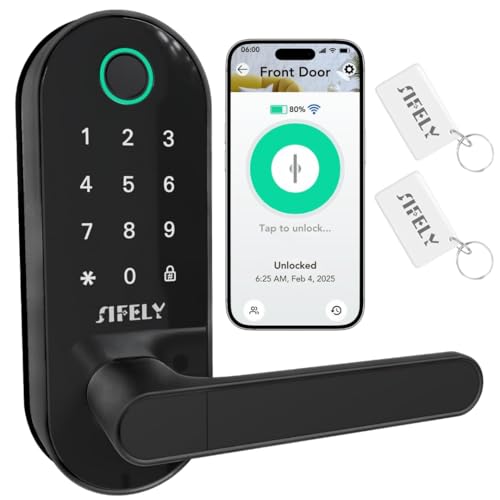
Homeowners and rental property managers will find the Fingerprint Smart Door Lock with WiFi Remote Access particularly advantageous. This lock offers keyless entry with multiple entry methods, including fingerprint recognition, passcodes, and a smart app. Its advanced biometric sensor releases in just 0.3 seconds, ensuring quick access. You’ll appreciate the heavy-duty deadbolt design for reliable security, plus features like auto-lock and low-battery alerts for peace of mind. The smart app lets you create codes and view access logs, while compatibility with Amazon Alexa and Google Assistant adds convenience. Installation is straightforward, making it perfect for everyday use.
Best For: Homeowners and rental property managers looking for secure, keyless entry solutions.
Pros:
- Offers multiple unlocking methods for convenience, including fingerprint, passcode, and smart app access.
- Heavy-duty deadbolt design ensures robust physical security and reliability.
- Easy DIY installation process makes it accessible for all users.
Cons:
- Dependence on WiFi connectivity may be a drawback in areas with unstable internet.
- Initial setup may require configuration time for users unfamiliar with smart technology.
- Battery life may require regular monitoring to avoid lockout situations.
Google Nest x Yale Smart Lock – Keyless Entry Deadbolt

The Google Nest x Yale Smart Lock is perfect for those who prioritize security and convenience without the need for WiFi. This tamper-proof lock replaces your existing deadbolt, providing a sleek Oil Rubbed Bronze finish. With an LED keypad, you can lock and open your door keylessly, and the keypad chimes confirm your actions. Activate Privacy Mode to disable access temporarily. You can manage guest access by creating unique passcodes or scheduling entry times. Plus, receive security alerts for locking, opening, or tampering attempts, and integrate it with Nest Hello and Nest Cams for enhanced protection. Installation is straightforward, too!
Best For: Those seeking a secure, keyless entry solution that offers convenience and customizable guest access without requiring WiFi.
Pros:
- Easy installation by replacing existing deadbolt without professional help.
- Customizable guest access with unique passcodes and scheduling options.
- Integration with Nest Hello and Nest Cams enhances overall security.
Cons:
- Requires batteries, which may need to be replaced periodically.
- Limited functionality without WiFi for remote access features.
- Privacy Mode may be inconvenient for frequent users needing quick access.
Factors to Consider When Choosing Smart Door Locks Without Wifi
When you’re choosing a smart door lock without WiFi, consider how you’ll access it—whether through a keypad, fingerprint, or smartphone app. Security features are vital, so look for models with robust encryption and tamper alerts. Don’t forget to factor in installation ease, battery life, and the lock’s material durability to guarantee it meets your needs.
Access Methods Variety
Selecting a smart door lock offers a range of access methods to suit different lifestyles and preferences. Consider options like fingerprint recognition, PIN codes, physical keys, and mobile app access to match your needs. Look for locks that support multiple user codes, giving family members and trusted guests unique credentials for added convenience. One-time PIN codes are great for temporary access, ensuring visitors or service personnel can enter without compromising your long-term security. Quick access features, such as touch-to-unlock or one-touch auto-lock, enhance ease of use for everyone. Additionally, if you prefer hands-free operation, check for locks that offer voice control capabilities with popular virtual assistants, making access even more convenient.
Security Features Importance
Choosing a smart door lock means not just focusing on access methods but also prioritizing security features that protect your home. Look for locks that offer auto-lock functionality and unique access codes to prevent unauthorized access. Advanced biometric recognition methods can further enhance your security. A robust design, like heavy-duty deadbolts and pick-resistant cylinders, boosts durability against physical attacks. Consider options that allow you to set temporary or one-time access codes for guests, ensuring convenience without compromising security. Real-time alerts about door activity keep you informed of any unauthorized attempts. Finally, features like anti-peeping technology and security alarms can provide an extra layer of protection, making them crucial factors in your decision-making process.
Installation Ease
Installing a smart door lock without WiFi shouldn’t feel intimidating, especially if you prioritize ease of setup. Look for models that require just a screwdriver, allowing you to complete the installation in minutes without specialized tools. Confirm the lock’s compatibility with standard door sizes, typically between 1-3/8 inches to 2-1/4 inches thick, to avoid complications. A detailed installation guide or video resources can make the process smoother, so choose locks that offer these aids. Also, consider locks that come with a complete handle set, which can enhance both aesthetics and installation ease. Finally, verify the specific door hole sizes, like 2-1/8 inches, to prevent any unexpected installation issues.
Battery Life Considerations
Battery life plays an essential role when it comes to smart door locks without WiFi. Many of these locks use standard AA batteries, which can last up to 365 days, depending on how frequently you use them and the features you enable. Keep an eye out for regular low battery alerts, usually indicated by a red light, to guarantee your lock remains functional. The number of opening attempts and features like auto-lock can greatly affect battery consumption. Some models even offer dual power options, combining rechargeable batteries with emergency AAA backups for added reliability. Finally, consider the time needed for battery replacement, as this can impact the overall convenience and usability of your smart lock.
Material Durability
When evaluating smart door locks without WiFi, material durability is a key factor that can greatly impact both security and longevity. Locks made from aluminum alloy or stainless steel resist wear and tear better than plastic options. For even more robustness, consider solid brass or zinc alloys, which offer high corrosion resistance, ensuring they withstand various environmental conditions. Look for a BHMA certification; locks rated AAA signify exceptional security and durability. The finish matters too—satin nickel or oil-rubbed bronze not only enhance aesthetics but also improve resistance to scratches and fading. Finally, regular maintenance, including lubrication and cleaning, can considerably extend your lock’s lifespan, regardless of the material you choose.
User Code Management
Choosing a smart door lock without WiFi means considering how user codes can enhance your home’s security and convenience. Look for locks that allow you to create multiple user codes, so family members or trusted friends can enter without keys. Some models even support temporary or one-time PIN codes, perfect for guests or service personnel. Advanced anti-peeping features can help protect your codes from prying eyes during entry. You’ll also want user management capabilities that let you delete or modify access codes easily, maintaining control over who enters your home. Additionally, consider locks that allow unlimited one-time codes for specific occasions, offering flexibility in your user access management. Your security is paramount!
Backup Access Options
Backup access options are essential for ensuring you’re never barred from your home, especially with smart door locks that don’t rely on Wi-Fi. Many models still offer physical keys, providing a reliable way to enter during power failures or battery issues. You might also find locks that allow one-time PIN codes, perfect for granting temporary access to guests or service personnel. Fingerprint recognition is another fantastic backup method, letting authorized users enter quickly without needing a keypad. Additionally, consider locks with auto-lock features, which enhance security by automatically securing your door after a set time. Finally, Bluetooth connectivity can give you the convenience of gaining entry to your door using a smartphone app when Wi-Fi isn’t available.
Price Range Comparison
Finding the right smart door lock without Wi-Fi can be a challenge, especially with prices ranging from $50 to $300. When choosing, consider the features you need. Basic models with keypad entry are more affordable, while locks with advanced security like biometric access or dual authentication can hit the higher end. Don’t forget to factor in installation costs, which can add another $50 to $150 if you need professional help. Warranties also matter; a lock with a longer warranty can offer better value. Finally, additional features like auto-lock and compatibility with smart home systems often increase the price, with premium models exceeding $200. Assess your priorities to find the right balance between cost and security.